Plastic Surgery Before and After Galleries: The Hidden Conversion Driver Most Surgeons Underuse
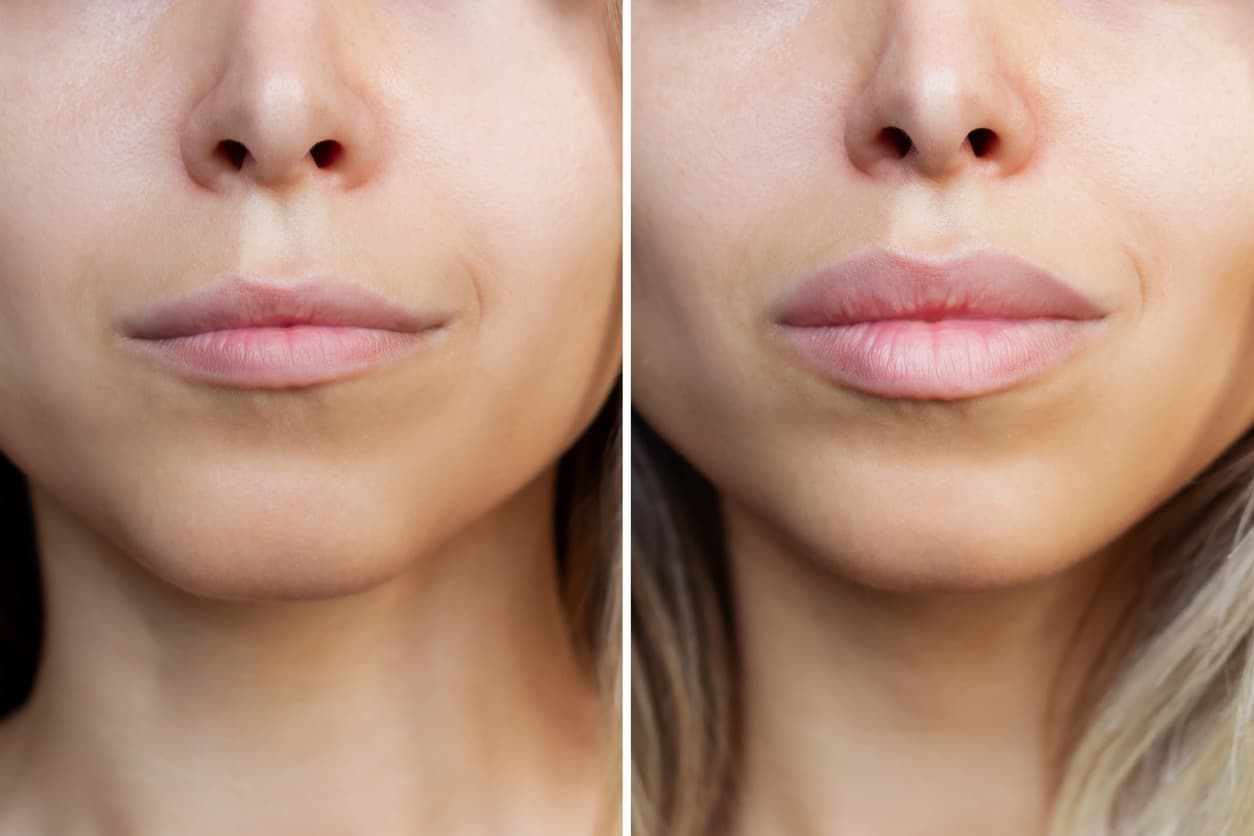
Most plastic surgeons treat their before-and-after gallery like a brochure. A grid of thumbnails behind the procedure pages, updated whenever someone remembers, decorated with the practice's colors. That treatment misses what the gallery actually is: one of the highest-volume search assets in the entire plastic surgery niche, and the page where a serious patient's decision usually gets made.
This piece is for surgeons and practice marketers who have a gallery already and suspect it's not doing what it should. The numbers, the structural decisions, and the technical SEO work that turn a gallery into both a ranking page and a closing tool.
Key Takeaways
Your gallery is a ranking page, not a brochure
The before-and-after gallery is one of the highest-volume search assets in plastic surgery and the page where serious patients make their decision. Each focal procedure needs its own indexable gallery page, not a shared grid of thumbnails.
Tummy tuck before and after draws 18,100 monthly searches
Breast augmentation pulls 8,100 and rhinoplasty 6,600. These aren't informational queries. The patient has already decided on the procedure and is one click from a consultation request.
Conversion is pattern matching, so case data wins
A patient scans until she finds someone with her body type, age, and starting point. Every case needs age, body data, technique, and time elapsed beneath the photos, or that recognition never happens.
Add one new case per procedure every month
Google reads substantive updates as a freshness signal, and 12 to 24 real cases per gallery per year compounds into depth a templated gallery never reaches. Reshuffling thumbnails doesn't count.
The Search Volume Nobody Talks About
Pull SEMrush data on before-and-after queries in the United States and the volumes are large enough to make most surgeons reconsider how seriously they're treating the gallery:
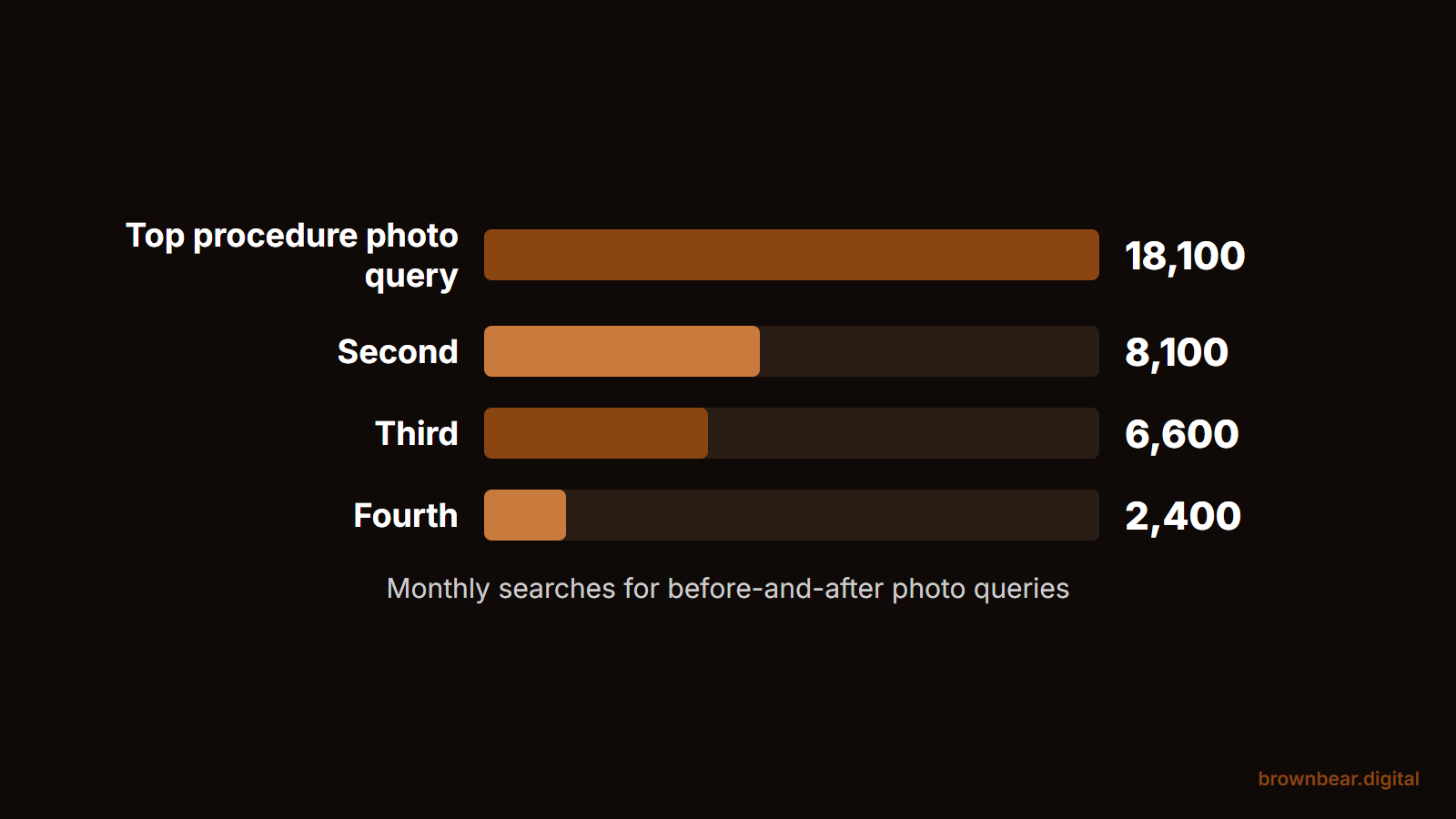
- Tummy tuck before and after: 18,100 monthly searches
- Breast augmentation before and after: 8,100 monthly searches
- Rhinoplasty before and after: 6,600 monthly searches
- Plastic surgery before and after: 2,400 monthly searches
Every major procedure has a significant volume of parallel before-and-after queries. These aren't informational searches at the top of the funnel. The patient running this query has decided they're interested in the procedure and now wants to see what realistic outcomes look like, one click from a consultation request.
The surgeons we work with consistently underestimate this traffic. They'll spend serious budget on procedure-page SEO and treat the gallery as a side project. The honest answer is that for many practices, the gallery should be running parallel SEO investment, because it's where the highest-intent traffic actually lands.
The two assets are not separable anyway. When we analyzed the #1 result for breast augmentation across 101 US city markets, 93% of those winning pages carried a before-and-after gallery, one of the closest things to a universal requirement anywhere in the data.
Why Galleries Are Ranking Pages, Not Just Brochures
Most plastic surgery galleries are built as a single page with thumbnails for each procedure. That structure ranks for nothing in particular and converts at a fraction of what it could.
The structure that ranks: a procedure-specific gallery page for every focal procedure. /breast-augmentation-before-and-after. /rhinoplasty-before-and-after. /tummy-tuck-before-and-after. Each one is its own indexable page with its own H1, its own intro content, its own schema, and its own internal linking from the procedure page.
This is the structural decision that unlocks gallery traffic. A single "photo gallery" page can't rank for a specific procedure's before-and-after query. A page built specifically around that procedure's photos, with the right content layer, can. The volumes are too large to leave on the table.
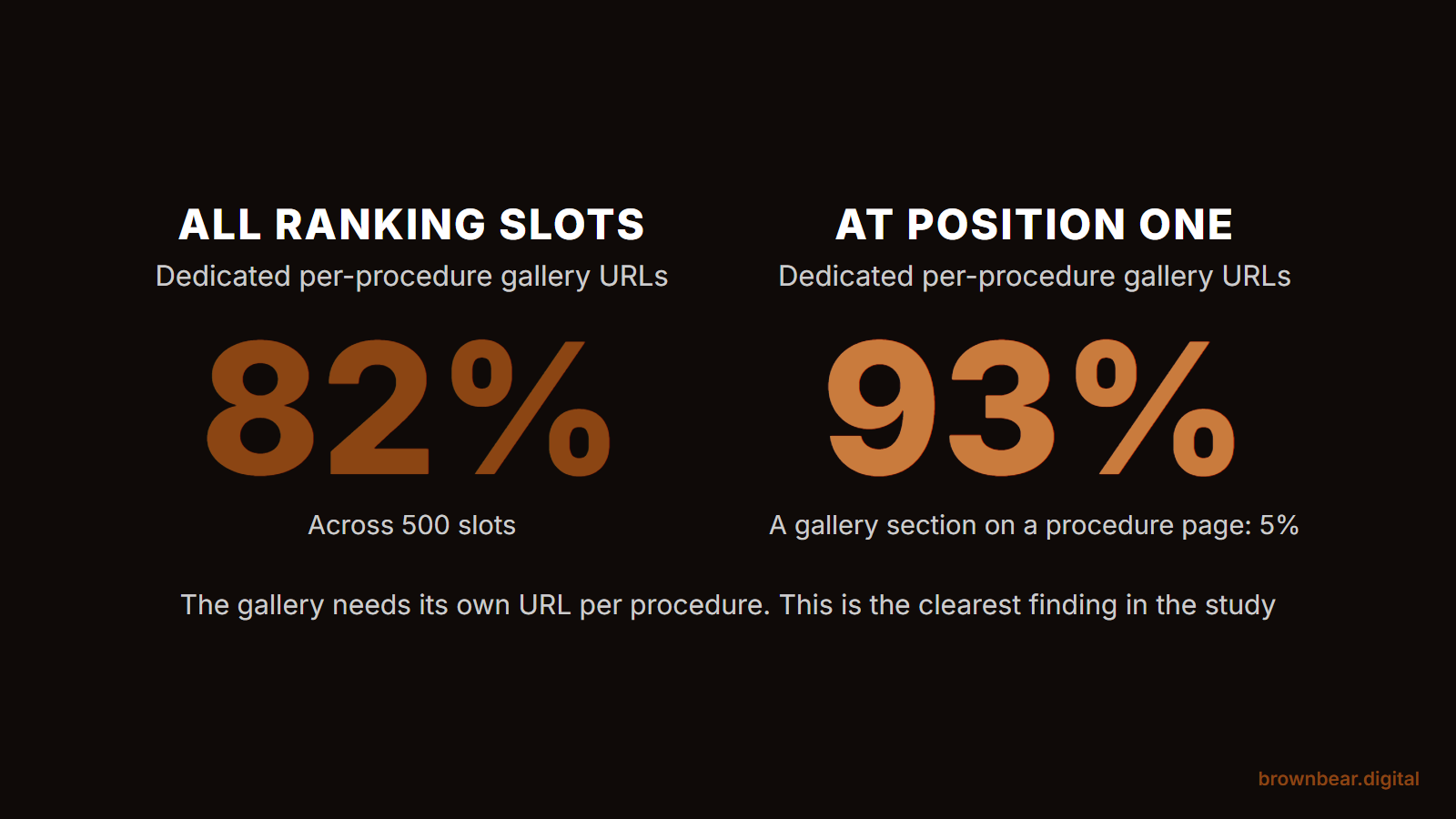
Our 50-procedure before-and-after gallery study puts numbers on that structure. Across 500 ranking slots, 82% of the practice pages that rank for photo queries are dedicated per-procedure gallery URLs, and at the #1 position that climbs to 93%. General procedure pages with a gallery section on them account for 5%. Google has already decided which URL this query deserves.
What Happens When a Patient Sees Themselves in Your Gallery
The conversion mechanic of a plastic surgery gallery is pattern matching. A patient considering a breast augmentation isn't looking at every photo in the gallery. She's scanning until she finds someone who looks like her in body type, starting point, and age range, and then studying that one case carefully.
If that recognition doesn't happen, the gallery doesn't convert. Not because the photos aren't good. Because nobody on the page reads as "a patient like me."
This is the conversion principle that should govern every decision about gallery design. The number of patients shown matters more than the number of photos per patient. Diversity of body types, ethnicities, ages, and starting points matters more than perfect lighting on the same patient demographic. The specificity of context per case matters more than a smooth overall presentation.
A gallery that gives a 42-year-old mother of two no version of herself to find is a gallery that doesn't convert her, no matter how beautifully it's designed. The same trust-first logic applies to every page surrounding the gallery, and our guide to plastic surgery website design trust signals maps that architecture site-wide.
Photography Standards That Hold Up to Professional Scrutiny
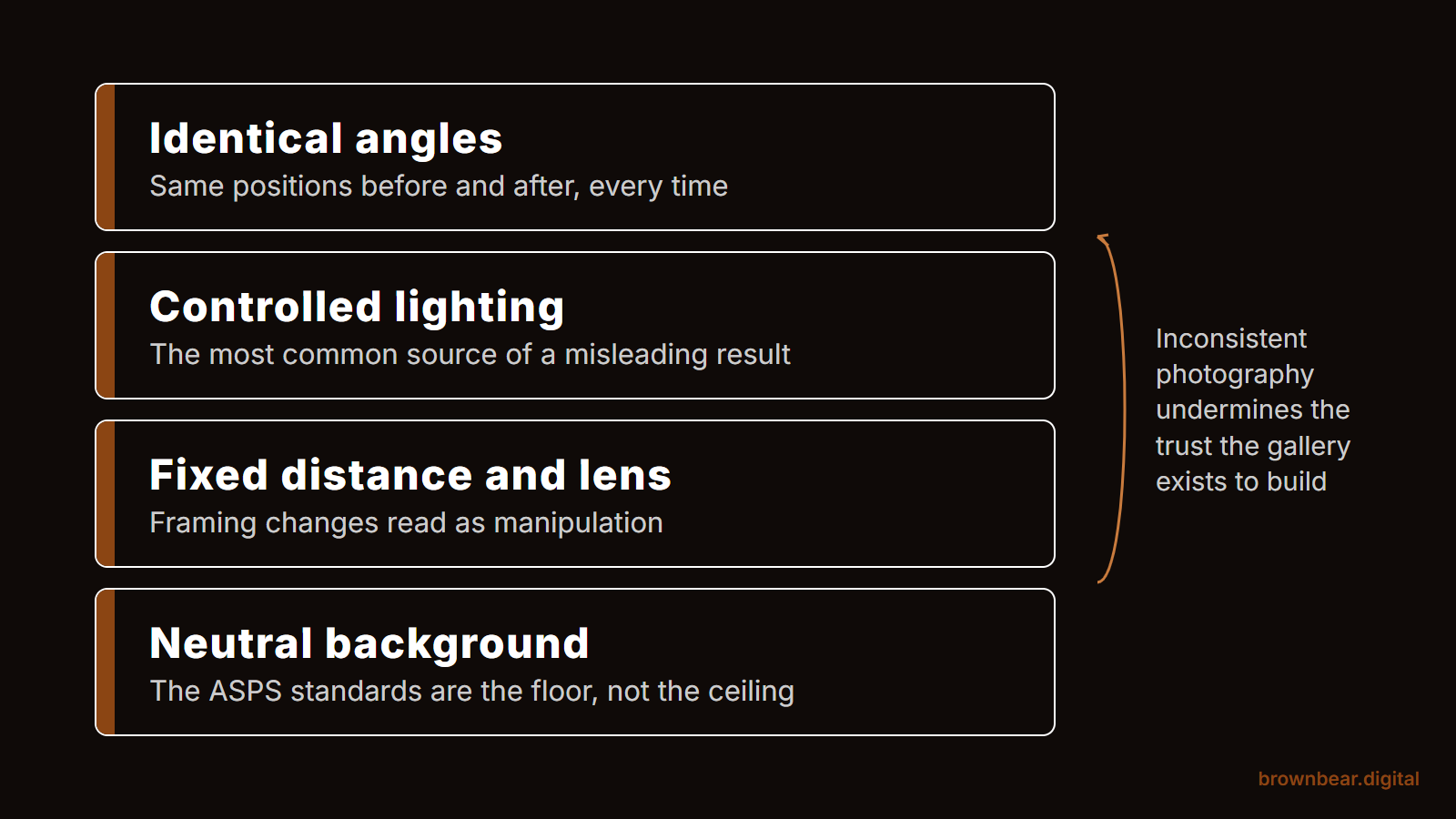
Patients comparing surgeons compare galleries side by side. The photographs themselves are read as a proxy for the surgeon's standards.
What signals a serious gallery: consistent lighting across cases, neutral backgrounds, identical patient positioning before and after, full-resolution images that hold up when zoomed in, and no filter or retouching that obscures the actual outcome. The same surgical case shot in three different lighting conditions on three different days reads as careless, even if each individual photo looks fine.
What signals an amateur gallery: photos taken with different cameras, varying backgrounds, patients positioned differently in before-and-after shots, low-resolution images that pixelate when enlarged, and obvious post-processing that smooths out detail.
The single highest-leverage photography decision a practice can make is investing in a consistent in-office photo setup (same camera, same lighting, same background, same positioning marks) and using it for every patient who consents. The cumulative effect over a year is a gallery that reads as professional documentation rather than a phone-camera collage.
The ASPS Standards That Should Be the Floor, Not the Ceiling
The American Society of Plastic Surgeons' Code of Ethics for advertising and its photographic documentation guidelines aren't optional reading for any surgeon publishing a gallery. They specify what an accurate, transparent presentation of surgical outcomes actually looks like: consistent positioning, consistent lighting, no misleading retouching, accurate disclosure of the time elapsed and any concurrent procedures.
These standards are the floor for any gallery worth ranking. A misleading presentation isn't just an ethics issue; it's a matter of reputational and regulatory exposure. State medical boards have disciplined surgeons for misrepresenting before-and-afters. Patients leave reviews about it.
Referencing these guidelines from the gallery page itself, not as fine print but as a stated commitment to documentation standards, is also a quiet signal of authority. Pages that cite recognized professional bodies are pages that AI Overviews and search engines treat as more authoritative. Most plastic surgery galleries don't do this. The ones that do read differently.
The Data That Should Sit Beneath Every Before-and-After
This is the single biggest gap in plastic surgery galleries we audit. The photos are presented with no context: no patient data, no technique notes, no recovery information. The patient, looking at the gallery, has to guess everything that matters.
What every before-and-after card should contain, beneath the photos:
- Age range at the time of the procedure
- Height and weight at the time of the procedure (with patient consent)
- Ethnicity or skin type, particularly relevant for procedures where outcomes vary
- Specific technique the surgeon used (dual-plane breast augmentation, open rhinoplasty, drainless tummy tuck)
- Implant or device specifics where relevant (size, profile, manufacturer)
- Time elapsed between the before and after photos
- Recovery notes where relevant (number of weeks to return to normal activity, any complications managed)
This data does three things at once. It lets a patient pattern-match more accurately. It signals to Google that the page contains substantive, specific content rather than just images. And it creates the kind of extractable, factual content that AI Overviews and large language models will cite when answering a patient's question about what realistic outcomes look like.
A gallery without this data is leaving conversion, ranking, and citation on the table.
Image Alt Text and File Names: The SEO Layer Most Galleries Skip
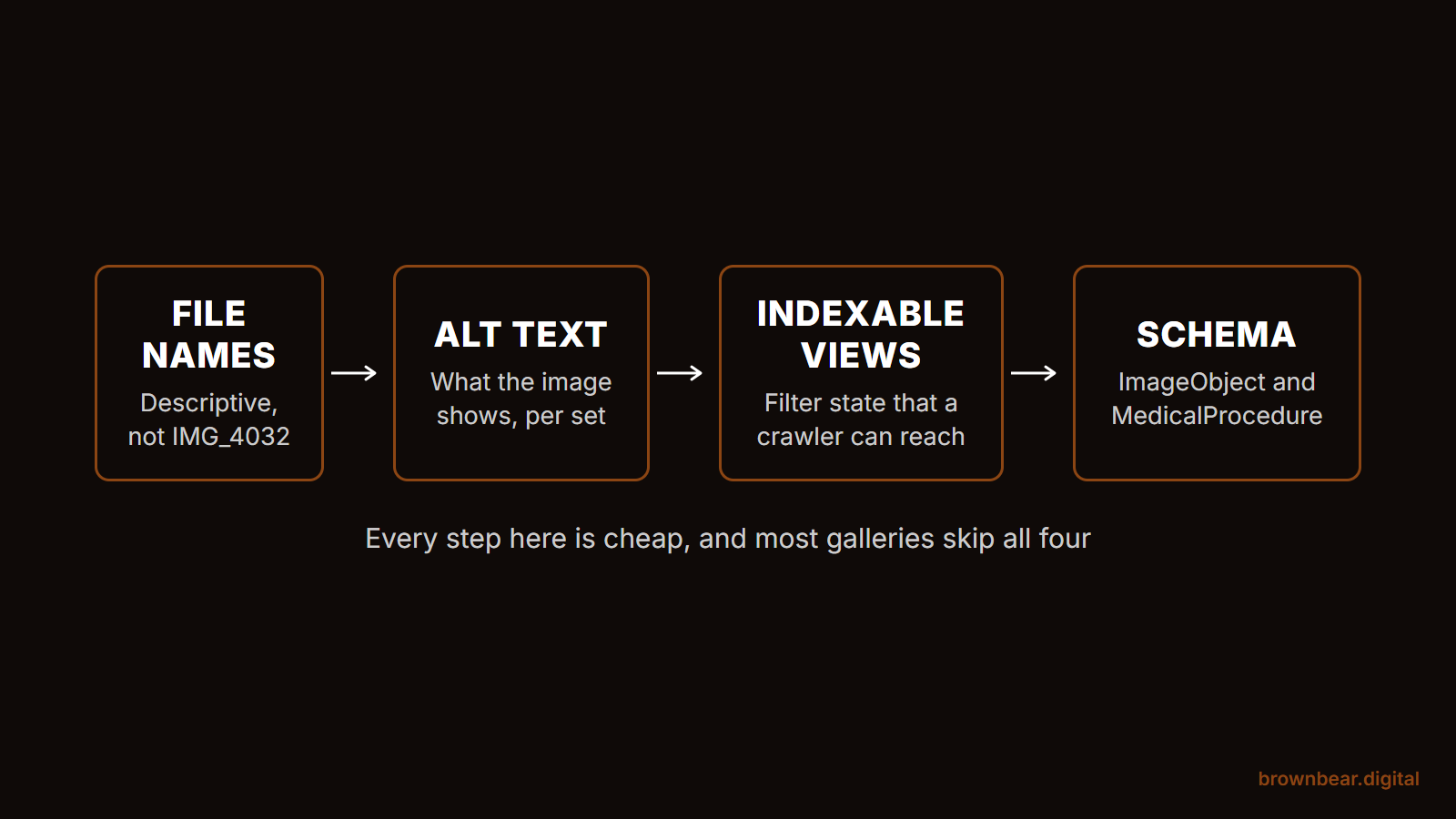
The text wrapped around an image is content. The text in the image's alt attribute is content. The image's filename is content. None of these are decoration, and most plastic surgery galleries treat all three as afterthoughts.
The pattern that works:
- Filenames are descriptive and procedure-specific. rhinoplasty-before-after-female-32-12wk-postop.jpg indexes; IMG_4421.jpg doesn't. Set the file naming convention before the photographer ever uploads to the CMS, and apply it consistently.
- Alt text describes the case, not the image. "38-year-old female, dual-plane breast augmentation with 320cc Allergan Natrelle 410 MX implants, 12 weeks post-operative" is alt text that does work. "Before and after photo" is alt text that does nothing.
- Captions repeat the case data in human-readable form. This is content the patient reads and content the search engine indexes.
Done together, these practices turn each before-and-after into a small content asset rather than an opaque image. Across a gallery of 300 cases, the cumulative SEO weight is significant.
Video Alongside Stills (and the Workflow That Makes It Possible)
Photographs answer one question: what does the outcome look like at a fixed point? Video answers a different question: how the patient moves, talks, and feels with the result.
For procedures where motion matters (rhinoplasty, facelift, breast augmentation, body contouring), a short patient video alongside the still photos materially improves the gallery's conversion mechanic. Watching a patient describe their recovery, on camera, three months out is a different signal than reading a written testimonial.
The reason most galleries skip this is logistical, not strategic. The workflow that makes it sustainable:
- Combine the filming with an existing follow-up appointment. Most patients are back in the office at the 6-week and 12-week marks anyway. Adding 20 minutes of filming to those visits is the lowest-friction path.
- Standardize the questions. Five questions every patient gets asked: the procedure they had, why they chose it, what recovery was actually like, what surprised them, and what they'd tell someone considering it. The structure makes the editing tractable.
- One consent form covering both stills and video. The release form addresses the use of photography, video, voice, and written quotes in a single document, with the same revocation procedure.
- B-roll the practice shoots once. The interview footage gets cut against B-roll of the OR, the consultation room, the practice exterior. That B-roll gets shot once and reused across patients.
- A specified retention and revocation procedure. When a patient revokes consent, the workflow for removing video, stills, transcripts, and any social cuts is documented and executed within a defined window.
The practices that have built this workflow once stop hesitating about whether to film. The ones that haven't stay stuck in the "we should film, but it's complicated" loop. The competitive moat is in actually shipping it.
Page Speed for Image-Heavy Galleries
The structural risk of building a serious gallery is that image-heavy pages load slowly, and slow pages don't rank. Core Web Vitals are a real ranking factor, and galleries are the page where most plastic surgery sites fail them.
Largest Contentful Paint (LCP) on a gallery page should be under 2.5 seconds. The way to get there with high-resolution photography is non-negotiable: every image served as a modern format (WebP or AVIF), responsive sizes generated for each device width, lazy loading on everything below the fold, and a CDN handling delivery. Compression at the source matters: raw 12MB photos pasted into the CMS will tank the page, no matter what else is in place.
Cumulative Layout Shift (CLS) on a gallery page should be effectively zero. The way to get there is to reserve image dimensions in the HTML so the layout doesn't jump as photos load. Most plastic surgery galleries fail this because images load in without dimensions declared, the page rearranges, and the CLS score degrades.
Interaction to Next Paint (INP) under 200 milliseconds is the third metric to watch. Heavy lightbox JavaScript and filter UI are where galleries usually fail. Patients tap a thumbnail, and the page is unresponsive for half a second. The fix is leaner JavaScript and deferred loading of any non-essential scripts.
The practices we audit are usually surprised by how much speed work the gallery needs. The fix is technical and involved. Skipping it leaves the page invisible to search.
The Mobile Gallery Experience
More than 70% of traffic to the plastic surgery gallery is mobile. The mobile gallery is its own design problem, not a shrunken version of the desktop layout.
The patterns that fail on mobile:
- Lightbox modals that don't close cleanly on a tap outside the photo
- Filters hidden behind a hamburger menu the patient never opens
- Horizontal swipe galleries that fight the browser's back-swipe gesture
- Pinch-to-zoom disabled, so a patient can't actually inspect the photo at full resolution
The patterns that work:
- A vertical scrolling feed of cases, one or two per row, depending on screen width
- Filter UI exposed at the top of the page with sticky behavior on scroll
- Tappable cases that open a full-screen view with proper close gestures
- Pinch-to-zoom enabled with high-resolution images served on demand
- A persistent CTA, sticky bottom-bar or floating button, so the patient can request a consultation from inside the gallery without scrolling back to a header
Test the gallery on a four-year-old iPhone with mid-tier signal. The thumb zones, the load times, the swipe gestures, the close behaviors: all of it has to work in the conditions where consultations actually get requested.
Filter URL State and Indexable Gallery Views
The advanced ranking move on a gallery is treating filtered views as their own indexable pages. A patient filters the breast augmentation gallery to "under 35, B to D cup" and the URL updates to a clean, indexable address that Google can crawl.
This is rare in plastic surgery. Most galleries use JavaScript filters that don't change the URL and aren't crawlable. A gallery built with filter URL state and proper canonical handling can rank for a long tail of searches no competing gallery can rank for: specific combinations of demographics and outcomes that match exactly what a particular patient is searching for.
The technical implementation needs care. Not every filter combination should be indexed (that creates infinite-URL problems). The pattern that works: index the most-searched combinations, canonical the rest back to the parent procedure gallery. Done well, the gallery becomes a content engine that captures long-tail traffic no competitor can match.
Internal Linking: The Procedure Page Has to Send the Patient Here
A gallery's conversion ceiling is set by how well the rest of the site sends traffic into it. The procedure page is the highest-leverage source.
The pattern that works: the rhinoplasty procedure page links to the rhinoplasty before-and-after gallery from the body content with named anchor text, "see the rhinoplasty before-and-after gallery," at the point in the page where a patient is most ready to look at results. Not "click here." Not "gallery" in a navigation menu. A contextual link with anchor text that matches the gallery's H1.
The procedure page should also link to the most relevant filtered gallery view if the page is targeting a specific patient demographic. A page about deep plane facelift for patients 50 to 65 should link to the filtered facelift gallery for that age range. Each named-anchor internal link is a topical signal that compounds.
The About page does similar work, linking the surgeon's bio to the procedures she's known for, which then link onward to the galleries that demonstrate her outcomes. The result is an authority cluster where the gallery sits at the bottom of the funnel and inherits the topical authority of every page that points to it.
Schema for Galleries: ImageObject and MedicalProcedure
Structured data on a gallery is what tells Google, and the AI systems pulling from Google, that these aren't random images, they're documentation of a specific medical procedure performed by a specific surgeon.
The two schema types that matter:
- ImageObject on every gallery photo, with author (the surgeon), description (the procedure and technique), and content URL. This signals that each image is a documented, attributed asset.
- MedicalProcedure on the gallery page itself, declaring the procedure shown, the body location, and the surgeon performing it. This connects the gallery to the procedure as a recognized entity.
Layered together, these turn a gallery from a folder of images into a page Google reads as professional medical documentation. The citation eligibility this creates, in AI Overviews and in LLM-powered search assistants, is something almost no plastic surgery gallery currently has.
Gallery Freshness as a Ranking Signal
A gallery isn't a one-and-done asset. Google reads update frequency as a relevance signal: pages that get fresh content regularly are read as actively maintained, and they outrank functionally identical pages that haven't been touched in two years.
The cadence we recommend to clients: a minimum of one new case added per focal procedure per month, and a published "last updated" date visible on the page and reflected in schema. That's 12 to 24 new cases per procedure gallery per year, which is realistic for an active practice and meaningful as a signal of freshness.
What doesn't count: reshuffling the existing thumbnail order. Renaming files. Re-cropping the same images. Google's freshness signals look at substantive content changes: new cases with new case data, new alt text, new schema entries. Cosmetic reshuffles don't move the needle.
The compound effect over time is what makes this work. A gallery that adds a dozen real cases a year, every year, accumulates content depth a templated gallery never reaches.
Consent, HIPAA, and What Your Release Form Has to Cover
None of the structural work matters if the legal foundation isn't solid. Patient photos are protected health information under HIPAA the moment they're tied to identifying details, and detailed before-and-after data is exactly that.
What a serious release form needs to cover:
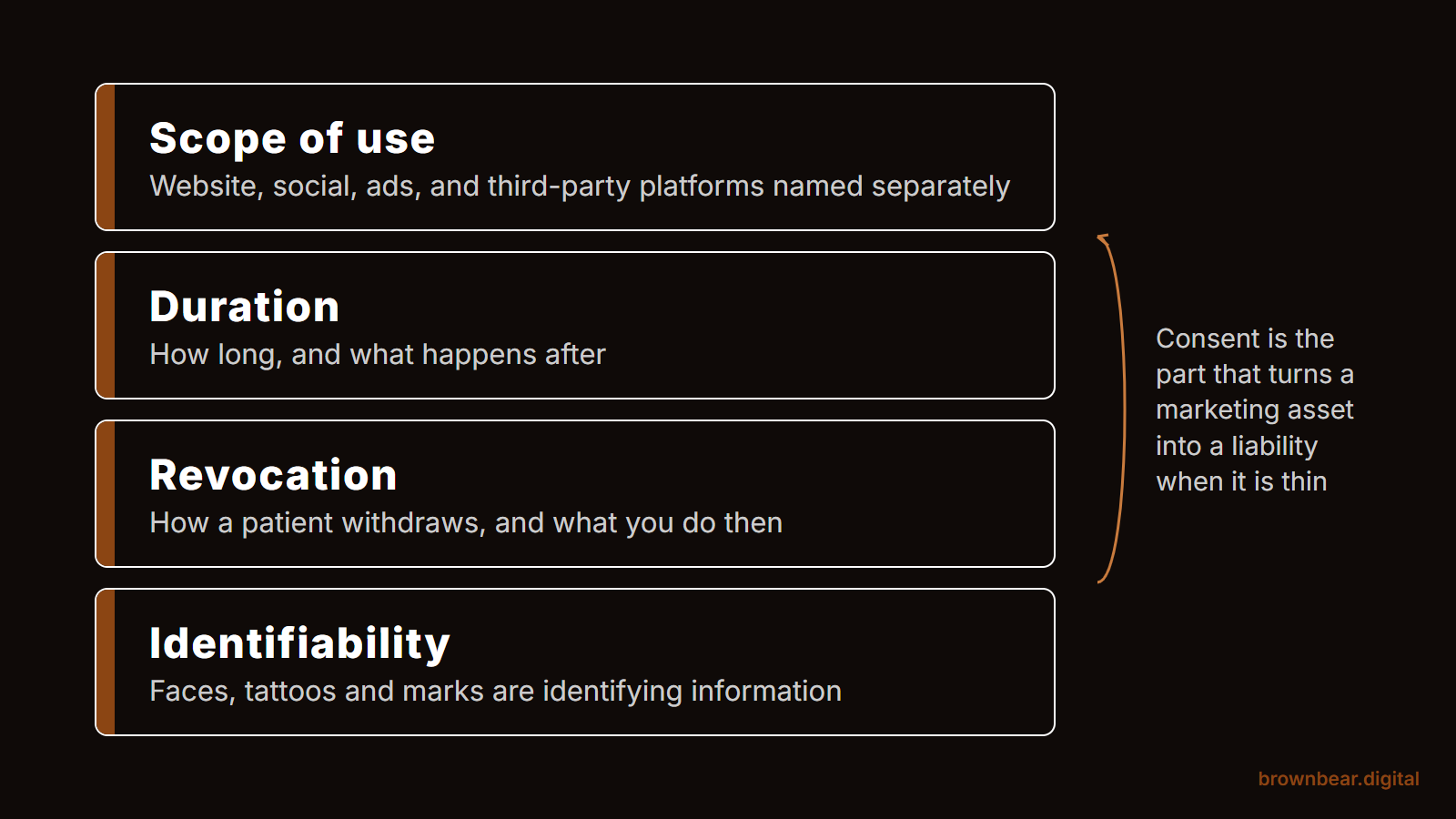
- Specific authorization for use on the practice website, including before-and-after galleries
- Authorization for social media and any third-party platforms the practice uses
- Specific authorization for the data fields published alongside the photos (age, weight, ethnicity, technique)
- Term length and revocation rights (most release forms allow patients to revoke consent on a defined timeline)
- Authorization for any video filmed during recovery or follow-up appointments
- A documented internal procedure for how revocation gets executed: which assets are removed, on what timeline, by whom
The release form is also where a practice protects itself if a patient later revokes consent. A clean documented authorization, with a clear revocation procedure, lets the practice publish confidently and respond cleanly when consent changes.
This is the part of gallery work nobody enjoys, but it's the part that determines whether everything else can be built on top of it. A gallery built on shaky consent paperwork is a liability.
A Short Audit Checklist for Your Gallery
Run an honest pass on your own gallery before walking away from this piece:
- Does each focal procedure have its own indexable gallery page with a procedure-specific URL?
- Is the volume of patients shown enough that a 42-year-old mother of two could find herself, and a 28-year-old fitness model could find herself?
- Is photography consistent across cases, with the same lighting, background, and positioning?
- Does each before-and-after card include age, body data, technique, and time elapsed?
- Are filenames descriptive and alt text case-specific, not generic?
- Is patient video integrated alongside stills for procedures where motion matters?
- Does the gallery page pass Core Web Vitals (LCP under 2.5s, INP under 200ms, CLS effectively zero)?
- Is the mobile experience designed for the thumb (swipe, tap, zoom, sticky CTA) rather than a shrunken desktop?
- Are images served in modern formats with responsive sizes and lazy loading below the fold?
- Do filtered gallery views have clean URLs that can be indexed?
- Are procedure pages linking into the gallery with named anchor text, not "click here"?
- Is ImageObject and MedicalProcedure schema implemented?
- Is the gallery getting at least one new case per focal procedure per month, with a visible last-updated date?
- Does the gallery cite or reference recognized photographic documentation standards?
- Is the patient release form specific enough to cover everything published, with a documented revocation procedure?
If half of these are no, the gallery is the highest-leverage page on the site to fix: ahead of procedure pages, ahead of the homepage, ahead of any new content.
What This Earns You
A plastic surgery gallery built this way does work the rest of the site can't do. It captures the highest-volume, highest-intent search traffic in the niche: the procedure-specific before-and-after queries that bring in patients ready to consult. It converts those patients at materially higher rates because they can find someone like themselves and verify the outcome with real data. It feeds AI Overviews and LLM citations when patients ask their AI assistant what realistic outcomes look like.
The practices we work with that take their gallery seriously see the same pattern. Gallery traffic catches up to and often passes procedure page traffic within a few months. Consultation requests originating from gallery pages convert at higher rates than requests originating from procedure pages, because the patient has already seen the work.
If your gallery is currently a grid of thumbnails behind a procedure page, the work is structural. Procedure-specific pages. Patient-specific data on every card. Real photography standards aligned to ASPS guidelines. Descriptive alt text and filenames. Video where it matters. Schema. Page speed. Mobile experience designed for the thumb. Filter URL state. Internal linking from procedure pages. Update cadence. The gallery that's currently a brochure becomes a ranking page and a closing tool, in that order.
References
-
American Society of Plastic Surgeons. (2024). ASPS Code of Ethics. American Society of Plastic Surgeons. https://www.plasticsurgery.org/for-surgeons/practice-resources/ethics
-
Brown Bear Digital. (2025). Before-and-after procedure keyword search volume data. SEMrush US database, April 2025. Internal research.
-
Google LLC. (2025). Core Web Vitals. Google Search Central. https://developers.google.com/search/docs/appearance/core-web-vitals
-
Schema.org. (2025). ImageObject. Schema.org. https://schema.org/ImageObject
-
U.S. Department of Health and Human Services. (2025). Health Information Privacy (HIPAA). HHS. https://www.hhs.gov/hipaa/index.html
Related reading: Plastic Surgeon Homepage: 11 Elements That Actually Book Consults · Plastic Surgeon About Pages: The Most Underused Trust Asset on Your Website · The Complete Clinic Guide to Marketing Breast Augmentation Online
Ready for Brown Bear to Fix Your Gallery?
A gallery that isn't ranking or converting is the most common missed opportunity we find when auditing plastic surgery sites, and one of the highest-impact things to fix. Brown Bear Digital builds procedure-specific gallery pages with proper case data, descriptive alt text, ImageObject schema, and the internal linking architecture that turns a grid of thumbnails into a ranking page and a closing tool. Our web design services, plastic surgery SEO, and conversion rate optimization cover how gallery work fits into the broader strategy, as part of our plastic surgery marketing approach. Reach out for a consultation and we'll show you exactly what your gallery is leaving on the table.
Written By
Founder, Brown Bear Digital
Bryan has 15 years of experience across SEO, paid search, and AI search strategy. He founded Brown Bear to give businesses direct access to senior-level search expertise without the agency overhead.
Learn More About BryanReady to Turn Search
Into Revenue?
No pitch decks. Just a real conversation.