What 150 Top-Ranking Plastic Surgery Websites Look Like Without JavaScript

JavaScript has a real job on a plastic surgery homepage. It plays the hero video, fades in the headline, slides the before-and-after carousel and runs the chat and booking widgets, and Google renders JavaScript when it indexes the page. But it has limits. The crawlers behind ChatGPT, Claude and Perplexity read the HTML a server sends and stop there. A Vercel and MERJ analysis of AI crawler traffic found that none of the major AI crawlers render JavaScript, so whatever your homepage needs a script to show, those systems do not see. And every script is weight a patient's phone has to download and run before the page is finished.
So we ran the test on the sites that are winning. We took the homepages of 150 practices that rank in the top 5 private-practice results for "plastic surgeon in [city]" across 30 US cities, from New York to Newport Beach, and loaded every one three ways: as raw HTML, in real Chrome with JavaScript turned off, and fully rendered with JavaScript on. Then we graded each homepage on a 100-point rubric covering the hero and H1, procedure content, internal links, JavaScript weight, video and effects, and lab performance, and photographed the before-and-after for every site. This is the national follow-up to our 136-site Bay Area crawler study, with named examples this time.
When we looked at those top-ranking homepages, we found that the words mostly survive. The median homepage keeps 94% of its visible text in the raw HTML, and 129 of 131 keep their procedure links there. What does not survive is the first impression. One hero in four goes mostly blank with JavaScript off, one H1 in five is hidden behind an entrance animation, and the median homepage loads 1,046 KB of JavaScript, 1.7 times the web-wide median. That meant the useful question was never whether a site uses JavaScript. It was what each homepage shows before its scripts run, and how much it asks a patient's phone to load to get there.
If you are planning a redesign, this is the list of things to ask your designer before the cinematic hero gets approved. If your homepage already ranks #1, it shows what your site hands the AI tools your patients are starting to use, and why ranking well in Google does not settle the question. And if you run marketing for a group practice or build these sites, it is a benchmark: where 131 scored homepages land, where they lose points, and what the cleanest builds do differently. We cover what we measured, the scorecard, the five places homepages lose points, the sites that pass cleanly, and a checklist you can hand to a designer.
Key Takeaways
27% of top-ranking homepages go mostly blank without JavaScript
35 of 131 scored homepages show less than half their hero text with JavaScript off, and 25 (19%) hide the H1 itself. Almost all of them have the words in the HTML and hide them behind an entrance animation.
94% of the words still reach AI crawlers
The median homepage keeps 94% of its visible text in the raw HTML, and 129 of 131 keep their procedure links there. What AI crawlers miss is the first impression, not the copy.
1,046 KB of JavaScript on the median homepage
That is 1.7 times the web-wide desktop median of 613 KB. 66 of 131 homepages load more than 1 MB of JavaScript, and 18 load more than 2 MB.
1 in 3 homepages autoplays video
44 homepages (34%) autoplay video, at a median of 13.7 MB when they do, and 69% load an animation library. On 48% of homepages the largest thing on screen is a video or background image.
7 of 27 #1-ranked homepages hide their H1 without JavaScript
Median scores barely move from position 1 (80.8) to position 8 (81). Google forgives what AI crawlers, slow phones and failed scripts do not.
How We Graded 150 Homepages: Three Views and a 100-Point Rubric
The short answer: every homepage was captured as raw HTML, in Chrome with JavaScript off, and in Chrome fully rendered, then scored on six weighted sections out of 100.
The sample came from the live Google SERP. On October 11, 2026, we searched "plastic surgeon in [city]" for 30 cities: the largest US metros plus four cosmetic-surgery hubs (Miami, Scottsdale, Beverly Hills and Newport Beach). From each results page we kept the top 5 private-practice domains and set aside directories, publishers and hospital systems (US News, the ASPS surgeon finder, Zocdoc, Yelp, city magazines and academic medical centers). That produced 150 practice homepages, with no domain repeated across cities. Every result we read, kept or excluded, is listed in the source file linked in the methodology section.
Each homepage was then loaded three ways:
- Raw HTML. A plain HTTP request, no JavaScript. This is what a non-rendering AI crawler receives.
- JavaScript off. Real Chrome with scripts disabled, at 1366 by 900. This shows what exists in the page and is actually visible before any script runs.
- JavaScript on. Real Chrome, fully rendered after the network settles, with performance observers recording the largest paint, layout shift and every script and video request.
Eighteen sites put a "confirm you are human" wall or a security checkpoint in front of automated browsers, and one timed out, so 131 homepages were scored. The rubric weights the hero and H1 at 25 points, procedure content at 20, internal links at 20, JavaScript load at 15, media and effects at 10, and lab performance at 10.
The median homepage scores 81.7. Eighteen earned an A, 63 a B, 35 a C, 13 a D and 2 an F. That is a better result than the industry's reputation suggests, and it points somewhere specific: these sites mostly do the fundamentals right and lose points in the same two or three places.
Internal links and procedure content are close to full marks across the sample. The hero gives up a fifth of its points, and JavaScript load gives up 40%. That gap is the story of this report.
One Hero Headline in Five Disappears When JavaScript Is Off
The short answer: 25 of 131 homepages, 19%, have an H1 that is visible with JavaScript on and invisible with it off, and 35 (27%) show less than half of their hero text without JavaScript.
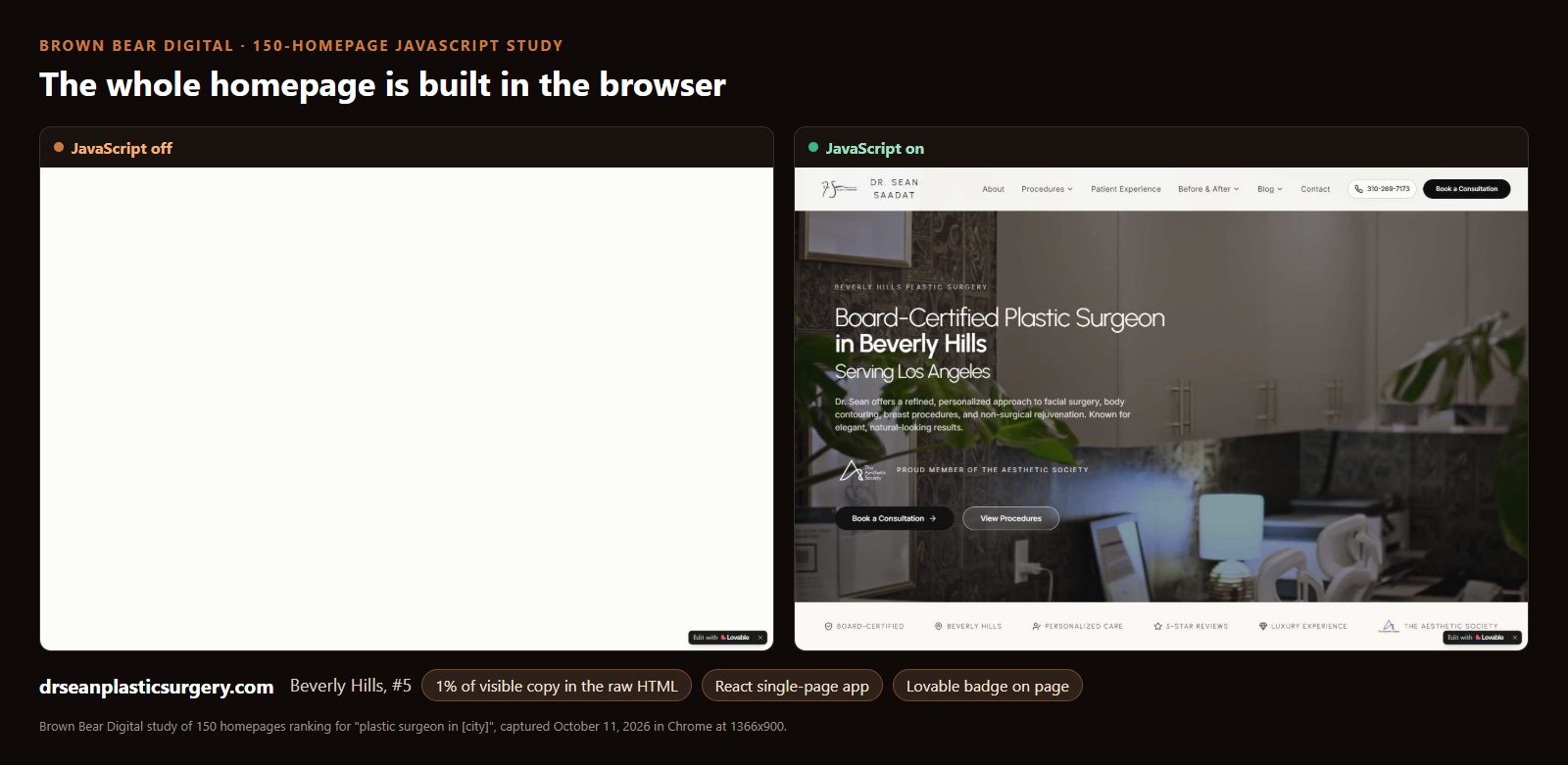
Only one of those sites builds its headline entirely in the browser. The Beverly Hills practice at drseanplasticsurgery.com, ranked #5, is a React single-page app with an "Edit with Lovable" badge in the corner, the mark of a site built with Lovable, an AI development platform that builds web apps from plain-language prompts. With JavaScript off, the page is a blank cream rectangle. Its raw HTML carries 1% of the text a patient sees.
The other 24 are a different and more common pattern. The words are in the HTML. Then the design hides them, setting the hero to invisible and letting an animation library fade it in once the page scripts run. GSAP, scroll-reveal libraries and parallax effects are the usual mechanism: 90 of the 131 homepages load at least one of them. Take the script away and the hero stays at its starting state, which is invisible.
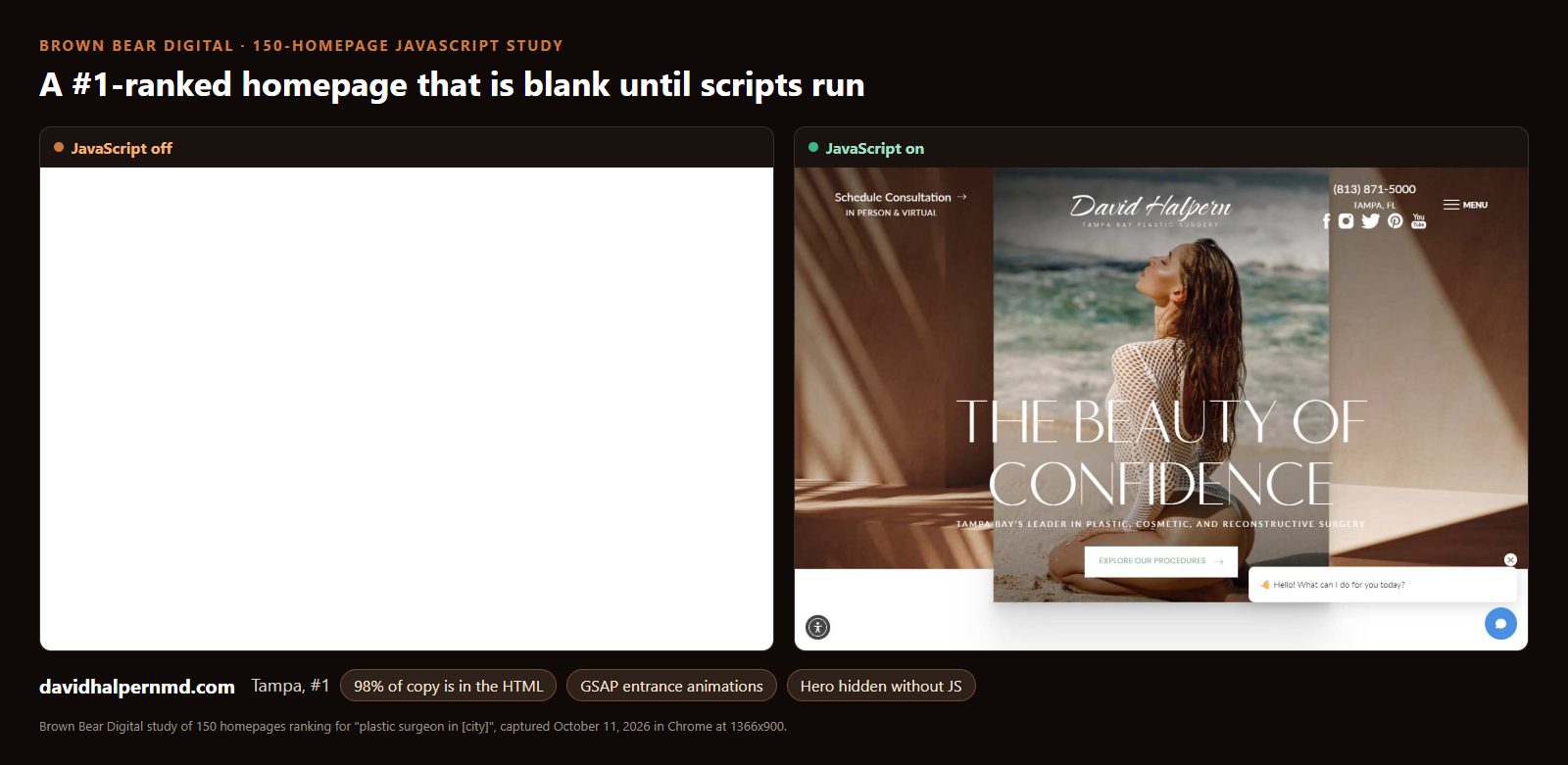
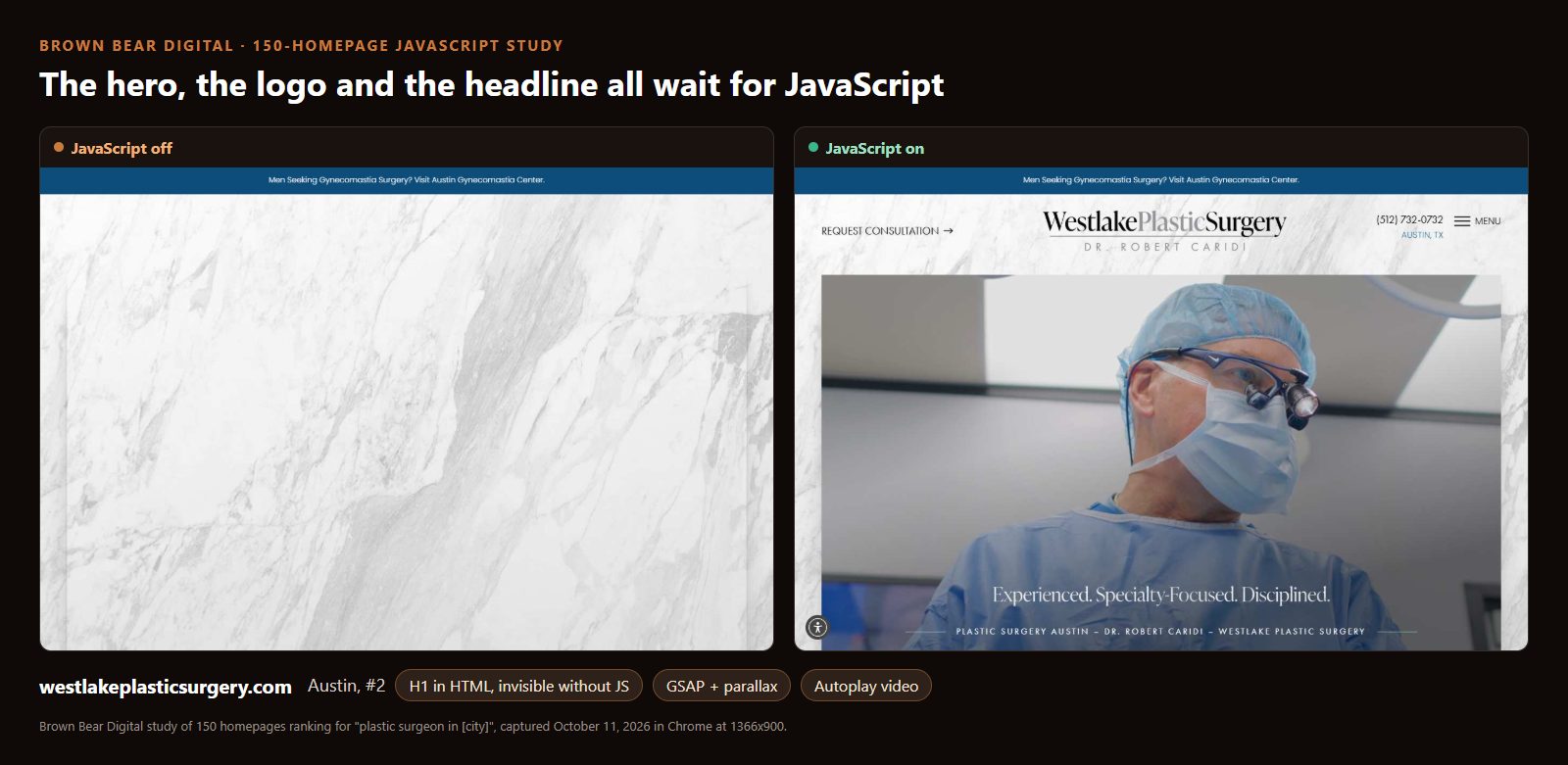
Dr. David Halpern's site ranks #1 for "plastic surgeon in Tampa," and 98% of its copy sits in the raw HTML. A text-reading crawler gets the words. But in a browser without JavaScript, the page is white from top to bottom, because every section waits on an entrance animation. Westlake Plastic Surgery in Austin, ranked #2, shows only a marble texture: no logo, no headline, no surgeon.
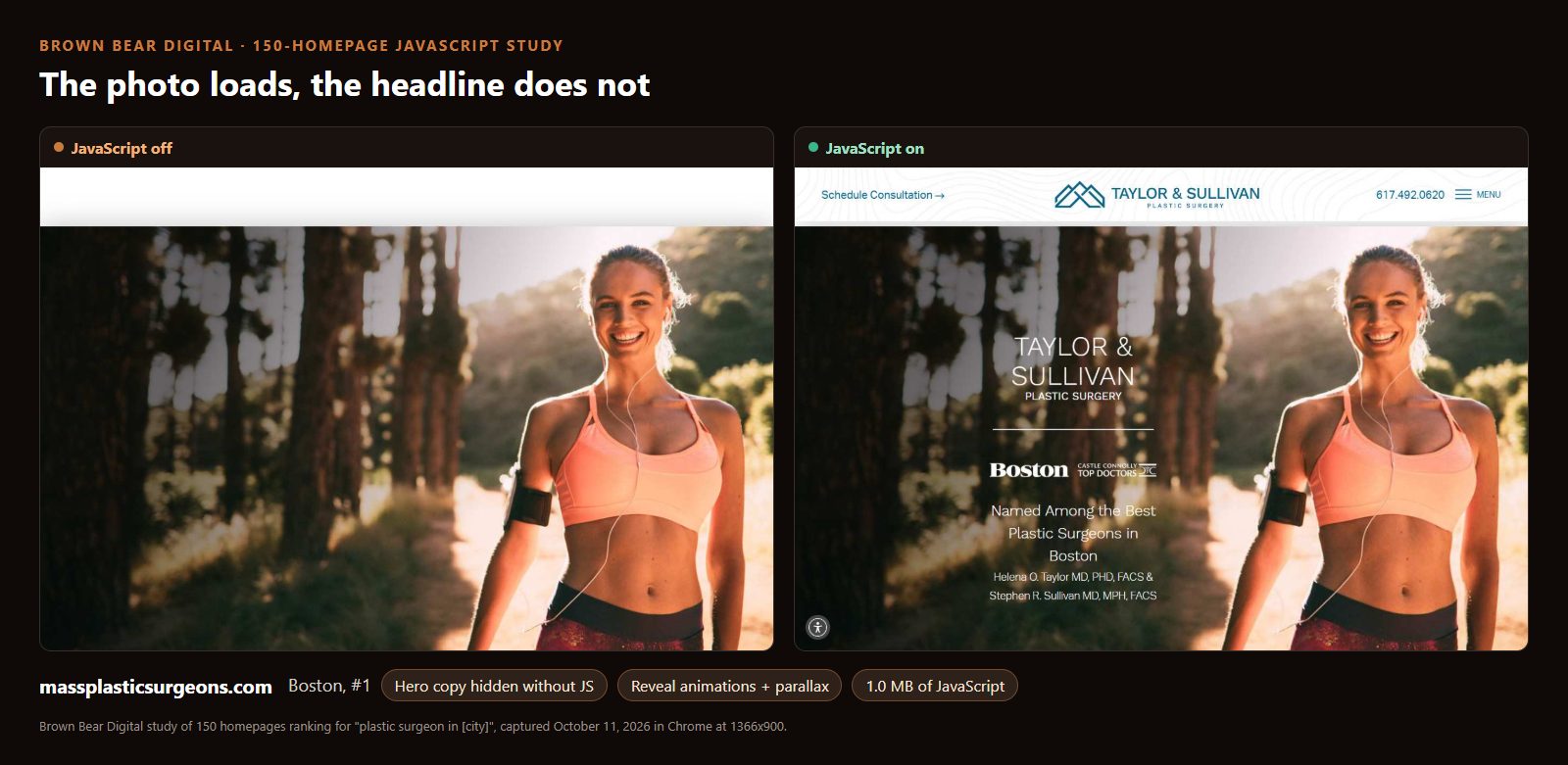
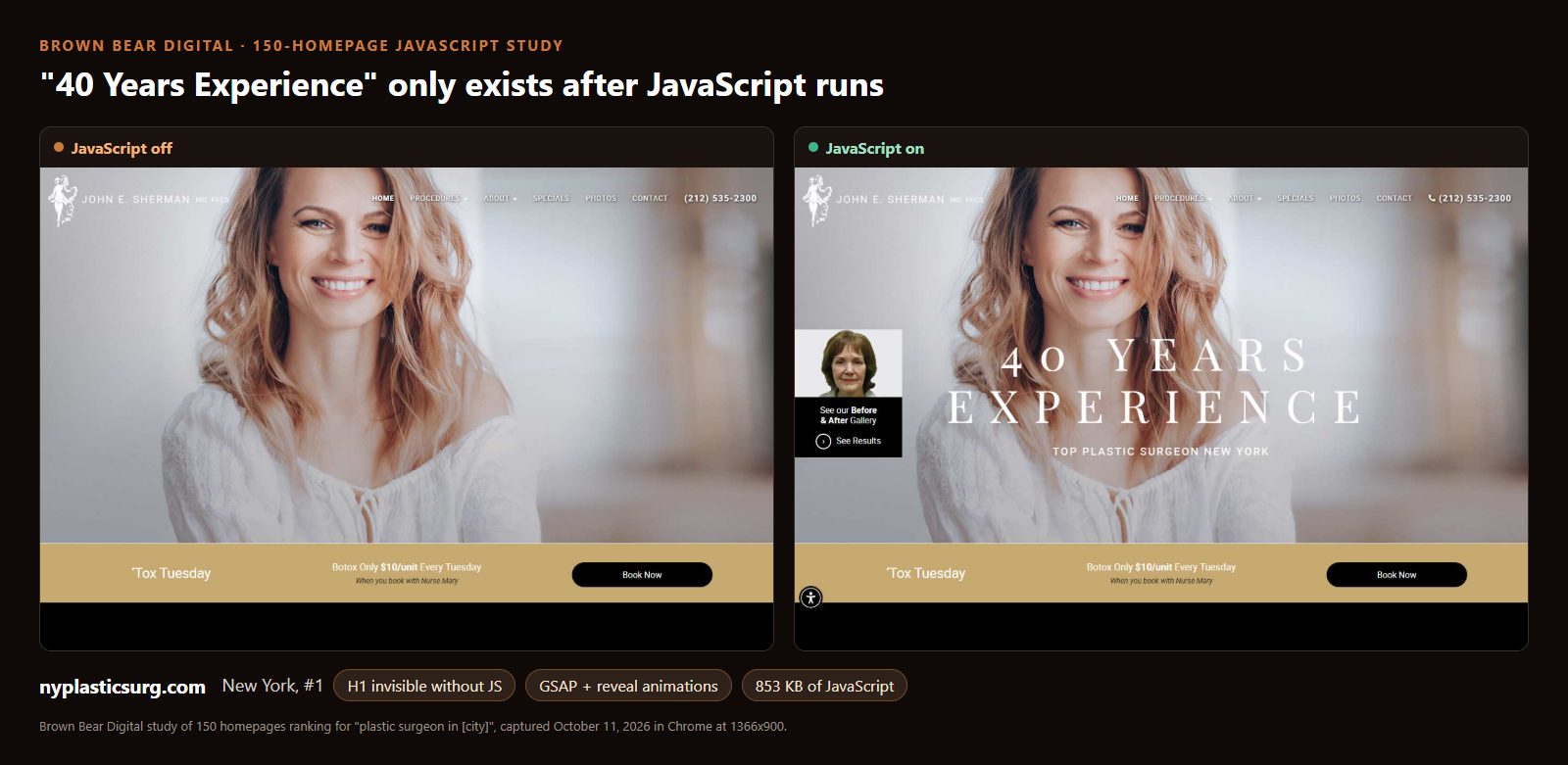
Two #1-ranked sites show the subtler version, where the photo loads and the words do not. Taylor and Sullivan's homepage at massplasticsurgeons.com, #1 in Boston, keeps its hero image and loses the practice name, the Boston Magazine Top Doctors badge and the surgeons' names. Dr. John Sherman's site, #1 in New York, keeps the smiling model and loses "40 Years Experience" and its H1, "Top Plastic Surgeon New York."
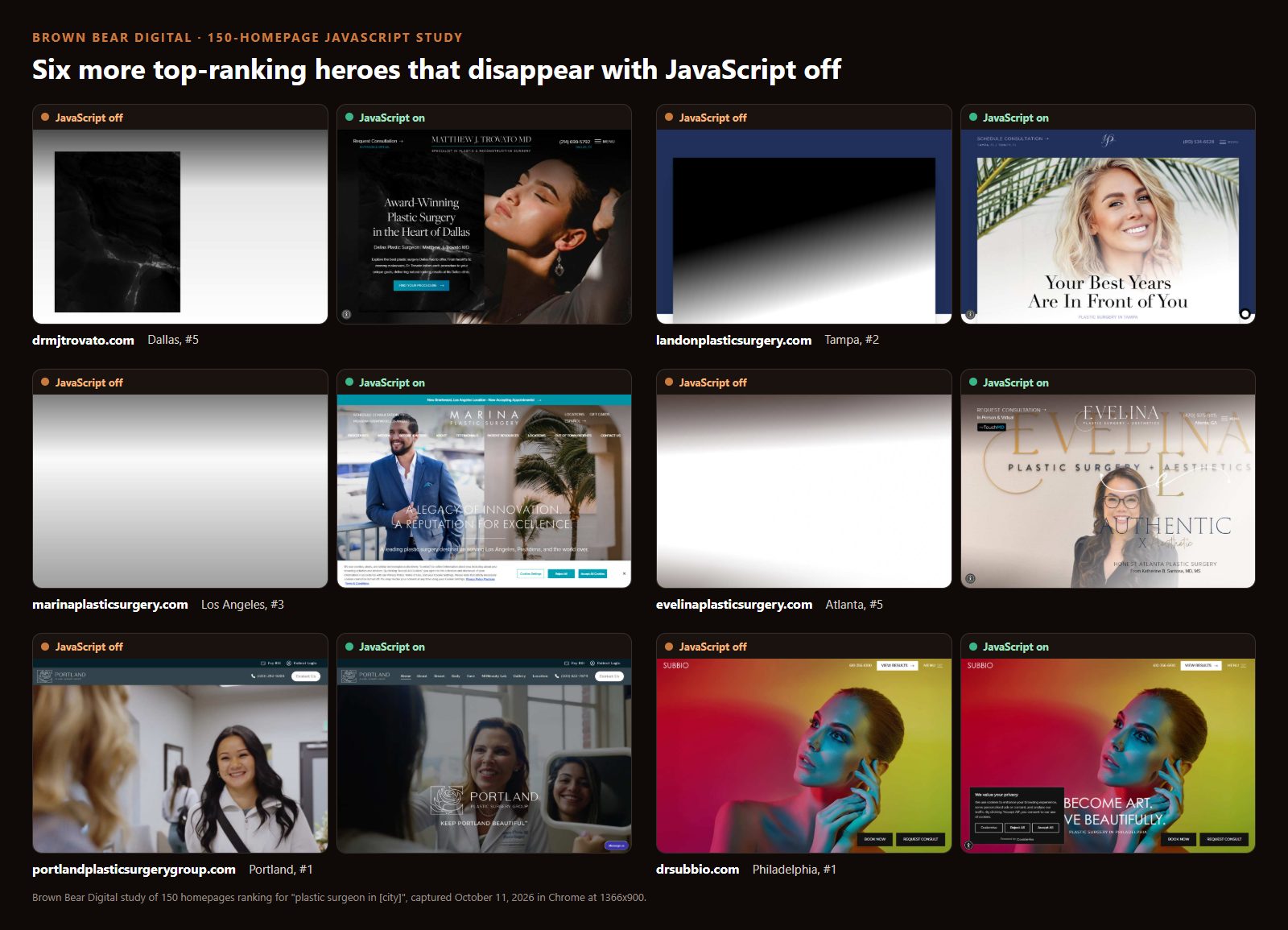
It is not a handful of outliers. Here are six more top-ranking homepages from Dallas, Tampa, Los Angeles, Atlanta, Portland and Philadelphia, three of them ranked #1 or #2, that lose their hero text or the hero entirely without JavaScript.
Pick a top-ranking homepage from the study, then drag the slider. Left of the line is the page with JavaScript off; right is what a patient sees with it on.
Screenshots captured October 11, 2026 and shown for research commentary; sites may have changed since. Nothing you do here is stored or sent anywhere.
Why does a hidden hero matter if the words are in the HTML? Three reasons, in descending order of certainty. First, anything that fails to run your scripts, from a blocked third-party file to a slow phone that times out, shows the blank version to a real patient. Second, the hero is the first thing screenshot-based AI agents and other browser-automation tools look at when they work from what is on screen. Third, Chrome does not count a fully transparent element toward Largest Contentful Paint, so a headline that starts invisible cannot count until it fades in, which can push that metric later.
Picture a patient on an older Android phone, on clinic Wi-Fi, opening your homepage from a text message. The animation library is still downloading. For three or four seconds, the page they see is the left-hand panel above. Most will wait. Some will hit back. The design was approved on a fast laptop where that panel never appears.
The Copy Usually Survives: What AI Crawlers Can Still Read
The short answer: the median homepage keeps 94% of its visible text in the raw HTML, only 6 of 124 measurable sites fall below 80%, and just 2 of 131 hide procedure-page links behind JavaScript.
This is where the popular version of the JavaScript story overreaches. Most top-ranking surgeon homepages are WordPress sites (82 of the 131), and WordPress sends finished HTML. The procedure menu, the "breast augmentation" and "rhinoplasty" links, the about section and the reviews are almost always in the HTML a crawler receives. Our Bay Area study found the same 94% median, so this now holds across two samples and 30 cities.
The exceptions are builds that render the page in the browser, like the React app above, and a few sites whose homepage content loads from a separate request after the page arrives. Those sites hand a non-rendering AI crawler a nearly empty document. If your site is one of them, no amount of content work fixes it; the fix is server-side rendering or prerendering, which our guide to JavaScript SEO for medical websites walks through by platform.
The practical read for most practices: your words are probably reaching AI crawlers. What is not reaching them, or reaching patients quickly, is covered next.
Half of These Homepages Ship More Than 1 MB of JavaScript
The short answer: the median homepage loads 1,046 KB of JavaScript, 66 of 131 load more than 1 MB, and 18 load more than 2 MB.
For context, the HTTP Archive Web Almanac puts the median desktop page at 613 KB of JavaScript. Top-ranking plastic surgery homepages carry about 1.7 times that. The middle half of the sample runs from 553 KB to 1,655 KB, and the top tenth starts at 2.5 MB.
Very little of that weight is the practice's own site. The median homepage pulls scripts from 7 third-party hosts, and the busiest tenth pull from 13 or more. Analytics and ad pixels are nearly universal at 92%. An accessibility overlay widget runs on 43 homepages, a third of the sample. A chat widget runs on 26. And 70 homepages, 53%, load at least one script in the document head without deferring it, which holds up the first paint until that script arrives.
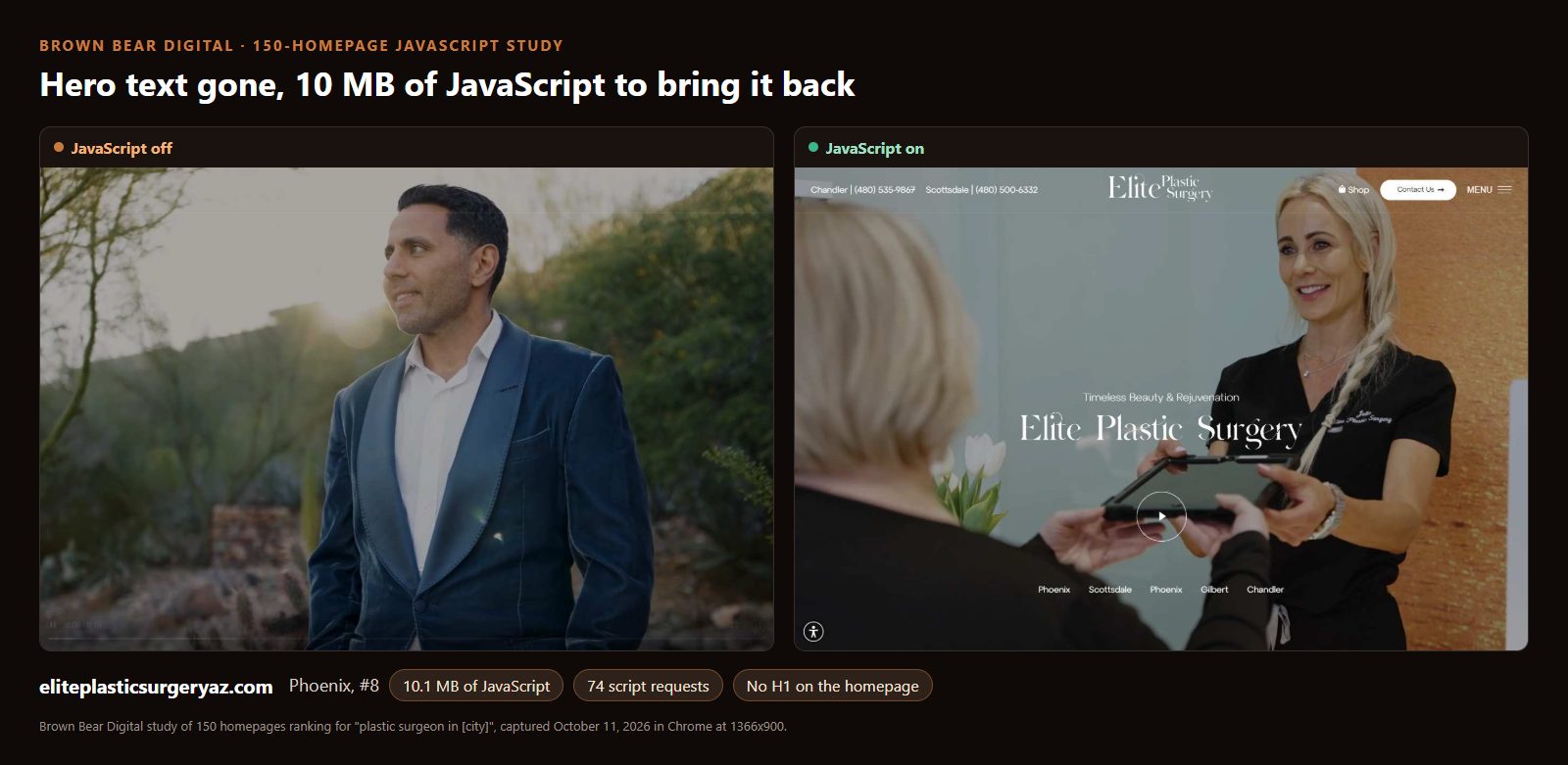
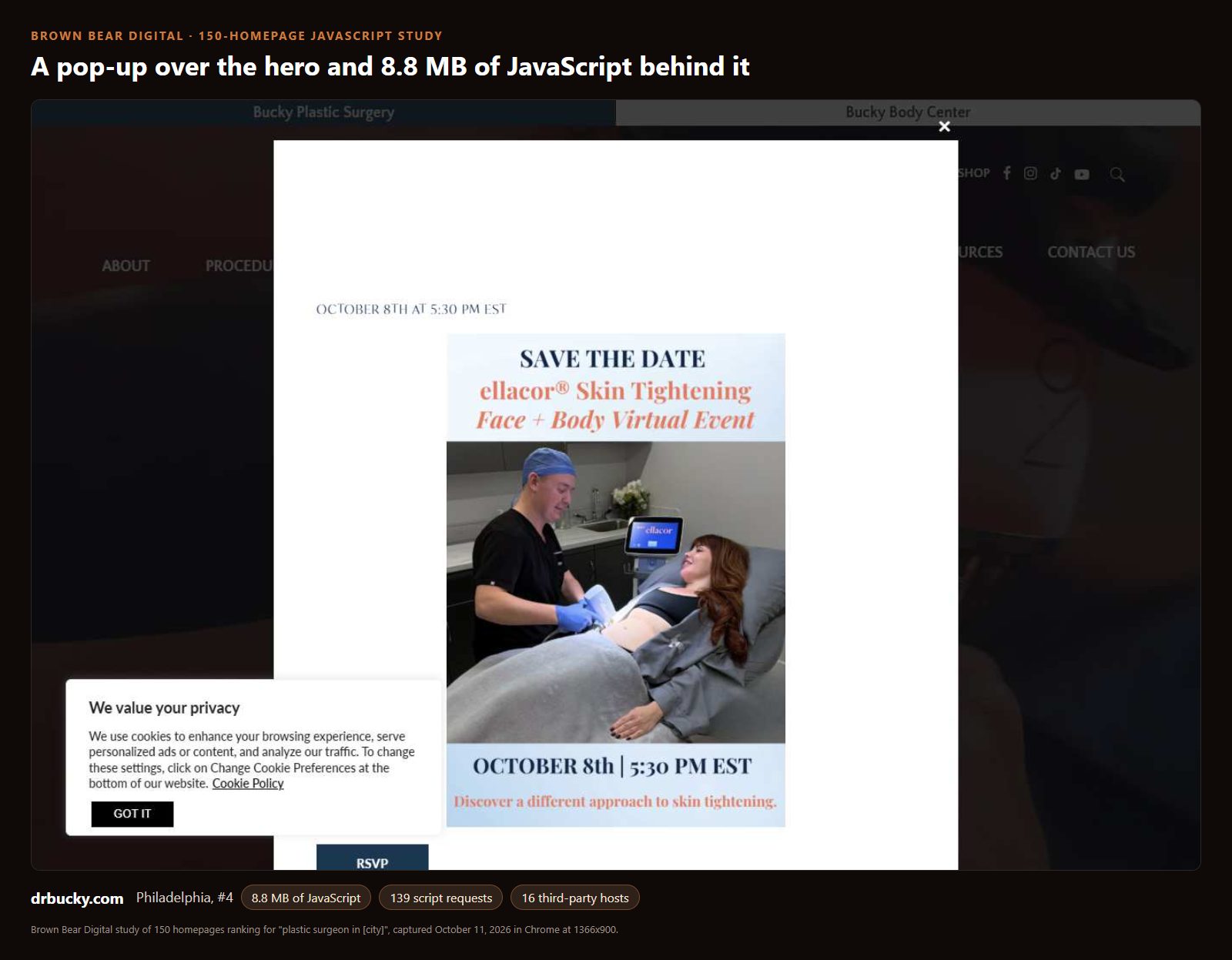
The heaviest homepages make the cost visible. Elite Plastic Surgery in Phoenix loads 10.1 MB of JavaScript across 74 script requests, and its hero text still disappears with JavaScript off. Dr. Louis Bucky's homepage in Philadelphia loads 8.8 MB across 139 script requests from 16 outside hosts, and greets a first-time visitor with a full-screen event pop-up over the hero.
Who should care most depends on how your site is built. If you are on a page builder like Elementor or Divi, most of your weight is the builder plus plugins, and the fix is an audit of what each plugin loads on the homepage. If you are on a custom build, the weight is usually third-party tags piled up by successive vendors, and the fix is a tag inventory with an owner for every line. We strip large amounts of JavaScript off client sites as a matter of routine, and the pattern is consistent: the scripts nobody can name an owner for are the ones to cut first.
Autoplay Video Is the Heaviest Thing on One Homepage in Three
The short answer: 44 of 131 homepages autoplay video, and where video loads, the median homepage requests 13.7 MB of it.
Video heroes are the signature of a premium surgeon site, and they are not invisible to crawlers in the way hidden text is. Most show a poster frame with JavaScript off. Their cost is weight. On 18 homepages the largest element painted on screen is a video, and on 63 it is a video or a background section rather than an image or text.

The Columbus, Georgia practice ranked #1 for "plastic surgeon in Columbus" runs three autoplay videos that together request about 205 MB of video files on load. Portland's Oregon Cosmetic and Reconstructive Clinic requests about 97 MB, and a ten-location group in Charlotte about 44 MB. Browsers often stop a video download partway, so treat these as the size of what the page asks for, not a guaranteed transfer. But a patient on a capped mobile plan pays for whatever arrives.
Say you are reviewing a redesign mockup and the agency proposes a 90-second brand film as the hero. The question to ask is not whether it looks good; it will. Ask for the file size, whether it autoplays on mobile, and what the hero shows before the first frame loads. If the answer is a 40 MB file and a blank box, ask for a compressed loop under 3 MB with a poster image, and put the full film one click away. Our guide to where video belongs on a medical practice website covers the placements that earn their weight.
The H1 Itself: Four in Ten Skip the Procedure or the City
The short answer: 80 of 131 homepage H1s name both a plastic surgery service and the city or region, 13 homepages carry more than one H1, and 10 have none at all.
Rendering aside, the headline itself is often a missed signal. A lot of top-ranking H1s are a surgeon's name ("Rod J. Rohrich, M.D.", "Dr. Terry Dubrow") or a mood line ("Look Better. Feel Better.", "Your Dream Team", "Become Art. Live Beautifully."). Some of these practices rank on the strength of a famous name, and a name-only H1 costs them little. For a practice building its reputation, an H1 like Restore SD Plastic Surgery's plain "Plastic Surgery San Diego" tells every reader, human or machine, exactly what the page is about. One Scottsdale homepage carries six H1 tags; Elite in Phoenix carries none.
If your surgeon's name is already the thing patients search for, keep it in the H1 and put the service and city in the line beneath. If you are still building recognition, lead with the service and the city and let the name carry the logo. Our homepage best practices guide has the full above-the-fold anatomy.
Procedures Parked in Carousels
The short answer: 45 of 131 homepages, 34%, keep procedure content inside carousel slides that are hidden until someone clicks or swipes.
Carousels are the standard way to fit 20 procedures into one homepage band. The text inside a hidden slide is usually in the HTML, so crawlers read it. The cost is to the patient: the third slide of a procedure carousel is easy to miss, and slider libraries often duplicate every slide to create the infinite loop, which means the same procedure card appears in the page source two or three times. Fifteen homepages put a slider in the hero itself, which makes the largest element on the page a moving target.
The cleaner build is a static procedure grid grouped by face, breast and body, the pattern on Boston Plastic Surgery's homepage below. Every procedure is visible, linked and in the HTML, with no slider script required.
Bot Walls: 27 Practices Turn Away GPTBot
The short answer: 27 of the 150 homepages refuse a request that identifies itself as OpenAI's GPTBot, and 18 put a "confirm you are human" challenge in front of automated browsers.
None of the 150 block GPTBot in robots.txt, which is where a practice would make that choice on purpose. The refusals come from the hosting firewall: the same request with a normal browser identity gets the homepage, and the GPTBot request gets a 403. Nine of the challenged sites share an identical wall, which points to one hosting or security vendor serving several practices. Our test requests came from a residential connection, and security services may verify the real crawlers differently, so treat this as a signal to check rather than a verdict. The check takes five minutes with your host, and the cost of a wrong answer is invisibility in ChatGPT search.
Why the Score Does Not Predict the Ranking
The short answer: median scores sit between 80.8 and 84.3 at every position from #1 to #8, and 7 of the 27 #1-ranked homepages hide their H1 without JavaScript.
This is the result that keeps the rest of the study honest about what it measures. Google renders JavaScript before it indexes a page, so a hero that fades in is still in the rendered HTML Google indexes. Local rankings also run on reviews, links, the Google Business Profile and proximity, none of which this rubric touches. A practice that ranks #1 with a hidden hero is not being penalized by Google for it.
What the score does predict is how the homepage behaves for everything that is not Google's renderer: AI crawlers that read raw HTML, patients on slow connections, screenshot-based agents and anyone whose browser fails to run a script. Imagine the marketing lead at a three-location group whose homepage ranks #1 in their city. Their Google traffic is fine, and nothing in Search Console will flag the hidden hero. The first sign is often a ChatGPT answer about "the best plastic surgeons in" their city that cites competitors and describes their practice from a directory listing instead of their own homepage. That is the gap this rubric measures.
The agency data points the same way. The 12 homepages credited to Studio 3 Marketing, the agency that ranked #1 for "plastic surgery website design" when we checked on October 11, score a median 87.4, the highest of any agency with three or more sites in the study. Practices with no visible agency credit score a median 80.9. Custom builds score a median 84.2, WordPress with Elementor 82.5, plain WordPress 80.4 and WordPress with Divi 75.9. The platform matters less than the decisions made on top of it.
The Homepages That Got It Right
The short answer: the 18 A-grade homepages look the same with JavaScript on or off, keep their weight modest and name the service and city in a single H1.

Dr. Kaimana Chow's Plastic Surgery of Austin ranks #1 in its city, scores 95 and loads 106 KB of JavaScript with zero third-party scripts. It still runs a video hero, and the poster frame and headline are visible before any script runs. Restore SD Plastic Surgery in San Diego tops the study at 98 with a plain "Plastic Surgery San Diego" H1. Boston Plastic Surgery scores 95 with a static grid of face, breast and body links that never needs a script to appear. The other A grades include Rady Rahban in Beverly Hills, Dr. Julius Few in Chicago, Pacific Plastic Surgery Group in San Francisco, Nashville Plastic Surgery Institute, West End Plastic Surgery in Washington, and CG Cosmetic in Miami. None of them look plain. They made the premium look survive without a script.
A No-JavaScript Checklist for Your Next Redesign
Everything above compresses into four checks. The first is the lights-off test, and it takes thirty seconds. The scorecard below the list turns all four into a score you can compare against the 131 homepages in this study.
- Run the lights-off test: turn JavaScript off and load your homepage. In Chrome, open DevTools, press Ctrl+Shift+P (Cmd+Shift+P on a Mac), type "Disable JavaScript", press Enter and reload. JavaScript stays off only while DevTools is open. The headline, the practice name, the main procedures and a way to call should all be readable. If they are not, ask your developer to make the animation's starting state visible and let the script add the motion on top.
- Ask for the weight in writing. Total JavaScript under 1 MB on the homepage, no unexplained third-party script, nothing render-blocking in the head, and a hero video under 3 MB with a poster image. Put the numbers in the redesign contract so they survive launch.
- Write the H1 for a stranger. One H1, naming the service and the city, with the surgeon's name in it or directly beneath it. Keep procedures in a visible grid rather than a carousel.
- Confirm the crawlers can get in. Ask your host whether its firewall challenges or refuses GPTBot, OAI-SearchBot, ClaudeBot and PerplexityBot, and decide on purpose whether it should.
Where you start depends on where you are. If your homepage is built in the browser, like a React or AI-builder app with almost nothing in the raw HTML, the first fix is server-side rendering, and everything else waits on it. If your words are in the HTML but hidden by animations, which is the far more common case, the fix is a CSS change on a live site, not a rebuild. And if you are mid-redesign, the cheapest moment to get all four right is before the design is approved.
Score your own homepage on the same 100-point rubric we used for 131 top-ranking plastic surgery homepages, then see where you would land.
You need two browser tabs: your homepage with JavaScript off (DevTools, Ctrl+Shift+P, "Disable JavaScript", reload) and View Source (Ctrl+U). For the weight and speed questions, use the DevTools Network tab and PageSpeed Insights, or pick "not sure."
For informational purposes only. The score approximates the study rubric from your own answers and is not a guarantee of rankings, traffic or AI visibility, and it is not legal or technical advice for your specific site. Your answers stay in this browser (saved in local storage so you can come back to them); nothing is sent anywhere.
Methodology, Limits and the Sites We Studied
The SERPs were read from the live Google US results in Chrome on October 11, 2026, from a logged-in browser profile, so light personalization is possible. Homepages were captured the same day at desktop size (1366 by 900) in Chrome via Playwright. Text coverage measures the share of the rendered page's visible text, in five-word sequences, that already appears in the raw HTML. Lab performance was recorded on an unthrottled desktop connection and is useful for comparing sites in this sample, not as a substitute for Core Web Vitals field data. Video sizes are the sizes reported by video requests during load and are an upper bound. Bot-access tests came from a residential connection. Rubric scores are a snapshot of one day and do not measure reviews, links or any other ranking factor.
The full source list covers all 273 search results we read, with the city, search position and ranking URL for each, the 150 homepages we studied and the reason each excluded result was set aside. The scoring scripts are available on request, so any practice can check its own row.
Get a JavaScript Audit of Your Practice Homepage From Brown Bear
This study is the same audit we run on a single practice site: the raw HTML, the JavaScript-off view, the weight and the crawler access, scored against the 131 homepages above. Most of the fixes are measured in hours, not a rebuild, and the ones that do need a rebuild are better known before you sign the next design contract. If you want a homepage that patients and AI tools see the same way, start with our plastic surgery website design team.
See Your Homepage With the Lights Off
We will load your homepage the way this study did, as raw HTML, with JavaScript off and fully rendered, and score it against the 131 top-ranking practices in this report. You get the screenshots, the weight breakdown and a prioritized fix list.
Get Your JavaScript AuditWritten By
Founder, Brown Bear Digital
Bryan has 15 years of experience across SEO, paid search, and AI search strategy. He founded Brown Bear to give businesses direct access to senior-level search expertise without the agency overhead.
Learn More About BryanGet Found on Google.
Get Cited by AI.
Tell us about your site. We'll send back a proposal for SEO and AI search.