JavaScript SEO for Medical Websites: What AI Crawlers Miss on Your Practice Site
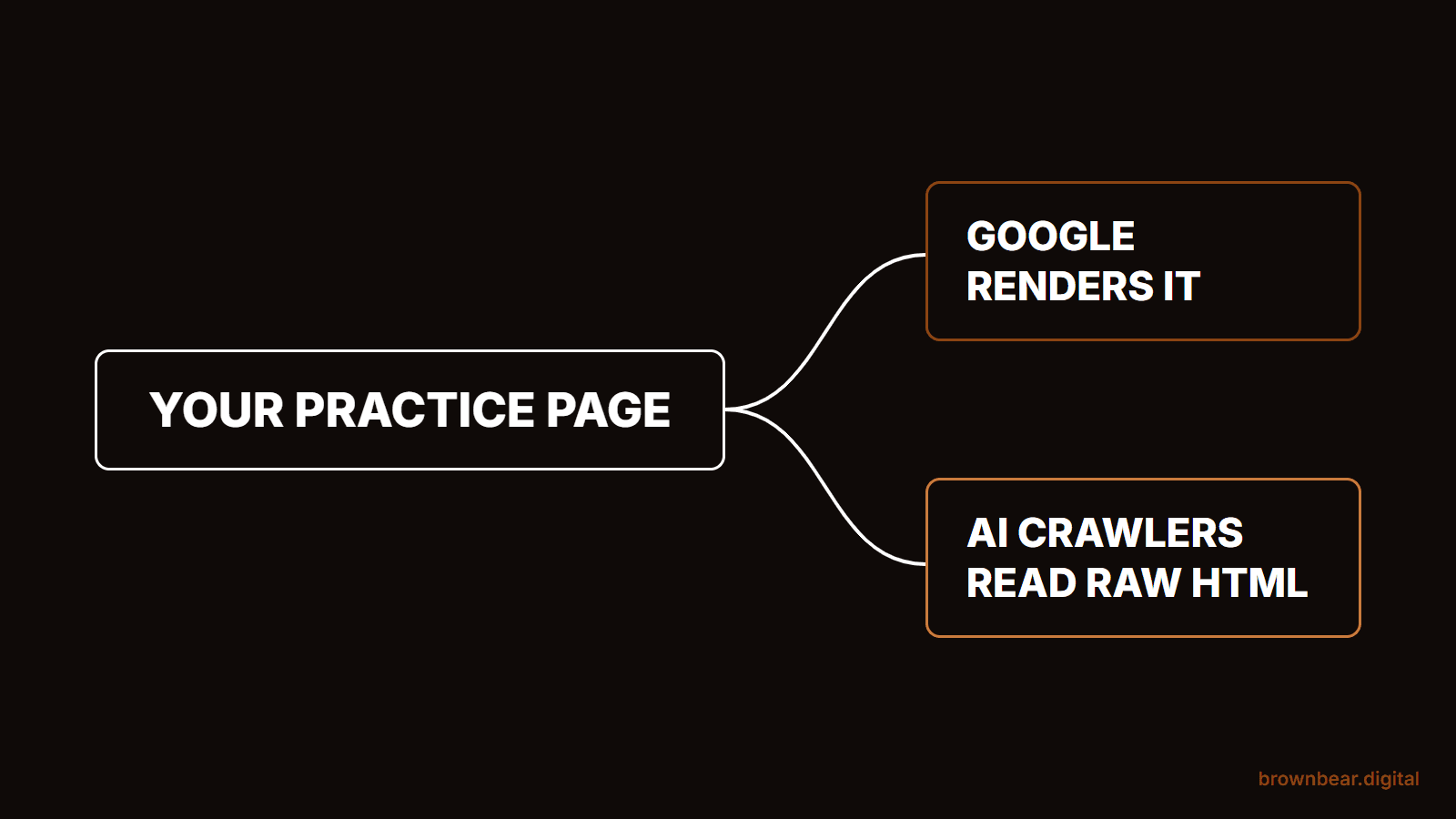
A practice website can look perfect to a patient and still be close to blank to the machines that answer patient questions. Google runs your site's JavaScript before it reads the page. Most AI crawlers, the ones feeding ChatGPT, Claude and Perplexity, do not. Whatever your site builds in the browser, from the price on a procedure page to the reviews under your surgeon's bio, may never reach them. This is Brown Bear's guide to JavaScript SEO for medical websites, written for the AI answer era rather than the Google-only one.
It draws on how Bryan Passanisi, founder of Brown Bear Digital, audits and rebuilds practice websites, read against Google's own JavaScript documentation and the published crawler measurements as of October 2026. Where a point is our own client observation rather than published research, we say so.
JavaScript SEO covers both halves of the problem: whether Google can render and index your pages, and whether crawlers that never run JavaScript can read them at all. We cover the features clinic sites rely on, how to test what a crawler sees, what to strip, and how to fix rendering on the platforms practices actually use. We don't re-cover robots.txt or firewall settings; those live in our guide to the rest of the AI visibility stack.
If you are a surgeon or practice owner, you probably paid for a site that looks polished and want to know whether that polish is costing you visibility. If you run marketing for a practice, you need a test you can run this afternoon and a list you can hand your developer. And if you manage a site for a multi-location group, one template problem is repeating across every location page you have.
By the end, you'll know which of your site's features hide content, how to check any page in about five minutes, and which fix fits your platform. The longer payoff is a site where every fact a patient might ask an AI about, prices, credentials, recovery, reviews, exists in plain text for whichever machine comes asking.
We've grouped it into four parts: how Google and AI crawlers read JavaScript differently, the clinic features that hide content, how to test and what to strip, and how to fix rendering and measure the result. Start with the two readers your site now has.
What JavaScript SEO Means When Patients Ask AI Instead of Google
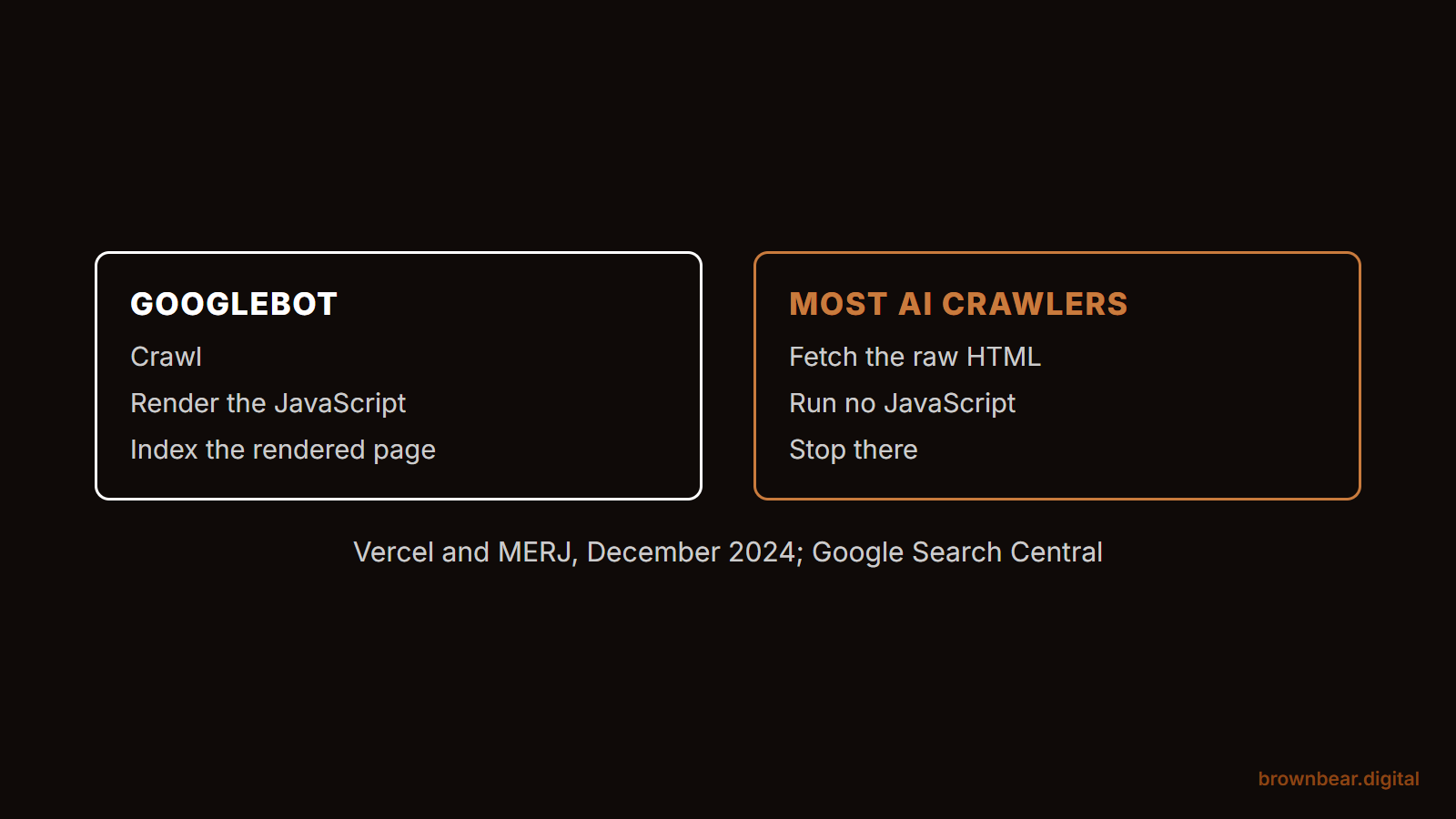
JavaScript SEO is the work of making sure content built or changed by JavaScript can still be crawled, read and indexed. For a medical website in 2026 it has two audiences. Googlebot renders JavaScript and eventually sees what a patient sees. Most AI crawlers read only the raw HTML your server sends, so anything JavaScript adds later is invisible to them.
The clearest measurement comes from Vercel and MERJ's analysis of AI crawler traffic, published in December 2024. It found that none of the major AI crawlers it measured rendered JavaScript: OpenAI's, Anthropic's, Meta's, ByteDance's and Perplexity's. They did download JavaScript files, 11.50% of ChatGPT's requests and 23.84% of Claude's, but did not execute them. The two exceptions were Google's Gemini, which uses Googlebot's infrastructure, and AppleBot, which renders through a browser-based crawler. Independent log tests published through 2026 found the same pattern: no OpenAI, Anthropic or Perplexity crawler has been documented running a page's JavaScript in any useful sense.
| Crawler | Runs JavaScript? | What it reads on your page |
|---|---|---|
| Googlebot, which feeds Google Search, AI Overviews and AI Mode | Yes, after a rendering queue | The rendered page, minus anything that needs a click or scroll |
| Gemini | Yes, through Googlebot's infrastructure | The rendered page |
| AppleBot | Yes, browser-based | The rendered page |
| OpenAI crawlers: GPTBot, OAI-SearchBot, ChatGPT-User | No | Raw HTML only |
| ClaudeBot | No | Raw HTML only |
| PerplexityBot | No | Raw HTML only |
That split matters more in medicine than in most categories, because the questions patients bring to AI tools are specific. "How much is a deep plane facelift in Scottsdale." "Which surgeons near me are board certified in plastic surgery." "How long is rhinoplasty recovery." The answers live on your procedure pages, bios and pricing pages. If those facts arrive by JavaScript, an assistant that never runs it either skips your practice or describes it from someone else's page, often a directory or a review site.
Bryan's view, from the sites Brown Bear audits, is blunter than the study: LLM crawlers handle JavaScript poorly, and a page that assembles itself in the browser often reads to them as an empty shell. The good news is that this is mechanical. It is fixed with engineering, not with more content.
Google Renders Your JavaScript Eventually, and Only What Loads Without a Click
Google handles JavaScript better than any AI crawler, but not instantly and not completely. Google's JavaScript SEO documentation describes three phases: crawling, rendering and indexing. A page waits in a render queue first, and Google says it "may stay on this queue for a few seconds, but it can take longer than that." Rendering uses an evergreen version of Chromium, so modern code runs fine.
Three limits catch practice sites most often:
- Google does not click. Google's lazy-loading guidance warns against content that depends on user actions, because "Google Search does not interact with your page." Content that appears only after a tap, a scroll trigger or a "load more" button may never be rendered.
- Links must be real links. Google's guidance is to use real HTML links,
<a>elements with anhrefattribute, so it can discover the next page. A provider card that navigates with a click handler is a dead end for discovery. - A noindex in the HTML wins. Google says that when it finds a noindex tag it may skip rendering, so JavaScript that later removes the tag is too late.
Google also retired its own workaround. Its documentation now calls dynamic rendering, serving bots a prerendered copy, "a workaround and not a recommended solution," and recommends server-side rendering, static rendering or hydration instead.
Picture a facelift practice whose Search Console looks healthy: pages indexed, impressions steady. Its prices sit in an interactive cost estimator that fetches numbers after the page loads. Google renders the estimator and can see a starting price. ChatGPT's crawler gets the page heading and an empty div. When a patient asks ChatGPT what that surgeon charges, the answer comes from a two-year-old forum thread instead. Google being fine tells you nothing about the AI crawlers. You have to test for both.
Seven Clinic Site Features That Hide Content From Crawlers
The features that make a practice site feel premium are the same ones that most often move content out of the HTML. None of them is bad by default. Each is a question of how it is built: whether its text ships in the page's HTML and JavaScript only styles it, or whether JavaScript fetches and inserts the text after load. The first is safe for every crawler. The second is invisible to most AI crawlers and partly to Google.
1. Hero sliders and carousels
A slider that renders every slide in the HTML and uses JavaScript only to rotate them is fine. A slider library that builds slides from a data file after load hides every headline after the first, and sometimes the first too. Slider headlines are often your positioning statements, "board-certified facial plastic surgeon in Austin", which is exactly what an assistant needs to describe you.
2. Tabs and accordions on procedure pages
Procedure pages pack candidacy, recovery, risks and FAQs into tabs. If the tab text sits in the HTML and is only visually collapsed, crawlers that read raw HTML still get it. If each tab fetches its content when clicked, no crawler gets it, Google included, because no crawler clicks. This is where recovery timelines and risk language, the content YMYL questions turn on, most often go missing. Our AI-ready plastic surgery website guide walks through what each page type needs to carry in plain text.
3. Before-and-after galleries
Galleries are frequently third-party plugins or embedded iframes. Google can render an iframe and may index its content as part of your page, but a crawler reading your page's raw HTML gets only the iframe tag, not the gallery, so the captions describing procedure, age range and time since surgery never reach it. Gallery pages already rank on their images; the words around them are what an assistant can quote. The before-and-after gallery best practices we recommend start with text on the page itself.
4. Review and testimonial widgets
Many review widgets render reviews in the browser with JavaScript. Google can usually render them, but on your own site those reviews may not exist in the raw HTML at all. AI tools mostly learn your reputation from the review platforms themselves, so the widget is not your main reputation signal, but a few written testimonials in the HTML give your own pages something to quote.
5. Chat and booking widgets
Chat and booking tools rarely hide page content, because they don't carry any. Their cost is weight: third-party scripts that load on every page and compete with the content for the browser's attention. Google's Core Web Vitals ask for an Interaction to Next Paint under 200 milliseconds, and a heavy chat script loading on every page can be one reason a page misses it.
6. Pricing calculators and financing tools
Cost questions are where practices can still win local and AI answers, and calculators are where the numbers most often disappear. If you publish price ranges, put a plain sentence with the range in the HTML next to the tool, in the form "Rhinoplasty at our practice typically costs between [your low figure] and [your high figure], including anesthesia and facility fees." The calculator can stay for patients; the sentence is for the machines.
7. "Load more" blogs and filtered provider directories
Blog indexes with a "load more" button and provider directories that filter by location without changing the URL both hide pages behind interaction. Older posts and individual surgeon pages can lose their only internal links. Use paginated URLs and real <a href> links so every page is reachable without a click.
How to See Your Site the Way an AI Crawler Does
The fastest check is what we call the Two-Copy Test. Every page has two copies: the one your server sends, which is all most AI crawlers read, and the one the browser builds after JavaScript runs, which is what patients see and what Google eventually renders. Compare the two. Anything in the second copy and not the first is invisible to ChatGPT, Claude and Perplexity.
Run it on your three most important pages: your top procedure page, your lead surgeon's bio and your pricing or financing page.
- Search the source. Open the page, press Ctrl+U, or Cmd+Option+U on a Mac, to view source, then use Find to search for a sentence you can see on screen, such as a price or a recovery timeline. Found it? The server sent it. Not found? JavaScript built it.
- Turn JavaScript off. In Chrome DevTools, open the Command Menu with Ctrl+Shift+P, or Cmd+Shift+P on a Mac, type "Disable JavaScript", and reload. What's left on screen is roughly what an AI crawler reads.
- Fetch it as an AI crawler. From a terminal, request the page with the user agent OpenAI publishes for GPTBot,
curl -A "Mozilla/5.0 AppleWebKit/537.36 (KHTML, like Gecko); compatible; GPTBot/1.4; +https://openai.com/gptbot" https://yourpractice.com/rhinoplasty/, and search the output. It shows what a crawler that runs no JavaScript receives and catches some bot rules keyed to the user agent, though not blocks that check OpenAI's real IP addresses. - Ask Google what it rendered. In Search Console, run URL Inspection on the page and open View crawled page, or Test live URL, to see the HTML Google rendered. That tells you whether Google's side is fine even when the AI side isn't.
- Measure the whole site. For more than a handful of pages, crawl with Screaming Frog in JavaScript rendering mode and sort by the JS Word Count % column, which shows how much of each page's text exists only after JavaScript runs.

We ran the test on our own site while writing this. Fetched with GPTBot's user agent, our guide to optimizing a website for AI search returned its full body, every section of a guide of more than 4,000 words, in the first response, because the blog is generated as static HTML at build time. That is the result you want: nothing to wait for and nothing to run.
Say you manage marketing for a two-surgeon practice and run the test on your rhinoplasty page. The heading, the intro and the surgeon's name are in the source. The cost range, the recovery week by week and all twelve FAQs are not, because the theme loads them from an API when the accordion opens. That is three of the four things patients ask AI about rhinoplasty, gone from the copy the AI crawlers read. Paste your own two copies into the tool below and it does the comparison for you.
What We Strip From Practice Sites and What We Keep
The fix for most practice sites is less JavaScript, not smarter JavaScript. Bryan puts it directly: the amount of JavaScript Brown Bear strips off client sites is large, because LLMs do not do a good job crawling it, and in our client work it has been a bigger lever for AI visibility than schema markup. Schema is still worth keeping tidy. It just can't describe content the crawler never received.
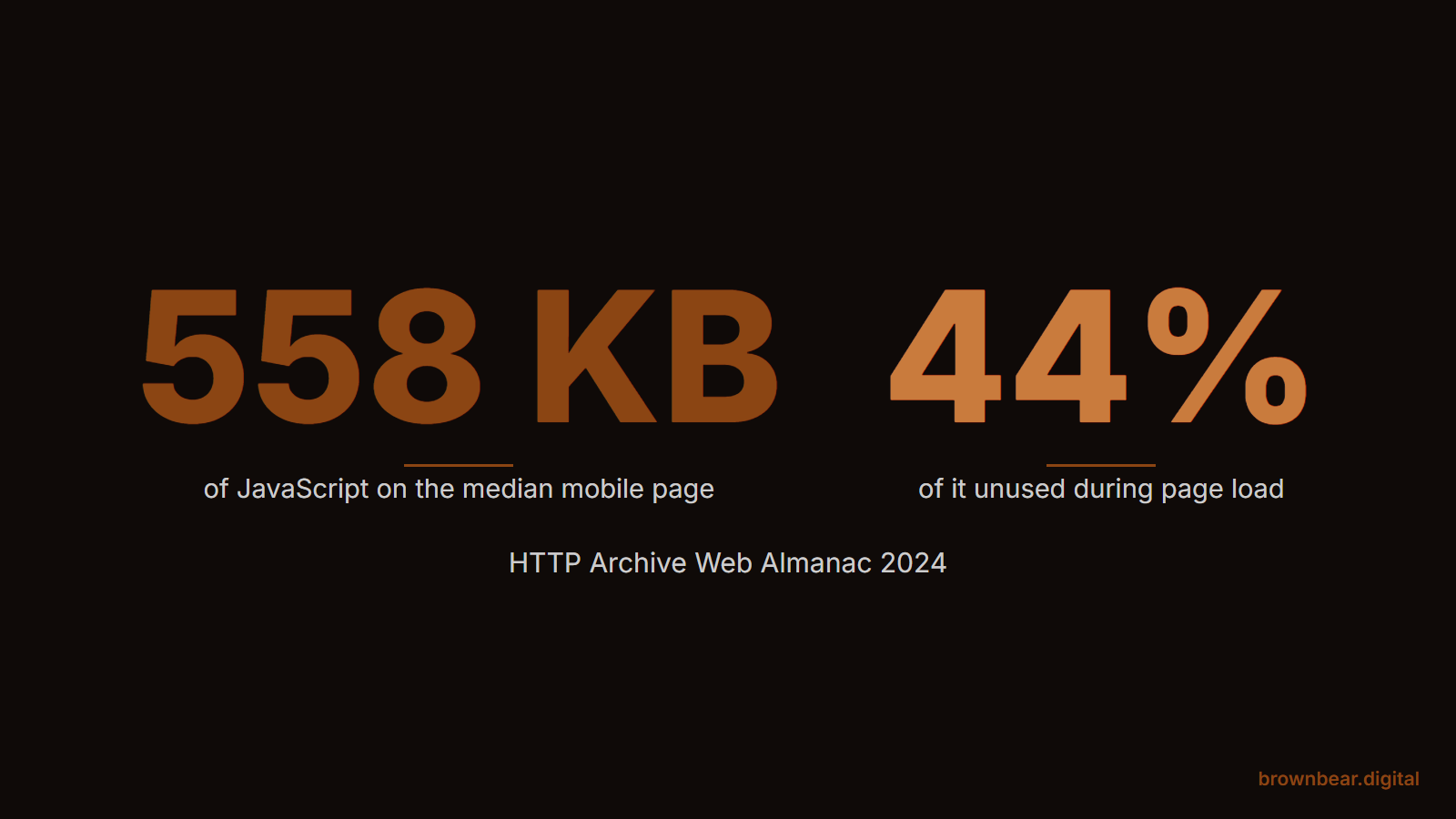
The web as a whole carries more script than it uses. The HTTP Archive's 2024 Web Almanac put the median mobile page at 558 kilobytes of JavaScript, with about 44% of it unused during page load. A practice site built on a page builder, carrying a slider library, an animation library, three tracking tags and two widgets, can easily sit above that median.
| Usually strip or replace | Usually keep |
|---|---|
| Slider and animation libraries used for one effect | Online booking, loaded on the pages where patients book |
| Page-builder scripts for modules the page doesn't use | Analytics and ad tags you actually report on, behind consent where required |
| Duplicate or abandoned tracking tags | Chat, if chats turn into consultations, loaded after the page content |
| Widgets that inject core content: prices, FAQs, bios, credentials | Interactive tools, as long as the facts they show also exist in plain text |
| Client-side rendering of whole public pages | Client-side rendering behind a patient portal login, where indexing doesn't matter |
The keep column comes with a condition. Chat earns its weight only if it books consults; if your team can't say how many consultations chat produced last quarter, test the site without it for a month. Booking belongs on booking pages, not every page. And any interactive tool stays only if the fact it computes also sits in a sentence nearby.
When we take this on as part of website development for medical practices, the order is always the same: get the content into the HTML first, then cut the scripts that slow the page, then defer what's left.
Server Rendering Options for the Platforms Practices Actually Use
The right fix depends on what your site is built on. Server rendering, where your server sends complete HTML for every page, is the target in every case. How you get there changes by platform.
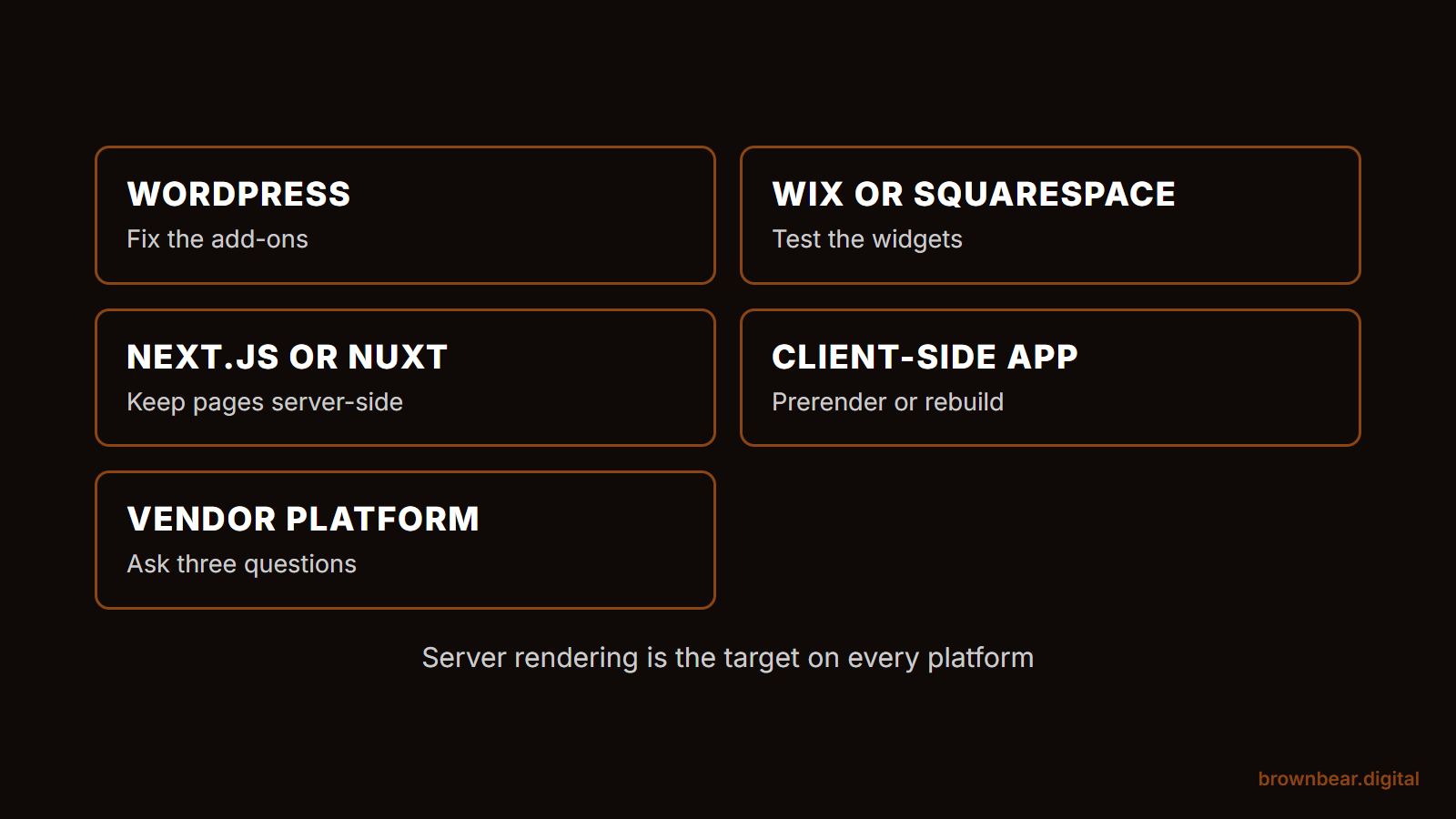
If you're on WordPress with a page builder,
your pages are server-rendered by default, so start with the exceptions. Run the Two-Copy Test on pages that use third-party tab, slider, gallery or calculator add-ons, or grids that load more items as you scroll, since those are where content can arrive after the page loads. Replace the specific plugin or module, not the platform.
If you're on a hosted builder such as Wix or Squarespace,
Wix says its sites use server-side rendering, and Squarespace delivers most standard page content in the initial HTML, though some blocks load theirs with JavaScript. Your risk sits in those blocks, embedded apps and third-party widgets, so test pages that use them. Your attention also belongs on the crawler settings: Squarespace, for example, has a "Block known artificial intelligence crawlers" setting under Settings, then Crawlers, covered in our guide on how to optimize your website for AI search.
If you're on Next.js, Nuxt or another modern framework,
use server-side rendering or static generation for every public page. Both are the defaults: Next.js prerenders App Router pages to HTML, and Nuxt renders on the server unless told not to. The common mistake is a page marked to render on the client because one component needed the browser; move that component into its own client-only piece and keep the page server-rendered.
If your site is a client-side app, React or Vue with no server rendering,
you have the biggest gap and two real options. Prerendering at build time generates static HTML for each public page and can take days rather than months. A rebuild on a server-rendered framework takes longer but removes the problem for good. Dynamic rendering, serving bots a separate copy, is the option Google itself no longer recommends.
If your site runs on a medical marketing vendor's own platform,
you may not control the code at all. Ask the vendor three questions in writing: does every public page send its full text in the initial HTML, do procedure-page tabs and FAQs load with the page or on click, and can you remove a widget without breaking the template. Their answers tell you whether to stay.
Imagine a three-location dermatology group whose site an agency built as a React app in 2021. Every page fails the Two-Copy Test, and the group has a redesign budgeted for next year. Prerendering the forty public pages now buys a year of AI visibility for a fraction of the redesign cost, and the redesign can then move to a server-rendered framework. If you go the rebuild route, treat it as a migration and follow a website migration SEO checklist, because new URLs and templates break rankings faster than JavaScript ever did.
What Changes After the Fix, and What to Measure
Three things should move after a rendering fix, and each can be measured without guessing.
- Crawlable text. Re-crawl and compare JS Word Count % before and after. On your key pages, the target is near zero: everything a patient reads exists before JavaScript runs.
- Speed. Check Core Web Vitals in Search Console and PageSpeed Insights. Google's thresholds are a Largest Contentful Paint within 2.5 seconds, an Interaction to Next Paint under 200 milliseconds and a Cumulative Layout Shift under 0.1. Removing unused script usually helps the second most.
- AI crawler access and answers. Your server logs show whether GPTBot, OAI-SearchBot and PerplexityBot are fetching your pages and getting 200 responses. Then ask ChatGPT and Perplexity the questions your pages answer, such as your procedure cost and your surgeon's credentials, and note whether your site is cited and whether the facts match.
Be careful with what you conclude from the third. AI answers change by day, by wording and by user, so a single before and after check is an anecdote. Run the same prompts monthly and keep a log. In our client work, getting content into the HTML is the step that makes AI citations possible in the first place; whether they follow also depends on your reputation off the site, which is why this sits inside a wider AI search optimization for medical websites program rather than standing alone.
Where to start this week:
- Run the Two-Copy Test on your top procedure page, your lead surgeon's bio and your pricing page.
- List every fact that appears only after JavaScript runs, and rank it by how often patients ask about it.
- Send your developer or vendor that list with one instruction: these facts must be in the HTML the server sends.
- Re-test the same three pages after the fix, and start a monthly log of what ChatGPT and Perplexity say about your practice.
Get a JavaScript Rendering Audit From Brown Bear
Most practices never find out what their site looks like to the machines answering their patients' questions. Brown Bear's technical audits start with exactly that: the Two-Copy Test across every page type, a list of what's hidden, and a fix plan matched to your platform, from swapping a plugin to prerendering a whole app. If you want that map for your practice, start with our technical SEO audits for medical websites.
Written By
Founder, Brown Bear Digital
Bryan has 15 years of experience across SEO, paid search, and AI search strategy. He founded Brown Bear to give businesses direct access to senior-level search expertise without the agency overhead.
Learn More About BryanGet Found on Google.
Get Cited by AI.
Tell us about your site. We'll send back a proposal for SEO and AI search.