What an AI-Ready Website Looks Like for Plastic Surgeons, Page by Page
A patient asks ChatGPT who does the best deep plane facelift near her, what it costs, and whether the surgeon is board certified. Then she asks it to find a Tuesday evening consultation. Every one of those answers is assembled from pages, and some of them should be yours. Whether they are depends less on how your site looks than on whether a machine can read it, quote it, and use it.
This is Brown Bear's page-by-page guide to what an AI-ready plastic surgery website actually looks like. It draws on the AI-visibility audits we run for practices, on our own published research into what ranks for procedure and before-and-after searches, and on what Google, OpenAI, Perplexity and Anthropic document about how their systems read the web.
When we say AI-ready, we mean both the AI answers inside Google and the assistants patients open on their phones, and both the machines that read your pages and the newer agents that try to act on them. If you own a practice and keep hearing that AI search changes everything, you want to know which pages matter and what to fix first. If you run marketing for a group, you need a way to audit a site with dozens of procedure pages without guessing. And if you are in the middle of a redesign, you want the requirements written down before the agency quotes.
By the end you will have a short list of moves for every page type on a plastic surgery site, the most common miss on each, and a way to decide where to start based on how your site is built. The payoff is a site that AI systems describe accurately and that patients can act on, which is the part of AI visibility you fully control.
We have organized it into three parts: what AI-ready means and how to test for it, a walk through the nine page types every practice site has, and the site-wide technical layer underneath them. So let's start with the definition, because most of the confusion begins there.
Key Takeaways
Run every page through the Read, Cite, Act test
Can a machine read the page's facts in the HTML the server sends, cite them because they are specific and match the rest of the web, and act on the next step without guessing? Each page type tends to fail in its own predictable place.
Fix Read failures first, because they block everything else
Prices, credentials and procedure text that load by script or sit inside images are often invisible to machines that do not run scripts. Open View Source on a procedure page and search for a sentence and a price.
Blocking training bots does not remove you from AI search
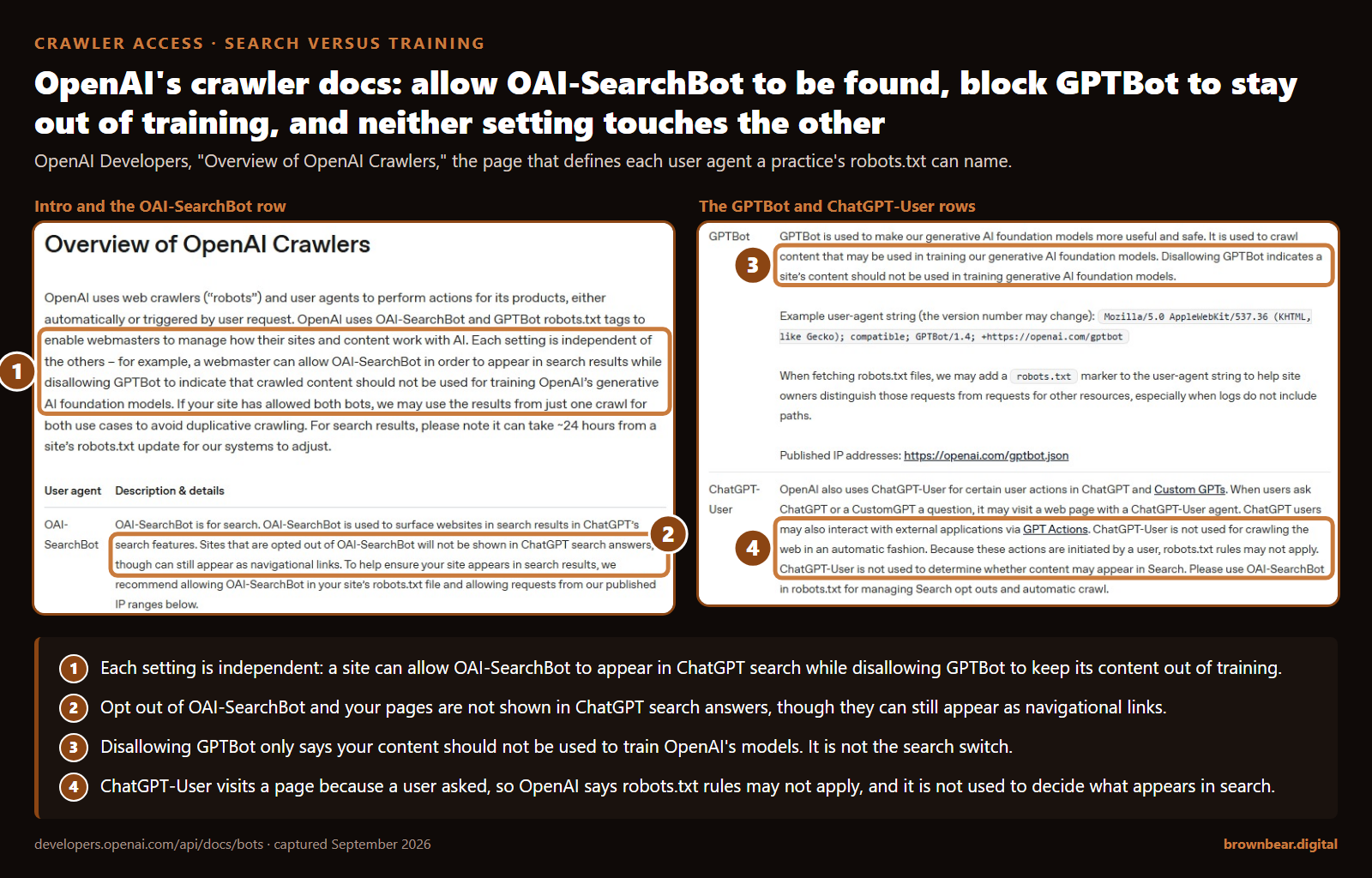
GPTBot and the Google-Extended token govern model training. Googlebot, OAI-SearchBot, PerplexityBot and Claude-SearchBot decide whether you appear in AI answers, so set each one on purpose in robots.txt.
Schema labels the page, it does not replace the text
Google says structured data is not required to appear in AI Overviews or AI Mode. Where you use it, make every value match the visible page and describe an individual surgeon as IndividualPhysician, not Physician.
What AI-Ready Means When the Reader Is a Machine
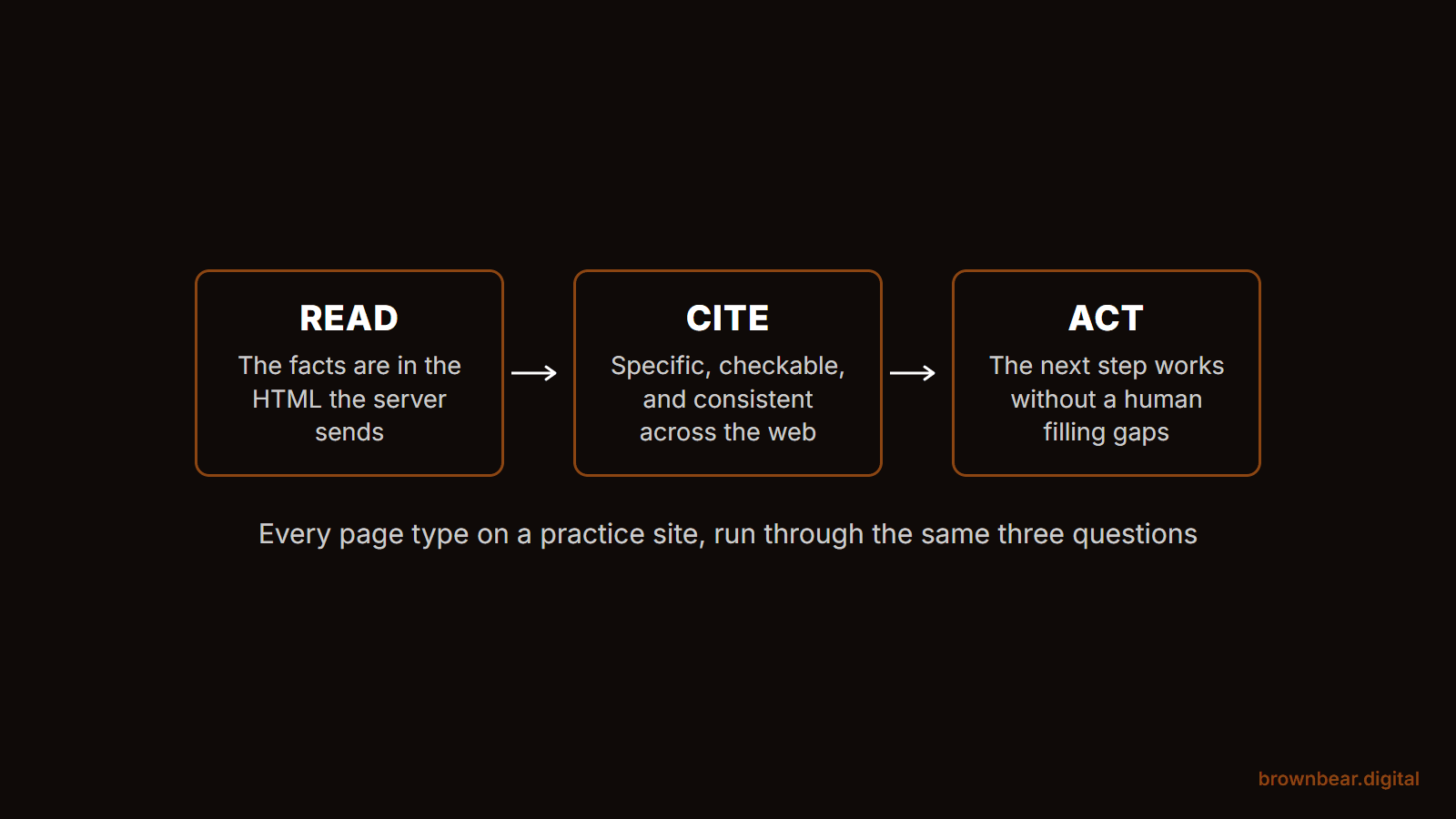
An AI-ready website is one that AI systems can read from the page's own HTML, cite with confidence because the facts are specific and consistent, and act on because the next step, a call, a booking, a set of directions, works without a human filling the gaps. It is not a new kind of website. Google's own guide to optimizing for generative AI search says a page needs to be indexed and eligible to show with a snippet to appear in AI Overviews and AI Mode, that structured data is not required, and that files like llms.txt are ignored by Google Search.
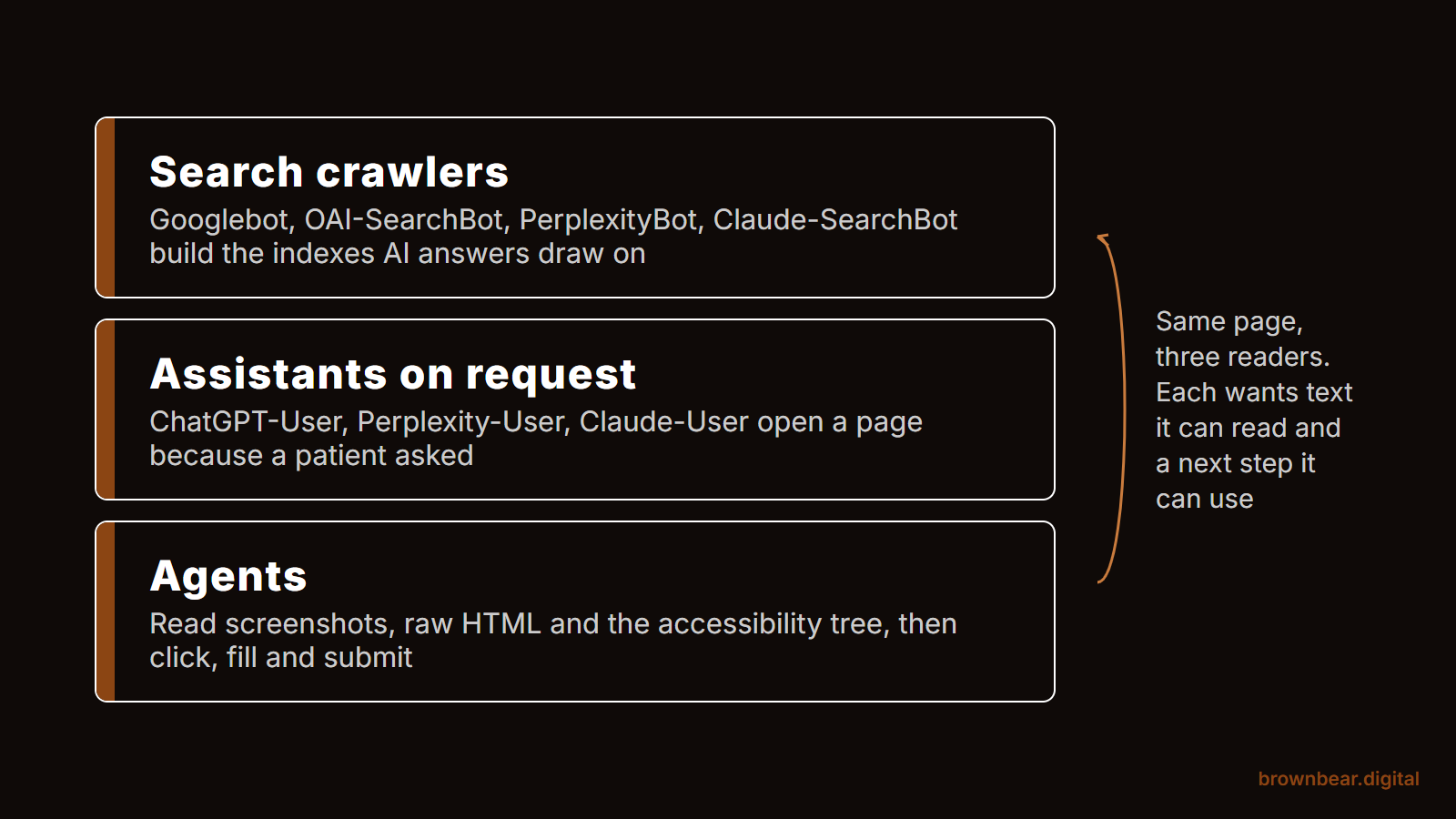
Three kinds of machine visit a practice site, and they want slightly different things:
- Search crawlers build the indexes that AI answers draw from. Googlebot crawls for Google Search, and Google says AI Overviews and AI Mode draw on that Search index. OAI-SearchBot, PerplexityBot and Claude-SearchBot build the search layers of ChatGPT, Perplexity and Claude.
- Assistants fetching on a user's request, such as ChatGPT-User, Perplexity-User and Claude-User, open a page because a patient's question sent them there. They read what the server sends, often in one pass.
- Agents go further. They look at screenshots, the raw HTML and the accessibility tree, and try to click, fill and submit. Google's web.dev guidance on agent-friendly sites, published in April 2026, is the clearest public description of what they need.
That gives every page on your site the same three-question check. We call it the Read, Cite, Act test:
- Read: is the page's core information in the HTML the server sends, as text, not locked in an image, a widget or a script that runs later?
- Cite: does the page state specific, checkable facts, and do they match what the rest of the web says about you?
- Act: can a patient, or a machine working for one, take the page's next step without guessing?
Most pages pass one or two. Each page type tends to fail in its own predictable place, which is what the rest of this guide walks through. One clarification first: "AI-ready website" also gets used for sites that bolt on AI tools, like a chatbot or a face simulator. Those can be useful, but none of them makes a page easier for ChatGPT or Google to read. This guide is about the site itself.
The Page-by-Page Scorecard at a Glance
Here is the whole guide in one table. Each row is expanded below.
| Page type | What AI systems need from it | The move that matters most | The common miss | Test it usually fails |
|---|---|---|---|---|
| Homepage | Who you are, what you specialize in, where you are | One plain sentence naming surgeon, specialty focus and city | Slogans instead of facts | Cite |
| Procedure pages | Candidacy, recovery, risks, cost range, who performs it | A direct answer under each question a patient asks | The procedures you want to be known for are buried | Cite |
| Surgeon bio and about | Credentials that can be verified elsewhere | Board, fellowship and hospital named in text, linked out | Credentials only in a logo strip | Read |
| Before-and-after gallery | Words describing each case | Numbered cases with procedure, age range and interval | Photos with no text at all | Read |
| Pricing and cost | A range, what it includes, when it was checked | Ranges in plain text with a review date | "Call for pricing" | Cite |
| Reviews and testimonials | Corroboration from sites you do not control | Earn volume on third-party profiles | Star markup on your own reviews | Cite |
| Locations and contact | One exact name, address and phone per office | Match your Google Business Profile character for character | Small variations across the web | Cite |
| Consultation booking and forms | Fields and buttons a machine can identify | Labeled fields, real buttons, stable layout | Booking inside an unlabeled widget | Act |
| FAQ, education and blog | Visible questions with direct answers | Answer first, then explain | Accordions and FAQ markup treated as the goal | Read |
| Site-wide technical layer | Access, server-rendered text, clean entity data | Allow the search crawlers you want in robots.txt | A robots.txt or firewall blocking AI search bots by accident | Read |
If you would rather score your own site than read the table, the grid below walks you through the same checks for each page type and tells you which one to fix first. It is the same page-type review we run at the start of our AI search optimization for aesthetic practices.
Page-Type Readiness Grid
Tick each statement that is true of your site today. Each check is tagged with the test it belongs to: Read, Cite or Act. When you are done, the grid shows where every page type stands and which three to fix first.
For informational purposes only. The grid counts your answers to the article's checklist; it does not crawl your site, measure AI visibility or predict rankings, and it is not legal, HIPAA compliance or medical advice. Your ticks are saved only in this browser (localStorage) so you can come back to them; nothing is sent anywhere.
1. The Homepage Is Your Entity Statement
AI systems use your homepage to settle three facts: who the practice is, what it is known for, and where it is. The homepage that passes the Read, Cite, Act test states those facts in plain text in the first screen, in words a machine can lift into a sentence.
The moves that matter:
- Write one entity sentence. Something like "Dr. Jane Rivera is a board-certified plastic surgeon in Scottsdale, Arizona, focused on facial rejuvenation and deep plane facelifts." Put it in the HTML, not in a hero image.
- Lead with the specialty you want to be known for. A homepage that lists 40 procedures with equal weight teaches every reader, human or machine, that you are a generalist.
- Link to the pages that prove it: the surgeon bio, the flagship procedure pages, the gallery.
The common miss:
slogans. "Artistry. Precision. Confidence." tells an AI system nothing it can repeat. Our study of the #1 procedure page in 101 cities found that half of the winning pages were homepages, and most of those homepages never put the procedure in the title tag. Homepages carry real ranking weight, so the words on them matter. For the conversion side of the page, see our breakdown of the homepage elements that book consultations.
2. Procedure Pages Carry the Most Weight
Procedure pages are where patients ask the questions that decide a booking: am I a candidate, how long is recovery, what are the risks, what does it cost, who does it here. An AI-ready procedure page answers each of those in a short, direct paragraph under a heading that matches the question, then goes deeper.
The moves that matter:
- Answer first, then explain. The first two sentences under "How long is recovery after a tummy tuck?" should state the typical range and what drives it.
- Name the surgeon who performs it and link to the bio, so the page connects a procedure to a credentialed person.
- Give the flagship procedures their own depth. In our AI-visibility audits, the information AI repeats about a practice is rarely wrong. What goes missing is emphasis: the procedures a surgeon most wants to be known for are buried, so the models describe a generalist when the practice wants to be seen as a specialist.
- Date the page with a visible last-reviewed date and a reviewer, and change it only when the content changes.
Where practices still win is the specific question. Authority sites like the American Society of Plastic Surgeons and Mayo Clinic increasingly own the AI answer to "what is breast augmentation." Local and cost-focused questions, such as "breast augmentation near me" or what a rhinoplasty costs in your city, still open the door for practices, because Google and the assistants infer local intent. That is why the procedure page matters more than any blog post you publish about the same procedure.
Picture a practice in Scottsdale that wants to be the valley's facelift practice. Its facelift page is 300 words and a gallery link, while its injectables page runs 2,000 words because a vendor wrote it. Ask ChatGPT about facelift surgeons in Scottsdale and the practice shows up, if at all, as a med spa. Nothing the AI said was false. The site simply told it the wrong story.
The common miss:
treating the procedure page as a brochure. The 101-city study above lays out the outline and FAQ counts the #1 pages share. For writing the answers themselves, see our content-level AI search guide.
3. Surgeon Bio and About Pages Prove Who Operates
Elective surgery is "your money or your life" territory in Google's quality guidelines, so search and AI systems look hard at who is responsible for the advice and the surgery. The bio page is where that gets settled, and it passes only when the credentials are in text and can be checked somewhere else.
The moves that matter:
- Name every credential in words: the certifying board, residency, fellowship, hospital privileges and society memberships. A row of logos is invisible to a reader that parses text.
- Link each claim to the place that confirms it, such as the board's verification page, the hospital roster and the society directory. Those outside profiles are what AI systems cross-check against.
- Give each surgeon one clean URL, and keep the name identical everywhere, down to middle initials and credentials.
The common miss:
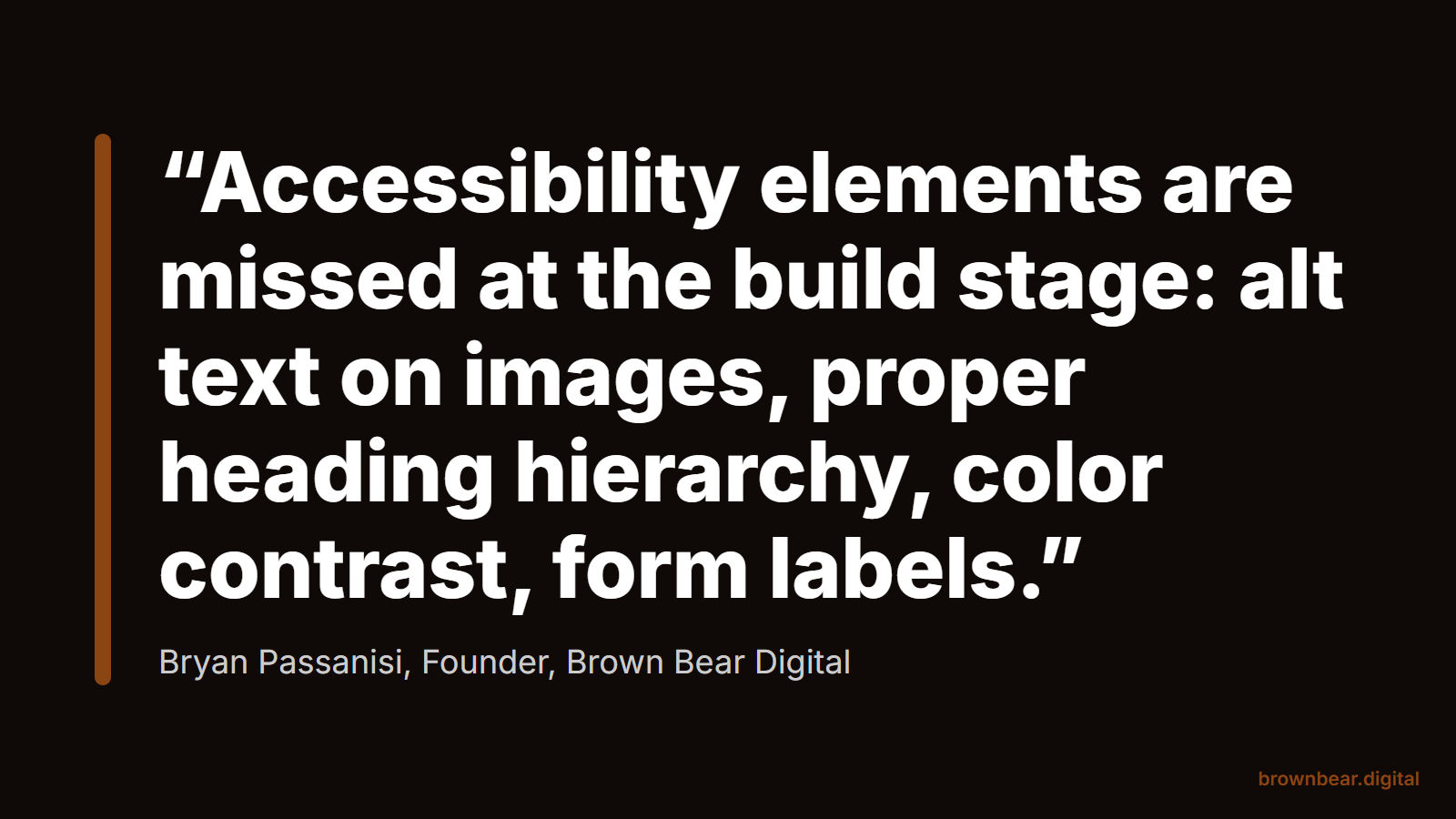
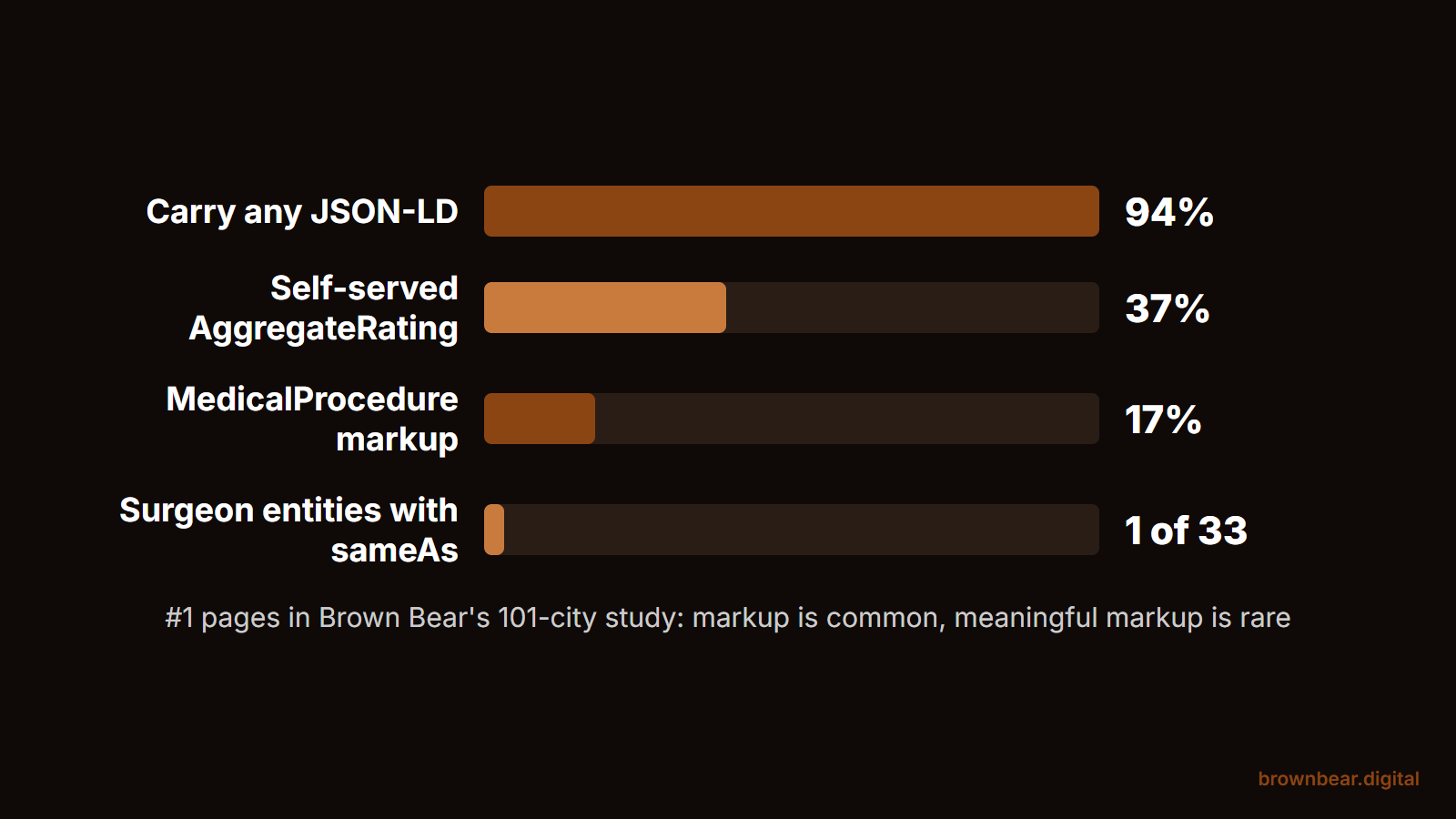
credentials that live only in images or in a PDF CV. In our 101-city study, the surgeon entities on winning pages were skeletal: 33 Person entities, 14 with credentials, and exactly one that linked out with sameAs. For how to write the page itself, including the entity consistency checks, read our guide to building a surgeon About page that builds trust.
4. Before-and-After Galleries Need Words Around the Photos
A gallery is the page patients trust most and the page AI systems can read least, because a photo grid with no text says nothing to a text parser. The AI-ready gallery documents each case in words: the procedure, an age range, the interval since surgery, and any technique detail the surgeon is comfortable sharing.
The moves that matter:
- Number the cases and give each one a short text description, not just alt text.
- Write descriptive alt text that states the procedure and the view, such as "Front view before and 6 months after breast augmentation with 350cc implants."
- Keep the trust language visible: a results-may-vary note and a statement that the photos show actual patients who consented.
The common miss:
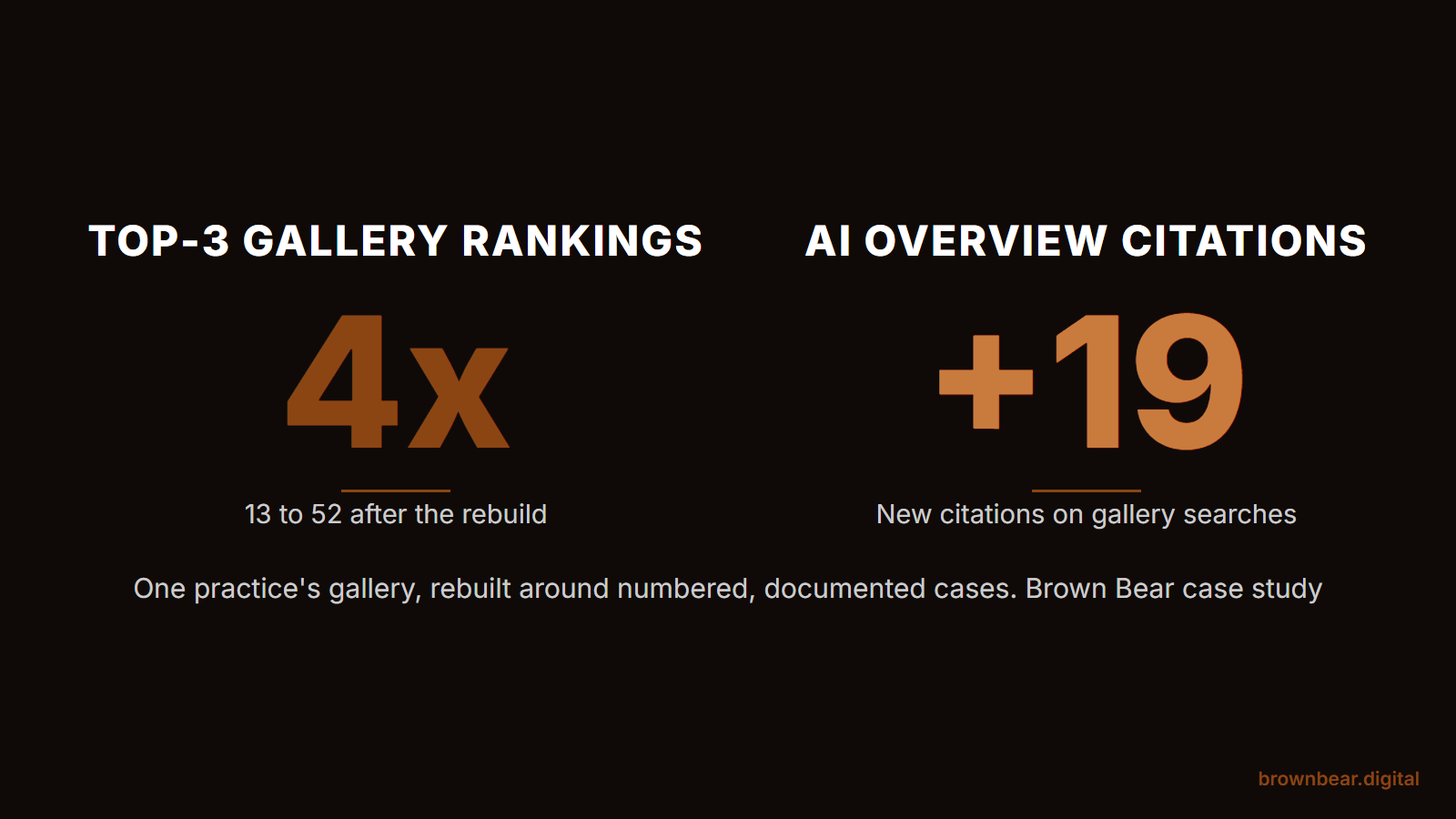
anonymous grids. In our study of 418 ranking pages for before-and-after searches, only 35% of ranking galleries numbered their cases, 15% stated the post-op interval on at least one photo, and only 39% carried a results-may-vary disclaimer. When we rebuilt one practice's gallery around documented cases, its top-3 rankings on gallery searches went from 13 to 52 and it picked up 19 new AI Overview citations. The full audit is in our gallery redesign case study, and the page-level detail is in our before-and-after gallery guide for plastic surgeons.
5. Pricing and Cost Pages Give AI Something Specific to Cite
When a patient asks an assistant what a procedure costs in her city, the practice that publishes a real range gives it something specific to cite. An AI-ready pricing page states a range in plain text, says what the fee includes, names financing options, and shows when the numbers were last checked.
The moves that matter:
- Publish ranges, not a single number. A sentence that gives your real low and high figures for a procedure, and says they include surgeon, facility and anesthesia fees, is citable and still leaves room for the consultation.
- Say what is in and out: surgeon fee, anesthesia, facility, garments, follow-up visits, revisions.
- Put the numbers in the HTML. Prices loaded by a calculator widget, a pricing plugin or an image are often invisible to machines that do not run scripts.
- Show a review date so a reader, human or machine, knows the range is current.
That third point is not theoretical. In a r/TechSEO thread, a software founder posted that his homepage was nearly invisible to AI crawlers. A commenter who scanned the rest of his site found the pricing page named every plan tier in the raw HTML and showed no price at all, because the numbers loaded with JavaScript; the founder confirmed it and fixed it. An assistant asked what that product costs knew the tiers existed and could not give a number. A practice pricing page built the same way fails the same way.
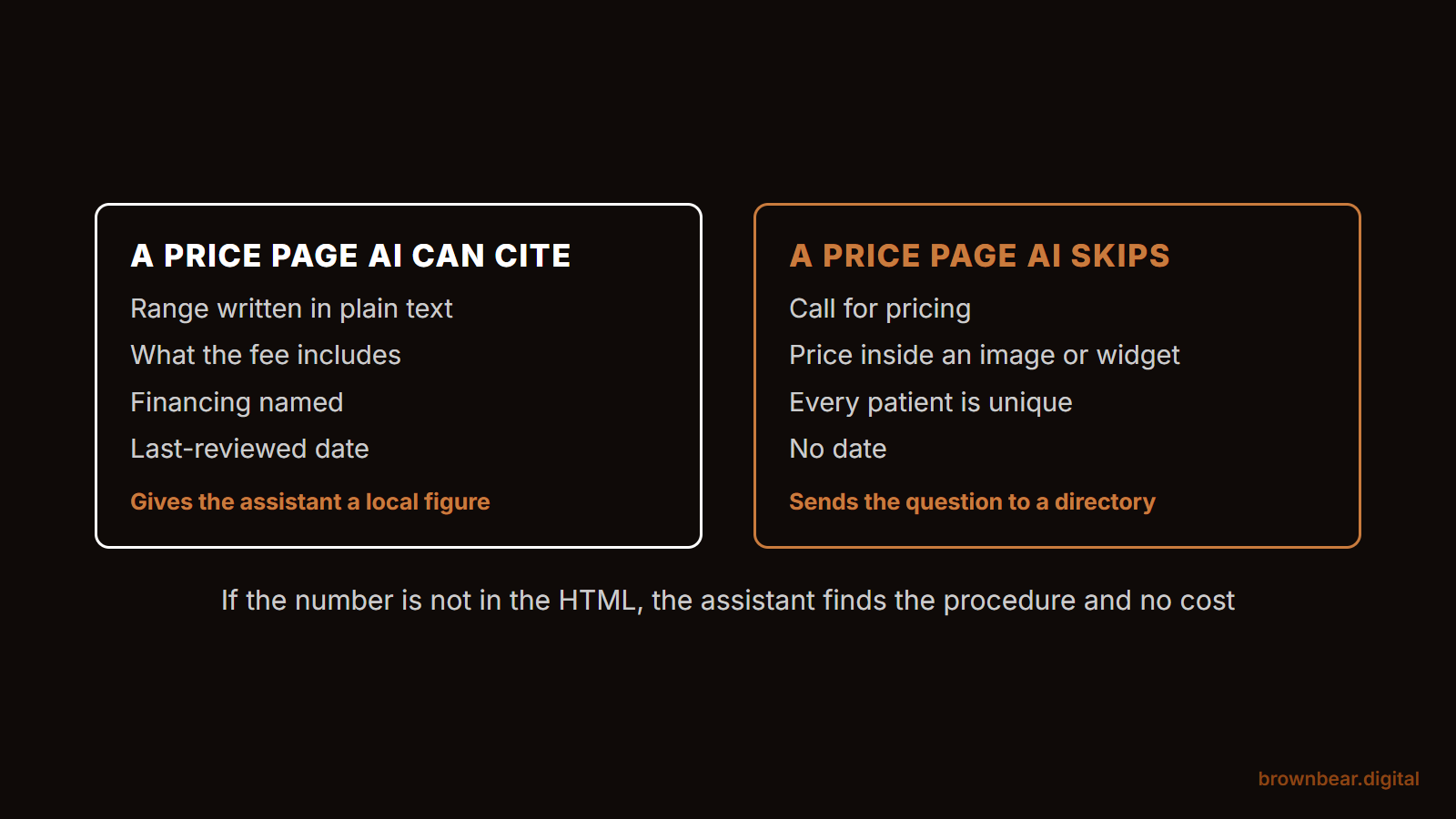
Here the answer forks. If your practice already quotes ranges at consultation and your market is price-competitive, publish them; the practices that do give an assistant a local figure it can cite when a patient asks what a tummy tuck costs in your city. If you genuinely cannot publish a range, because your cases vary too widely or your surgeons disagree, publish the cost drivers instead, with typical ranges for each component. What you should not do is leave the page as "call for pricing," which gives the AI nothing and sends the question to a competitor or a directory.
The common miss:
no pricing page at all, or one that says only that "every patient is unique."
6. Reviews and Testimonials Belong Mostly Off Your Site
AI systems treat what others say about you as corroboration and what you say about yourself as a claim. Reviews on your own site help patients, but the reviews that shape AI descriptions mostly live on Google, RealSelf, Healthgrades and similar profiles. The AI-ready approach is to earn a steady flow of detailed reviews there, and to use your own testimonials page as a readable summary that links out.
The moves that matter:
- Ask every patient, not only the happy ones. Google's review policy prohibits discouraging negative reviews or selectively soliciting positive ones, and it bars soliciting reviews that include specific content, such as naming a staff member.
- Keep testimonials on your site as text, attributed with first name or initials and procedure, with consent on file.
- Skip review star markup on your own pages. Google says pages about a business that controls the reviews about itself are ineligible for the star rating feature.
What surprises practice owners most in our audits is how much third-party sites, meaning reviews, directories and press, drive what AI says about them, and how little they show up compared with competitors. Picture a surgeon with 40 glowing video testimonials on her own site and 11 Google reviews, the newest from last spring. The assistant can read the 11. The videos, which say nothing to a system that reads text, add little to what it tells the patient. For the full program, including responses that stay inside HIPAA, see our guide on how to generate and answer plastic surgery reviews.
The common miss:
AggregateRating markup on the practice's own reviews. Our 101-city study found it on 37 of the 101 #1 pages, nearly all rated 4.6 to 5.0, even though Google does not show stars for self-served reviews.
7. Location and Contact Pages Settle the Facts
Location pages are where AI systems confirm the facts they will repeat: the practice name, the address, the phone number, the hours, and which surgeon operates where. An AI-ready location page states each of those in text, exactly as your Google Business Profile does, and gives each office its own page.
The moves that matter:
- Match your Google Business Profile character for character: suite numbers, abbreviations, phone format and practice name.
- One page per office, with the surgeons who operate there, the procedures offered there, parking, and a map embed with the address also written out in text.
- Put hours and phone in text, not only in an image or a click-to-reveal button.
The most common factual error we find in AI-visibility audits is small variations in a practice's name, address or phone number across the web. It is also one of the easiest to fix. If you run one office, this is an afternoon of cleanup. If you run three or more, or your surgeons operate across locations, the location pages become the source of truth and need an owner, because every move or new hire creates a fresh mismatch somewhere. For the profile side of that work, see our guide to local SEO and Google Business Profile setup for plastic surgeons.
The common miss:
an old suite number, an old phone tracking number, or a former practice name still live on a directory, which the AI then repeats with full confidence.
8. Consultation Booking and Forms Are Where Agents Act
The booking page is where the Act part of the test lives. AI agents are starting to complete tasks for people, such as finding an open consultation or filling in a request, and they can only do that on a page whose fields and buttons are identifiable. An AI-ready booking page uses real form elements with labels, real buttons, a stable layout, and a phone number in text as a fallback.
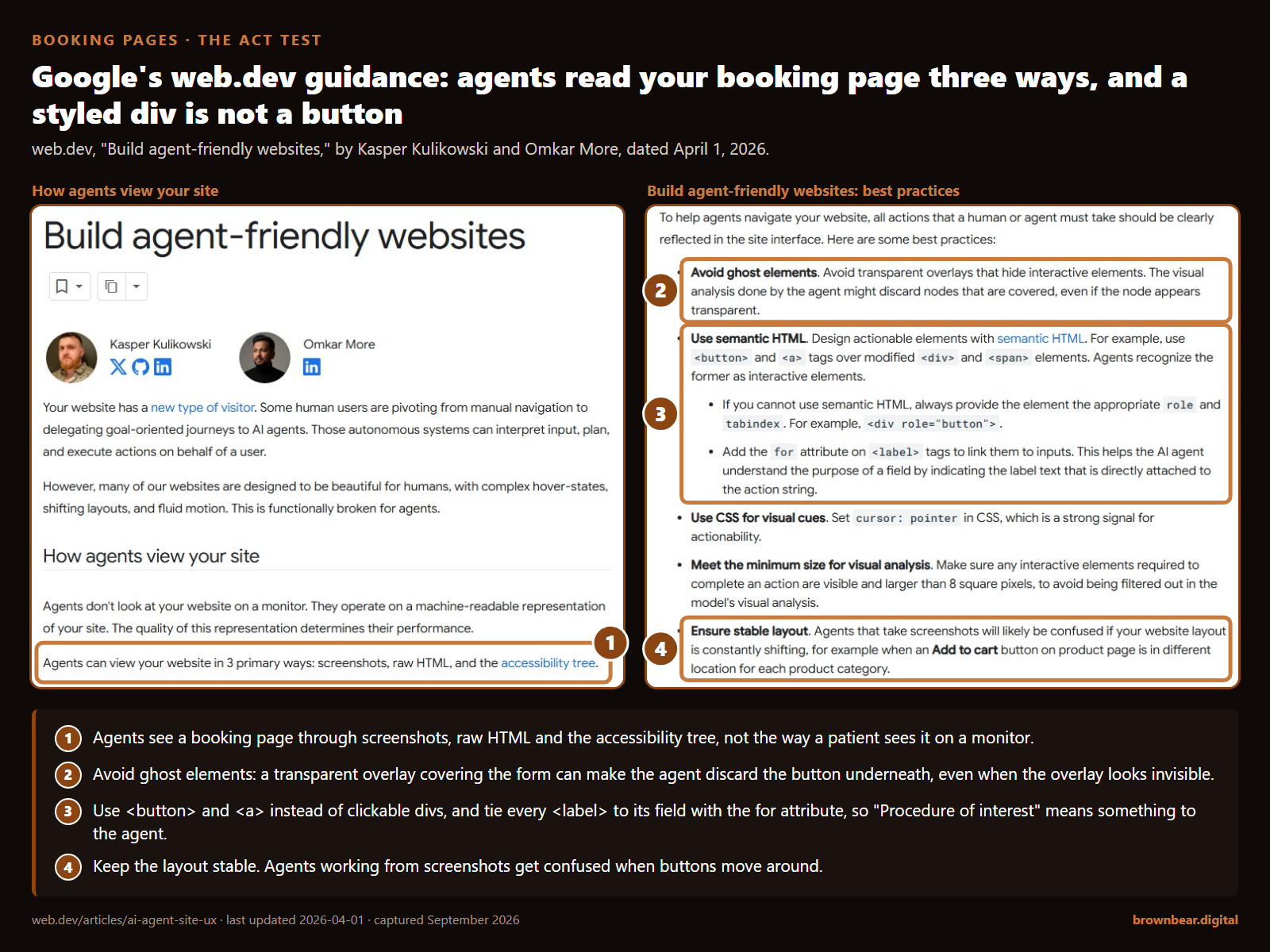
The moves that matter, drawn from Google's web.dev guidance on agent-friendly sites:
- Use real buttons and links, not clickable divs. Agents recognize
<button>and<a>as things to press. - Connect every label to its field, so "Procedure of interest" is tied to the input it describes.
- Keep the layout still. Pop-ups, shifting banners and transparent overlays confuse agents that work from screenshots.
- Offer a plain path: phone number, hours and a simple request form in text, even if you also use a scheduling widget.
Say a patient asks her assistant to request a Thursday evening consultation for a rhinoplasty. The agent lands on your booking page, finds a chat bubble covering the form, a "Submit" that is really a styled div, and a date picker with no label. It gives up and reports back that it could not book, then offers the practice down the road, whose form is three labeled fields and a button.
To walk a patient's errands through your site step by step, run the Agent Errand Test in our guide to how AI agents are changing the way patients find a plastic surgeon.
Forms also carry the most privacy risk on the site. For a practice that is a HIPAA covered entity, a consultation request naming a procedure is protected health information, and the HHS guidance on online tracking technologies says regulated entities may not use tracking technologies in a way that results in impermissible disclosures of it to tracking vendors. A federal court vacated one part of that guidance in June 2024: the part saying an IP address plus a visit to a public, unauthenticated page about a health condition or provider triggers HIPAA. The bulletin still treats what a patient types or selects in a scheduling form, such as a reason for seeking care, as protected information when a tracking tool collects it. Keep third-party pixels off booking and form pages unless your counsel has signed off. The practical rules are in our guide to the HIPAA rules that apply to practice websites; this is not legal advice.
The common miss:
booking that exists only inside a third-party widget with no labels and no fallback.
9. FAQ, Patient Education and the Blog Still Earn Their Place
These are the pages that answer questions before a patient is ready to book. AI systems quote them when they answer a question directly and specifically. The AI-ready version puts the question in a heading, the answer in the first sentence or two, and the nuance after it.
The moves that matter:
- Keep questions and answers visible, not hidden in accordions that only load on click.
- Write for the patient's actual question, in the words patients use, including cost, pain, recovery and "is this normal" questions.
- Publish what only your practice can say: your surgeon's view on technique choices, your recovery protocol, your own case data.
Two things changed in 2026. Google stopped showing FAQ rich results in Search in May 2026, so FAQ markup no longer earns a visual result. The questions and answers themselves still matter, because they are the passages an AI system can lift. And Google's June 2026 documentation update confirmed that llms.txt files are neither needed for Google Search nor used by it.
We still tell clients that long-form content is not dead because of AI. It earns links and it answers the middle-of-the-journey questions, like cost curiosity, that surface local practices. The caveat we give every client is to demand a reason behind every piece and to publish nothing that exists only to fill a calendar.
The common miss:
treating FAQ schema as the goal instead of the answers.
10. The Site-Wide Technical Layer Underneath Every Page
Every page above depends on four site-wide conditions: the right crawlers are allowed in, the content is in the HTML the server sends, the practice's entity facts are consistent, and structured data is used in proportion. Get these wrong and no single page can pass.
Crawler access for AI bots
Check robots.txt, and your CDN or firewall rules, against the bots that matter. The distinction most sites get wrong is search versus training:
| User agent | What it does | If you block it |
|---|---|---|
| Googlebot | Crawls for Google Search, whose index AI Overviews and AI Mode draw on | You leave Google Search and its AI features |
| Google-Extended | A control token for Gemini model training and grounding in Gemini Apps and Vertex AI; not a separate crawler | Google says it does not affect inclusion or ranking in Google Search |
| OAI-SearchBot | Surfaces sites in ChatGPT's search features | Your pages are not shown in ChatGPT search answers, though they can still appear as navigational links |
| GPTBot | Crawls content that may be used to train OpenAI's models | Tells OpenAI not to use your content for training; ChatGPT search runs on OAI-SearchBot, a separate bot |
| ChatGPT-User | Fetches pages for user actions in ChatGPT | OpenAI says robots.txt rules may not apply, because a user started the request |
| PerplexityBot | Surfaces and links sites in Perplexity search; not used for model training | You drop out of Perplexity results |
| Perplexity-User | Fetches pages to answer a user's question | Perplexity says it generally ignores robots.txt for these requests |
| ClaudeBot, Claude-SearchBot, Claude-User | Content that could contribute to model training, search result quality, and pages fetched when a user asks Claude a question | Each can be disallowed separately in robots.txt |
The branch here is a business decision. If your priority is being recommended, allow the search bots and decide on training bots separately; blocking GPTBot or Google-Extended does not remove you from ChatGPT search or AI Overviews. If your priority is keeping your content out of model training, block the training tokens and leave the search bots alone. Google's guide also says a site must be included in Search Console's generative AI setting to be eligible. Inclusion is the default, so the check is simply that nobody has switched your property to exclude.
Server-rendered content instead of heavy JavaScript
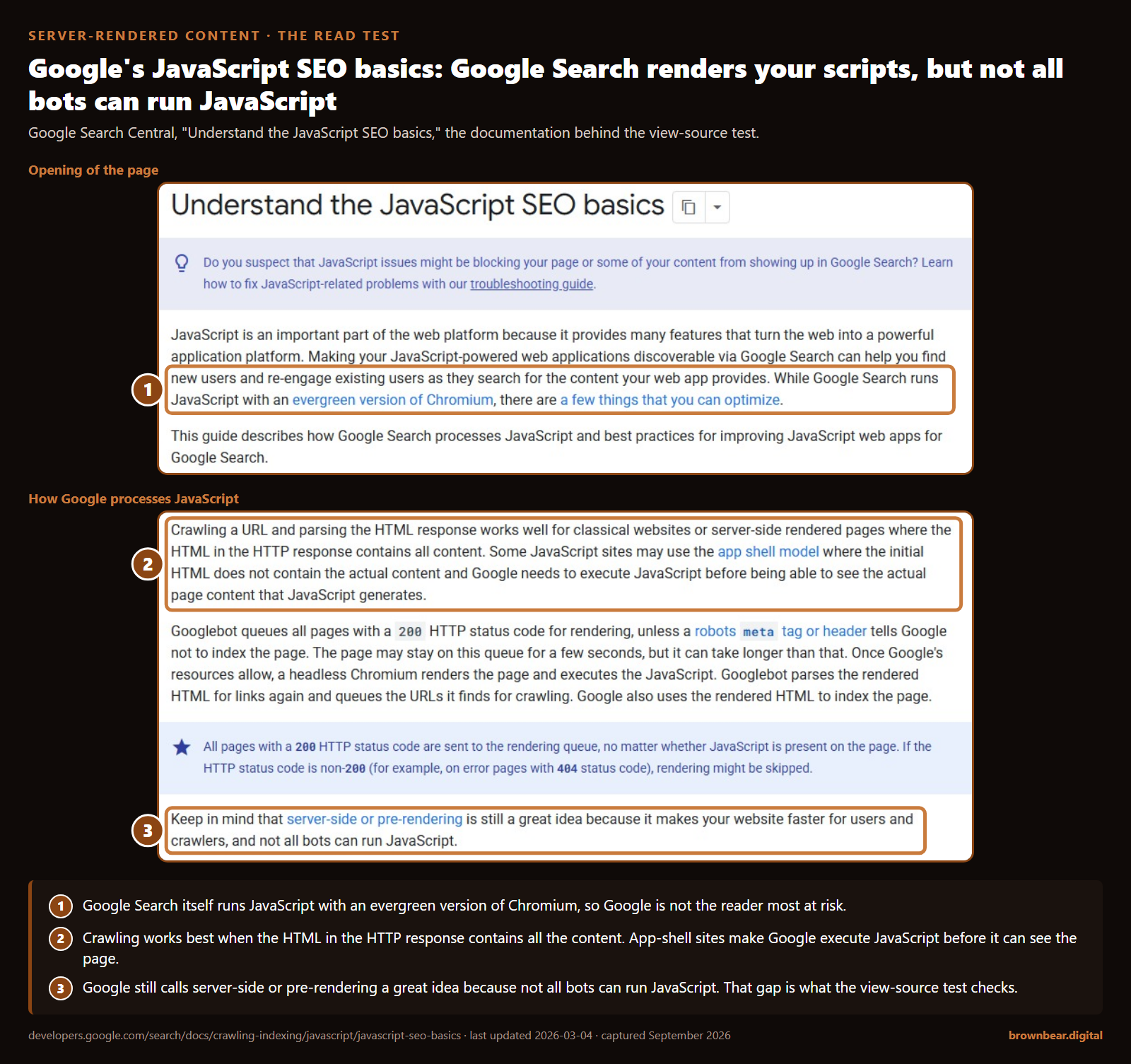
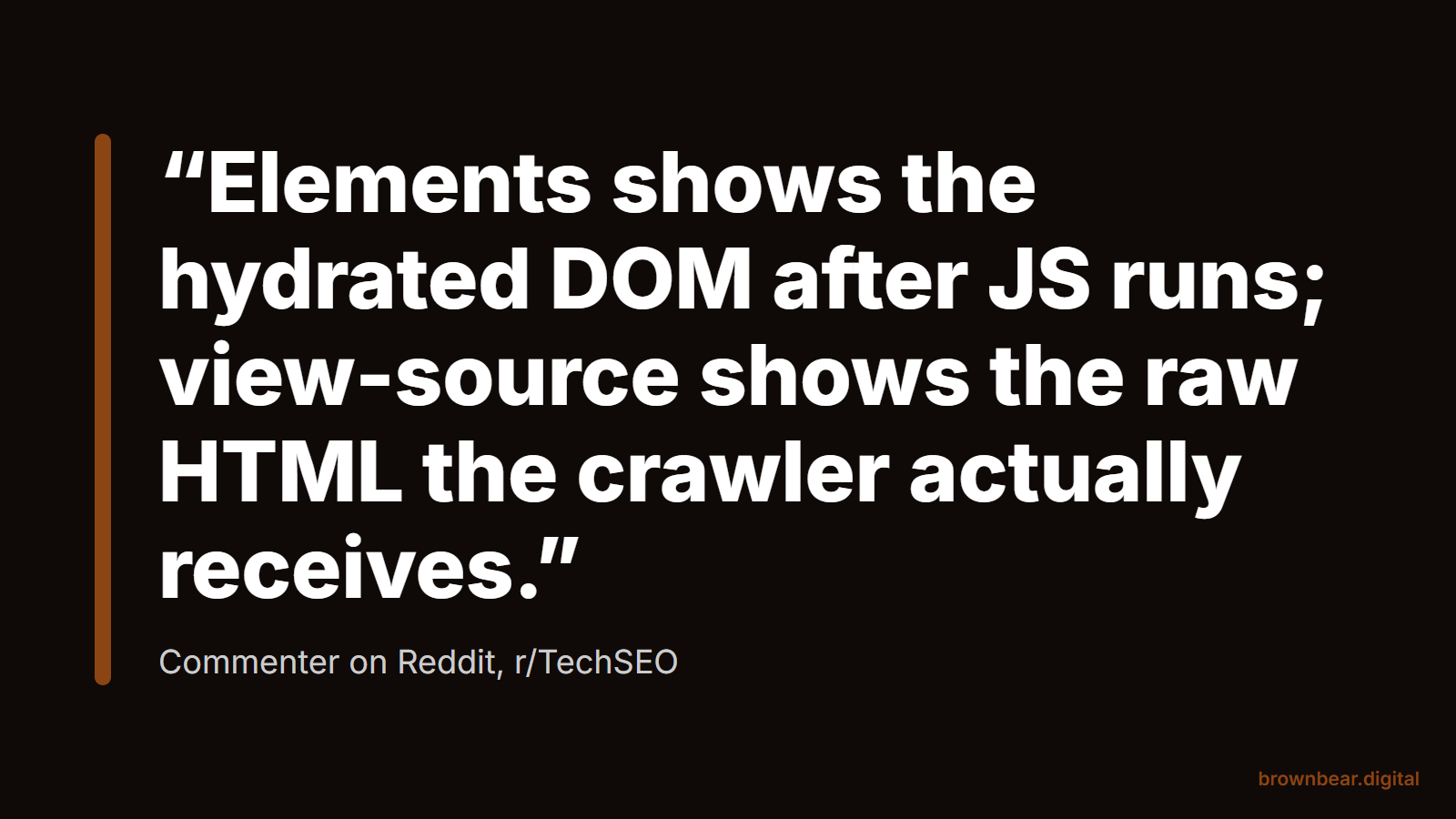
Google renders JavaScript with an evergreen version of Chromium, but its own documentation warns that not all bots can run JavaScript. Many AI crawlers and fetchers read only what the server sends. In our audits, LLM crawlers read JavaScript-heavy pages poorly, and we strip large amounts of JavaScript off client sites so the text is in the first response. The quick test: open a procedure page, view the page source, not the inspector, and search for a sentence from the page and a price. If they are not there, many AI systems cannot see them either.
Clean entity data
The practice name, surgeon names, address, phone, specialties and credentials should read the same on your site, your Google Business Profile, board and society profiles, hospital rosters and directories. Much of what AI says about a practice is assembled from those outside pages, so your site's job is to be the consistent source they can be checked against.
Schema in proportion
Structured data helps machines label what is already on the page. It does not substitute for the text. Our position is that schema is overhyped for AI search: worth doing properly, but it is not what gets a practice recommended. Crawlability and clearly structured content matter more. If you implement it, use accurate types. In schema.org, Physician is an organization type, a physician or physician's office considered as a medical organization, so an individual surgeon is better described with IndividualPhysician, the type schema.org provides for an individual practitioner. The practicesAt property that links a physician to a practice is still marked pending on schema.org, so treat it as optional. Make every value match the visible page. Our 101-city study found MedicalProcedure markup on only 17% of winning pages, so there is room to do this well without treating it as a ranking lever.
For the full remediation of each layer, including a robots.txt builder, read the full site-level AI search playbook. For which of these factors the evidence supports and which it does not, see which AI search ranking factors hold up.
Where to Start Depends on How Your Site Is Built
Nobody fixes ten page types at once. The right starting point depends on what your site runs on and how many offices you have.
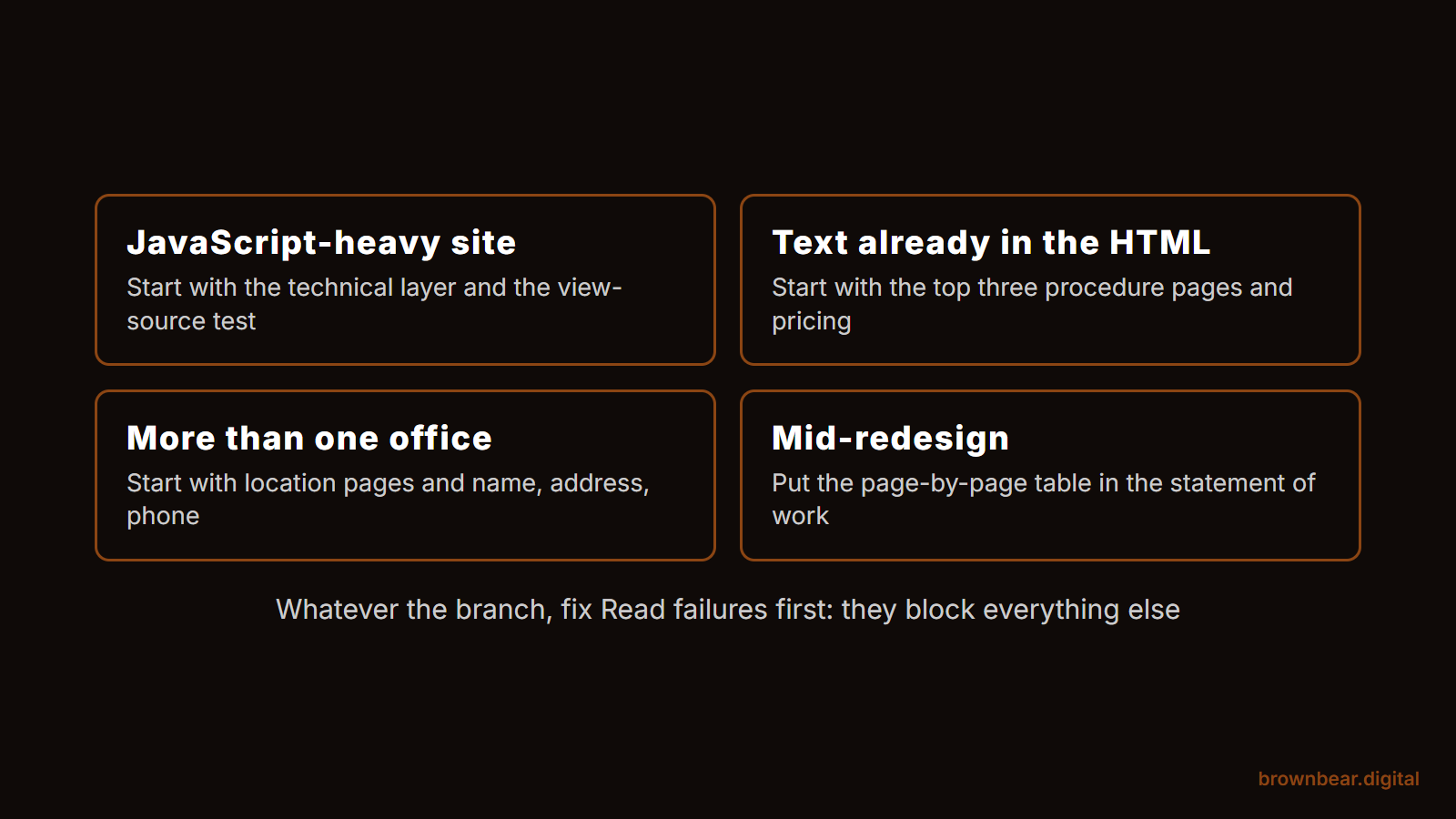
- If your site is built on a JavaScript framework or a heavy page builder, start with the technical layer. Run the view-source test on three procedure pages. If the text is missing, nothing else on this list will register until it is fixed.
- If your site already serves text in the HTML, which most WordPress sites do, start with your top three procedure pages and the pricing page. That is where the specific, local, cost-shaped questions land.
- If you have more than one office, start with location pages and entity consistency, because every mismatch multiplies across locations.
- If you are mid-redesign, put this guide's table in the statement of work, and our guide to the trust signals that make a practice site credible alongside it.
Whichever branch you are on, the first month looks the same:
- Run the Read, Cite, Act test on your homepage, your top three procedure pages, your booking page and one location page.
- Fix every Read failure first, because it blocks everything else.
- Rewrite the first two sentences of each flagship procedure page as a direct answer, and publish or update the pricing page.
- Align your name, address and phone everywhere they appear, starting with the Google Business Profile.
The immediate result is a site that tells every machine reader the same, specific story. The longer-term result is the one that matters to a practice: when a patient asks an assistant who to see, the description it gives is accurate, current and yours, and the next step works.
Build an AI-Ready Practice Website With Brown Bear
Brown Bear builds and rebuilds practice websites with this checklist as the brief, not an afterthought: text in the HTML, credentials that can be verified, pricing AI can cite, and booking pages an agent can use. We do the same work for medical, legal and local service businesses, and plastic surgery is where we have published the most research. If you want a site that passes the Read, Cite, Act test on every page type, start with our plastic surgery web design work.
Written By
Founder, Brown Bear Digital
Bryan has 15 years of experience across SEO, paid search, and AI search strategy. He founded Brown Bear to give businesses direct access to senior-level search expertise without the agency overhead.
Learn More About BryanGet Found on Google.
Get Cited by AI.
Tell us about your site. We'll send back a proposal for SEO and AI search.