How to Optimize Your Website for AI Search

This is Brown Bear Digital's field guide to making your website visible to AI search engines: ChatGPT, Perplexity, Gemini, and Google's AI Overviews. Not the content side of that job, which we cover separately in our guide to optimizing content for AI search, but the site itself: the crawler permissions, the rendering, the structure, and the signals that decide whether an AI engine can find you, read you, and trust you enough to cite you.
I'm Bryan Passanisi. I run Brown Bear, and I've audited enough sites through an AI crawler's eyes to know where visibility actually breaks. It is almost never where the GEO sales pitches say it breaks. The most common failures we find are mechanical: a firewall quietly blocking AI bots, a services page that renders as an empty div to anything that can't execute JavaScript, a business name spelled three different ways across the web.
When we say "optimize your website for AI search," we mean both the engines that answer questions with citations, like Perplexity and Google's AI Overviews, and the assistants people treat as their front door to the internet, like ChatGPT and Claude. Whether a patient asks "best rhinoplasty surgeon near Pasadena" or a founder asks "affordable CRM for a five-person team," the machinery that decides whose site gets pulled into the answer is the same, and most of it lives below your content.
If you own a practice and an agency built your WordPress site years ago, you're probably wondering whether it's quietly invisible to these tools. If you run marketing on a Squarespace or Wix site, you want to know which switches matter and which don't. If your company site is a React app your dev team is proud of, this guide has uncomfortable news and a fix. And if someone just pitched you a monthly "GEO package," you'll leave knowing exactly which line items are real work and which are theater. It also helps to know how GEO and AEO differ before you read the proposal.
By the end, you'll have a five-layer framework for auditing your own site, a working robots.txt policy for AI crawlers, a way to test what AI engines actually see when they visit, and a short list of things you can safely ignore. Longer term, that adds up to the outcome that matters: showing up, correctly described, in the answers your future customers are already reading.
We've organized the work into five layers we call the AI Visibility Stack: access, rendering, structure, entity, and measurement, followed by a hard look at what you can skip and where to start based on how your site is built. So let's begin with the machinery, because once you see how an AI engine reads a website, every fix in this guide becomes obvious.
Key Takeaways
Your AI visibility rides on your search visibility
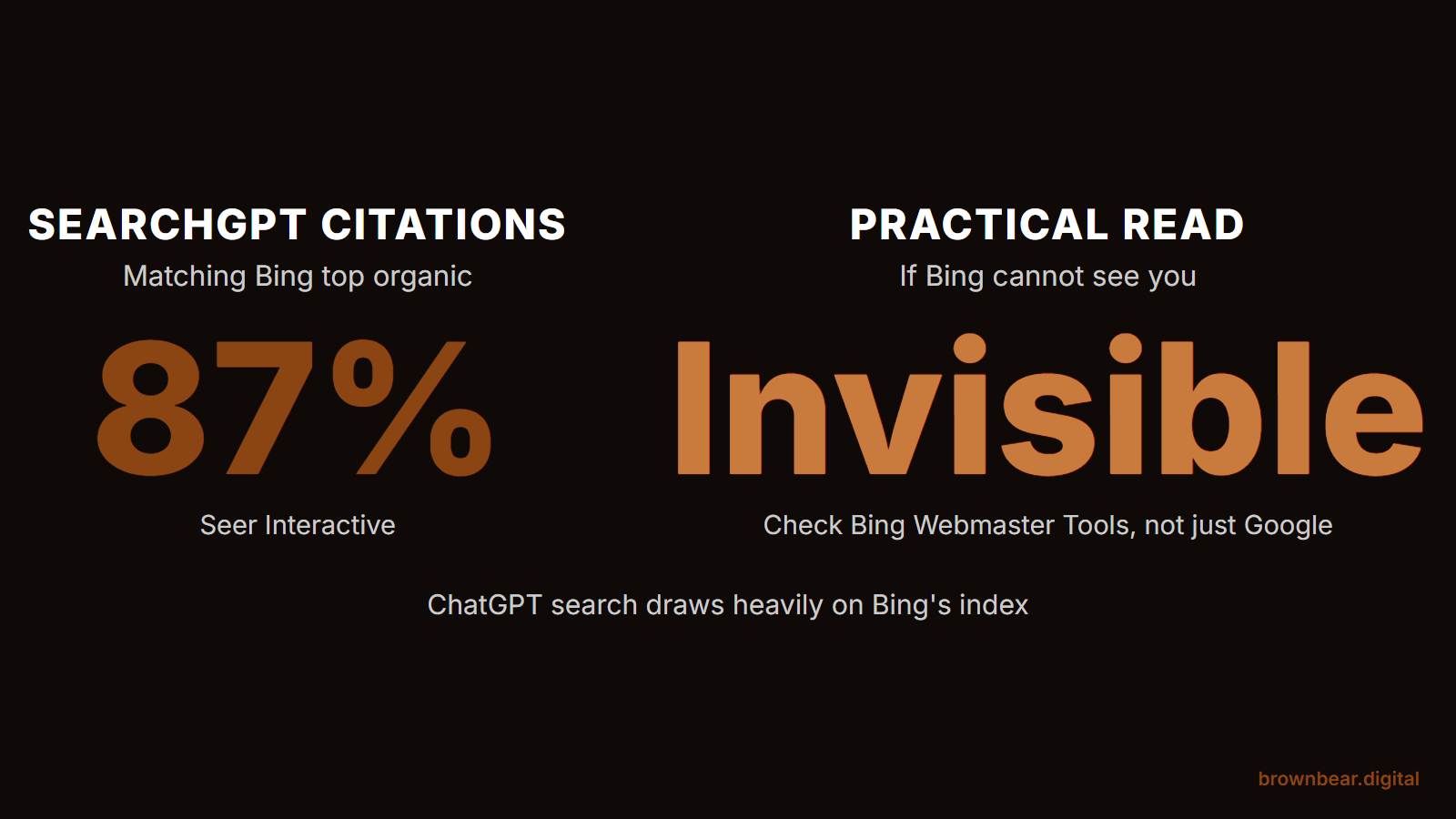
AI engines answer from search indexes built by crawlers. 87% of SearchGPT citations match Bing's top organic results, and page-1 Google rankings correlate with LLM mentions at roughly 0.65. There is no separate AI index to optimize for.
Fix the stack in order: access, rendering, structure, entity, measurement
Each layer only matters if the one below it passes. The expensive mistakes are low in the stack: sites paying for schema and content work while a firewall silently 403s every AI crawler.
Most GEO line items are theater
llms.txt packages, AI keyword density, and schema-as-silver-bullet don't map to how retrieval works. Crawler access, server-side rendering, entity cleanup, and log-based measurement do.
How AI Engines Actually Read Your Website
AI search engines answer questions in three steps: they retrieve pages from a search index, they read what those pages say, and they generate an answer that cites or summarizes the sources they trusted. This process is called retrieval-augmented generation, and it means an AI engine is not browsing the web live when someone asks it a question. It is pulling from an index that was built by crawlers, the same fundamental machinery that has powered search for decades.
That has a blunt consequence: your AI visibility rides on your search visibility. ChatGPT's search draws substantially on Bing's index through OpenAI's partnership with Microsoft; when Seer Interactive checked, 87% of SearchGPT citations matched Bing's top organic results. Perplexity now runs an index of its own. Gemini and AI Overviews draw from Google's. And Seer's larger study of 10,000 questions found roughly a 0.65 correlation between ranking on page one of Google and being mentioned in LLM answers. There is no separate "AI index" you optimize for in isolation. If your site can't be crawled, indexed, and understood, no amount of AI-specific tuning will put you in the answer, which is why a real SEO program is still the floor AI visibility is built on.
Where AI engines differ from classic search is in how unforgiving they are. Google's crawler renders JavaScript, retries politely, and gives your page many chances to be understood. Most AI crawlers do not. They hit your server, take the raw HTML they get in the first few seconds, and move on. Google's AI features add one more wrinkle worth knowing: a technique Google calls query fan-out, where one question is split into several sub-queries and answered from a wider set of pages than the classic top ten. That widens the door for focused, specific pages, and it is one reason smaller sites get cited in AI Overviews for questions the big authority sites answer only generically.
So the job is not to learn a new discipline. The job is to make your existing site legible to a stricter, less patient class of reader. That is what the next five sections do, in order.
The AI Visibility Stack: Five Layers in Triage Order
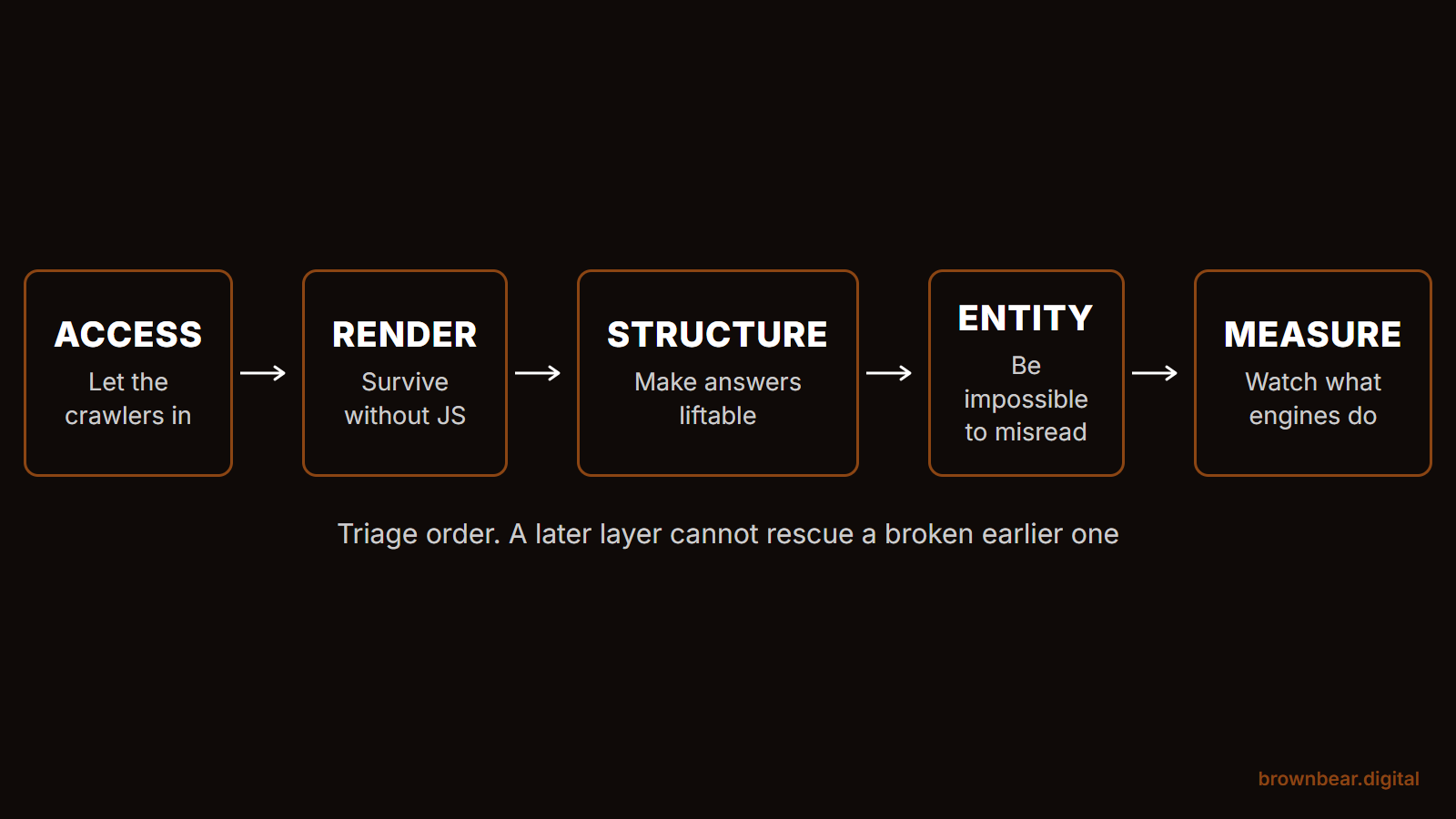
Every guide we've seen hands you a flat checklist. The problem with flat checklists is that they let you polish schema markup while a firewall rule is blocking every AI crawler from your site. So we order the work the way we actually run it for clients, as a stack where each layer only matters if the one below it passes:
- Access. Can AI crawlers reach your pages at all?
- Rendering. When they arrive, does your content exist in the HTML they receive?
- Structure. Can a machine lift a clean answer out of the page?
- Entity. Do the engines know who you are, consistently, everywhere?
- Measurement. Can you see what AI engines are doing with your site?
Work top to bottom. A failure at layer one makes layers two through five irrelevant, and in our audits, the expensive mistakes are almost always low in the stack: sites paying for content and schema work while sitting behind a bot blocker. Triage in this order and you'll never spend money polishing a page no AI engine can open. If you want the stack as a scored pass or fail rather than a reading order, our GEO audit turns the same logic into twelve checks you can run in an afternoon.
1. Give AI Crawlers a Clean Way In
The direct answer: audit your robots.txt and your firewall for rules that block AI crawlers, decide deliberately which bots you allow, and let the crawlers that feed AI search engines in. Blocking them makes you invisible in AI answers, not protected from them.
The complication is that "AI bots" are not one thing. They come in three families, and the right policy differs by family:
- Search and answer crawlers build the indexes AI engines cite from: OAI-SearchBot for ChatGPT search, PerplexityBot for Perplexity, Claude-SearchBot for Claude, plus Googlebot and Bingbot feeding their AI features. Block these and you disappear from AI answers.
- Training crawlers collect text to train future models: GPTBot for OpenAI, ClaudeBot for Anthropic, Google-Extended, which governs training and grounding for Gemini without affecting Google Search, CCBot for Common Crawl, Bytespider for ByteDance. Blocking these limits model training on your content but does not remove you from AI search results.
- User and agent fetchers visit when a real person's AI assistant opens your page mid-conversation: ChatGPT-User for user-initiated actions, Claude-User, Perplexity-User, and their peers. These are closer to visitors than crawlers; some don't even follow robots.txt, because they act on a human's direct request. Blocking them breaks the moment a prospect's assistant tries to read your pricing page for them.
Which brings us to the fork. If you run a lead generation business, a practice, a local service, or almost any company whose website exists to be found, allow all three families. Your content is marketing; the more machines that read it, the more answers you appear in. But if you're a publisher whose content is the product, the calculus changes: block the training family, keep the search and user families open, and you preserve licensing leverage without giving up AI search visibility. The deciding factor is whether your words are the thing you sell or the thing that sells you. OpenAI documents each of its bots separately for exactly this reason, and its published bot list at platform.openai.com/docs/bots is the reference we check when writing these rules for clients.
One precision point most guides get wrong: blocking Google-Extended does not remove you from AI Overviews. Google-Extended only governs Gemini. AI Overviews are fed by regular Googlebot, and the way to stay out of them is the nosnippet or noindex route, which also costs you classic search. For a business site, that trade is almost never worth it.
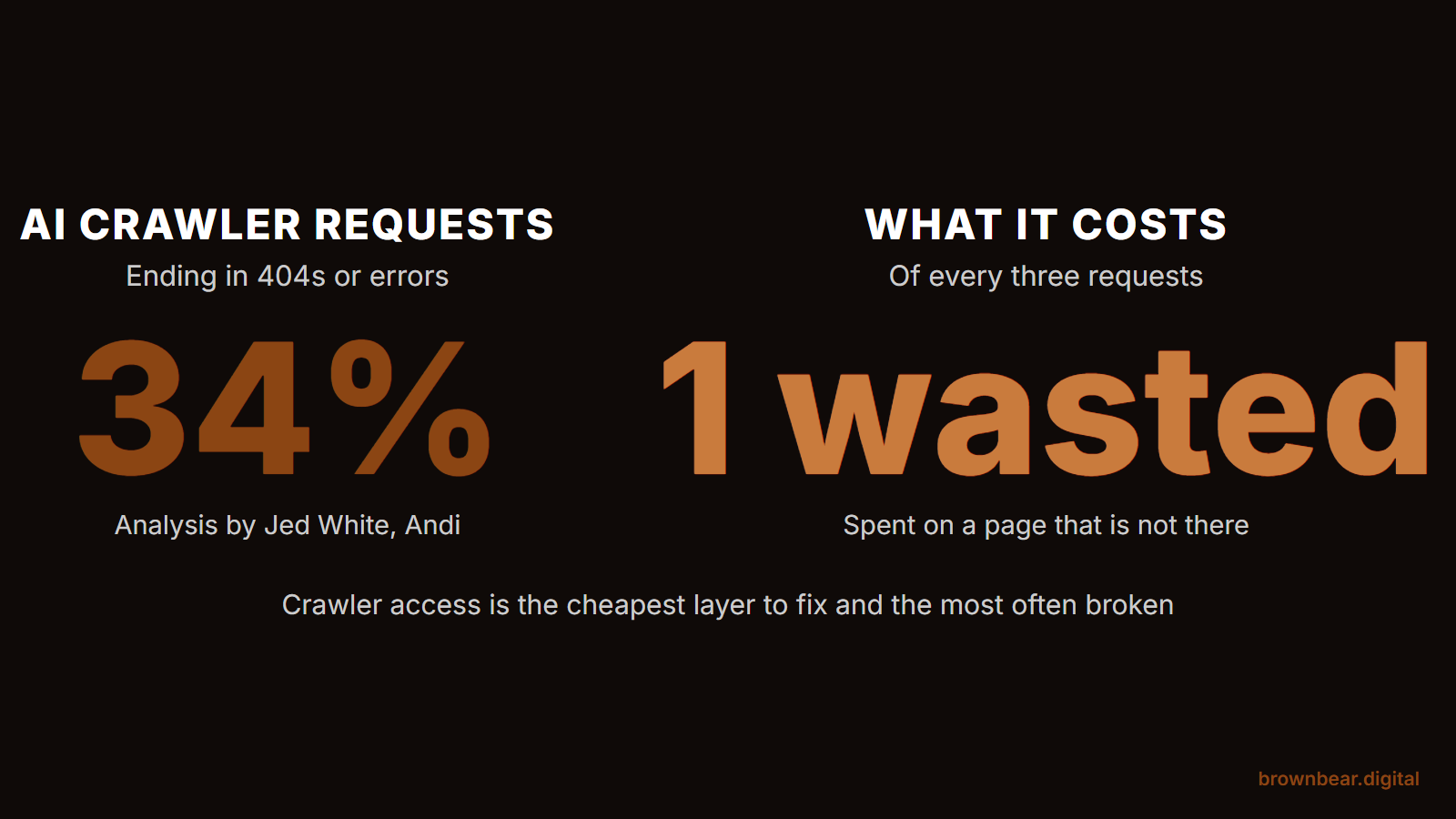
Then there's the failure mode nobody chose: your security stack blocking bots you never decided to block. CDN bot-fight modes, WAF rules, and aggressive rate limiting sit in front of your site and silently return errors to AI crawlers. Analysis published in early 2025 by Jed White, whose team builds the Andi search engine, found 34% of AI crawler requests ending in 404s or other errors across the web. Those failures don't show up in any dashboard you look at, because from inside the website everything works.
Picture a three-surgeon practice whose site sits behind a CDN with bot protection switched on to fight scrapers. Their agency publishes good content, rankings are fine, but the practice never appears in ChatGPT answers for procedures they're known for. When someone finally checks the server logs, GPTBot and PerplexityBot have been getting 403 errors for a year. Unblocking them costs nothing and takes an afternoon. That's a real pattern we see, and one of the usual answers to why a practice stops showing up in AI search: the fix is trivial, but only if you look.
AI Crawler Access Builder
Pick a stance for each bot family, or start from a preset. The tool writes the robots.txt block that matches your policy. Add it to your existing robots.txt; it does not replace your current rules.
Your robots.txt block
Bot names and purposes verified against OpenAI, Anthropic, Perplexity, and Google documentation as of August 2026; vendors add and rename bots, so recheck before major changes. robots.txt is a request, not a lock: most reputable crawlers honor it, but some bots, including Bytespider and user-triggered fetchers like Perplexity-User, may not. This tool is for informational purposes and runs entirely in your browser; nothing you select is transmitted or stored.
2. Stop Hiding Your Site Behind JavaScript
The direct answer: content that only appears after JavaScript runs is invisible to most AI crawlers. Server-render your important pages, or make sure the raw HTML your server sends contains every claim you want AI engines to read.
Classic Googlebot spoiled us. It queues pages, renders them in a headless browser, and eventually sees what a human sees. Most AI crawlers skip that entirely: they take the initial HTML response and nothing else. As of 2026, Google's own infrastructure remains the main exception that executes JavaScript; OpenAI's, Anthropic's, and Perplexity's crawlers do not. Google's generative AI documentation is the cleanest confirmation of how much the fundamentals matter even inside Google, and its AI optimization guide for site owners keeps returning to the same points: make sure crawlers can access your content, and keep the technical structure clean.
This is the layer I consider the single biggest lever, and it's where my take cuts against the industry's favorite advice. Schema markup gets the conference talks, but in our client work the wins have come from stripping JavaScript weight off pages and getting real content into the initial HTML. LLM crawlers handle JavaScript poorly, so a page that assembles itself in the browser reads as an empty shell to the machines deciding citations. We've made removing render-blocking scripts and client-side content injection a standard part of our AI visibility engagements for exactly this reason.
Say your company site is a React single-page app. The homepage your customers see lists your services, your locations, and forty reviews. The HTML your server actually sends contains a nav bar, a root div, and a bundle of script tags. To ChatGPT's crawler, your business has a menu and no body. Your competitor's dated-looking WordPress site, where every word sits in plain HTML, gets read in full and cited. That gap does not show up in any design review, which is why it survives so long.
What to do depends on the stack you're standing on. If you're on WordPress or another server-rendered CMS, you're mostly fine by default; your risk is page builders and plugins that inject key content client-side, so spot-check your money pages. If you're on a JavaScript framework like React or Next.js, use server-side rendering or static generation for every page you want cited, and treat client-only rendering as acceptable only for app screens behind a login. If you're on a site builder like Squarespace or Wix, rendering is handled for you, and your attention belongs on layer one instead: Squarespace, for example, ships a setting that blocks known AI crawlers, and you want to confirm it's switched off.
Testing this takes two minutes: fetch your page with curl or a crawler-view tool and read what comes back. If your service descriptions, prices, and credentials are in that response, you pass. If you see empty containers where your content should be, that's the project to fund before any other item in this guide.
3. Structure Pages So Machines Can Lift Answers
The direct answer: AI engines quote pages that answer questions cleanly near a matching heading. Lead every section with the answer, keep one idea per section, use real HTML headings and lists, and stop burying key claims in tabs, accordions, and PDFs.
An AI engine assembling an answer works like an editor on deadline. It scans retrieved pages for a passage that states the answer plainly, lifts it, and cites the source. Pages built from long unbroken essays force the machine to reconstruct your point, and machines don't bother when a competitor states the same point in two clean sentences under a heading that matches the question. Microsoft's guidance for its Copilot ecosystem says this outright: don't hide important answers in tabs or expandable menus, and avoid vague language that means nothing without specifics.
The practical rules are short. Match headings to real questions your buyers ask. Put the answer in the first sentence or two under each heading, then elaborate. Use semantic HTML: actual h2 and h3 tags, actual list markup, actual tables for tabular facts. Keep critical content out of formats crawlers handle badly, which means no pricing that only exists inside a PDF and no credentials that only appear when a tab is clicked.
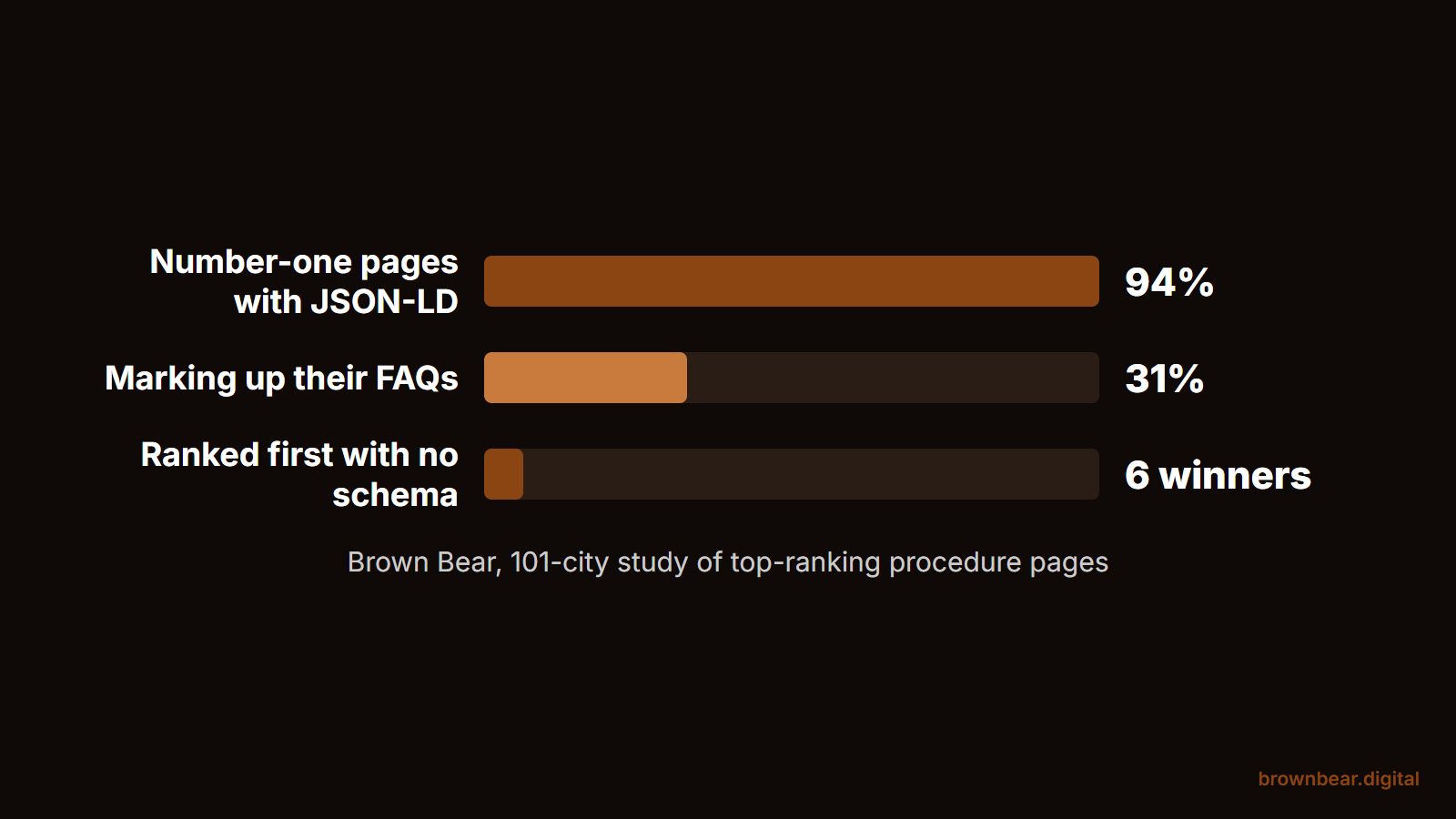
And schema? Keep your structured data accurate, especially LocalBusiness, MedicalOrganization or your industry's equivalent, and FAQ markup where it fits. But we'll say what most agencies won't: schema is a supporting signal, not the lever. In our 101-city study of top-ranking procedure pages, 94% of the number-one pages carried JSON-LD, yet six winners ranked first with no structured data at all, and only 31% even marked up their FAQs. My position, formed across our AI visibility audits, is that schema is overhyped for AI search. It's worth maintaining because it's cheap and it disambiguates, yet we have never seen schema rescue a page whose content was inaccessible or unliftable, and we have repeatedly seen plain, well-structured HTML get cited with no special markup at all. If a proposal in front of you leads with a schema line item, check whether layers one and two were even audited.
4. Make Your Entity Impossible to Misread
The direct answer: AI engines describe you from every source they can find, not just your website. Make your name, address, phone, and specialty identical everywhere, and invest in the third-party pages that AI answers actually cite.
When an assistant is asked "who's the best implant dentist in Burbank," it cross-references your site against directories, review platforms, press mentions, and professional profiles. Two failure patterns dominate.
The first is mundane: inconsistent basics. In our AI visibility audits, flat-out wrong information is rare; the most common real error is odd variations of a business name, address, or phone number across the web, which fragments you into two or three half-known entities. The fix is unglamorous cleanup at the local-listings level, and it's one of the highest-return afternoons in this entire guide.
The second pattern surprises owners more: how much of AI visibility is decided off your site. When we run visibility audits, clients expect to hear about their website; what the reports actually show is that review platforms, directories, and press coverage drive a large share of how AI engines see and describe a brand. The engines treat those third-party sources as corroboration. A practice whose site claims expertise in rhinoplasty, whose reviews mention rhinoplasty, and whose local profiles list rhinoplasty reads as one coherent entity with a specialty. A practice that's a generalist everywhere except its own homepage reads as a generalist.
There's a subtler version of the same problem: the specialty you want to be known for is buried. The information AI engines hold is rarely wrong, but the emphasis is off; the model sees a generalist while the practice wants specialist positioning. That's fixed on your site with dedicated, server-rendered pages per specialty, and off your site by pointing your review requests and PR at the thing you want to own. Entity work is slow compared to the layers below it, and it compounds: we cover the off-site half in depth in our pillar on improving your brand's visibility, sentiment, and citations in AI search. Do the mechanical fixes first, then compound trust over quarters.
5. Measure What AI Engines Do With Your Site
The direct answer: you can't manage what you can't see, and AI search gives you three visible surfaces. Watch AI crawler hits in your server logs, watch AI referral traffic in your analytics, and periodically ask the engines about your own brand.
Server logs are the ground truth for layers one and two: filter for the bot user agents from layer one and confirm they're getting 200 responses on the pages that matter. Analytics tells you what the answers are sending back; referrers from chatgpt.com, perplexity.ai, and gemini.google.com are small but unusually valuable segments. In our client reporting, LLM referral traffic converts to consultations and form fills at a higher rate than other channels, which is the number we put in front of skeptical owners. The volume is early-adopter small; the intent is not. Part of why: the AI-assisted journey compresses. A patient can go from "what type of breast augmentation is right for me" to "who's best near me" inside one conversation, so the click that finally reaches your site arrives far more decided than a classic first-touch search visit.
Imagine a med spa owner who spends one morning a month on this: twenty minutes filtering logs for GPTBot, OAI-SearchBot, and PerplexityBot, ten minutes on an analytics segment for AI referrers, and then five prompts asked in ChatGPT and Perplexity about her own services and city, noting who gets named and what gets said. Within a quarter she knows which posts AI engines actually fetch, which competitor keeps outranking her in answers, and whether last month's fixes moved anything. That's a functioning AI measurement program at zero tooling cost, and when you're ready to formalize the prompt-checking half, here's how to track what AI engines say about your brand.
Google's side got more visible in June 2026: Search Console now includes dedicated generative AI performance reports that break out impressions from AI Overviews and AI Mode. They're impressions only for now, with no clicks or query data, and they're still rolling out, so your blended Performance report remains the complete picture while the new reports tell you how often AI features are surfacing you. Treat rising impressions with flat clicks on question queries as a sign you're feeding answers, then check whether you're the cited source or just the background reading.
What You Can Skip: Real Levers Versus GEO Theater
The direct answer: most tactics sold as "AI optimization" are either repackaged SEO fundamentals, which are real but not new, or rituals with no evidence behind them. Here's how we'd sort the pitch deck someone is showing you.
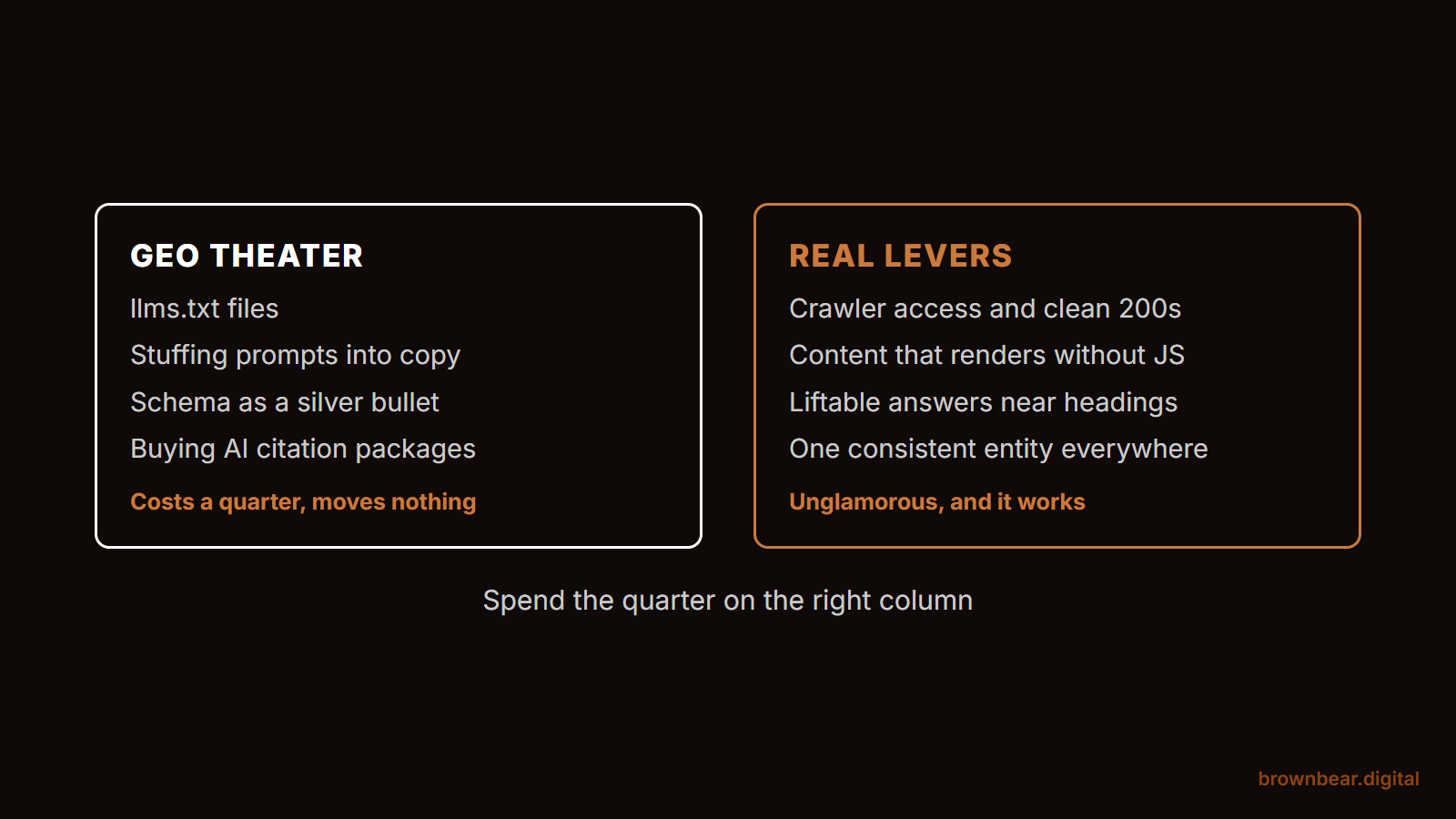
Real levers, worth money: crawler access audits, server-side rendering work, answer-first content structure, entity and listings cleanup, and log-based measurement. Everything in the stack above, in other words. These are real because they map to how retrieval actually works.
Theater, or close to it: llms.txt files, "semantic keyword density for LLMs," AI-specific keyword stuffing, and hidden prompt text. On llms.txt specifically, Google's optimization guide, the same one linked in layer two, says plainly that Google Search ignores such files, and no major engine has committed to them. It's harmless and takes ten minutes, so add one if you like being early; just refuse to pay anyone real money for it, and never let it substitute for the layers that matter. Prompt injection tricks, like white text instructing AI models to recommend you, deserve a harder no: they're detectable, they're the kind of thing that gets a domain distrusted, and engines are actively filtering for them.
Say a practice owner gets a $2,500-a-month GEO proposal: llms.txt setup, schema expansion, and monthly "AI keyword optimization" of existing posts. Nothing on the list is an access audit, a rendering fix, or listings cleanup. Whatever that package costs, it's priced for the buyer's anxiety, not the engines' mechanics. The vocabulary changes fast in this industry; the retrieval machinery underneath changes slowly. When a tactic isn't explainable in terms of crawling, indexing, retrieval, or corroboration, it's theater.
Get Ready for AI Agents While It's Still Early
The direct answer: the next wave of AI traffic isn't people reading answers, it's assistants doing tasks: comparing your prices, filling your contact form, booking your consultation. Sites that are fast, simple, and machine-legible will win those interactions by default.
Agent fetchers like ChatGPT-User already hit business sites when a user says "check whether this clinic takes my insurance and get me a consult request in." An agent behaves like your most impatient visitor ever: it won't wait out a slow page, can't solve a CAPTCHA it was never meant to solve, and gives up on a five-step form with a date picker built from divs. The preparation is mostly the stack you've already built: agents inherit every layer, from access to structure. On top of that, keep your conversion paths short, keep forms native HTML with labeled fields, and put your hours, pricing ranges, and booking path in plain text where both a human and an agent can read them. None of this is exotic. It's the same simplicity that converts humans, applied with a new audience in mind.
Where to Start Based on How Your Site Is Built
The stack is the framework; your platform sets the entry point. Find yourself below.
If an agency built your WordPress site:
your rendering is probably fine, so start at layer one. Ask your agency, or us, for three artifacts: your robots.txt policy for AI bots, confirmation from your CDN or security plugin that AI crawlers aren't blocked, and a month of server-log hits from GPTBot, OAI-SearchBot, and PerplexityBot. Then go straight to layer four and fix listing inconsistencies.
If you're on Squarespace, Wix, or another builder:
access and rendering are mostly platform-managed. Confirm the AI crawler toggle is set to allow, then spend your energy on structure and entity: answer-first pages for each service, and ruthless consistency across your profiles. Skip anything a vendor pitches you that requires server access you don't have.
If your site is a React, Vue, or Next.js app:
start at layer two and don't pass go until the curl test comes back with your content in it. Server-side rendering or prerendering for your public pages is the single project that unlocks every other layer for you.
If you're evaluating a GEO pitch:
hand the vendor this stack and ask them to map their line items to layers. Real providers will happily show you which layer each deliverable serves and will start with an access-and-rendering audit. If the mapping comes back as mostly layer-three garnish and theater-list items, you have your answer.
Wherever you land, the first pass is the same four moves:
- Fetch your top five pages with a crawler-view tool and confirm your content is in the raw HTML.
- Check robots.txt and your CDN or firewall settings against the bot families in layer one, and unblock what you're blocking unintentionally.
- Pull one month of server logs and confirm AI crawlers are hitting your money pages with 200s.
- Search your business name in ChatGPT and Perplexity, and log what they get wrong; that's your entity cleanup list.
Do those four and you'll know more about your AI visibility than most of the vendors pitching you.
AI Site Readiness Diagnostic
Ten questions across the five layers of the AI Visibility Stack. Answer what you know. Your score tells you which layer to fix first.
0 of 10 answered
This diagnostic is for informational purposes and is a self-assessment, not a technical audit; results are not a guarantee of AI search visibility. Your answers stay in your browser and are never transmitted or stored.
Make Your Site AI-Ready with Brown Bear
The engines deciding who gets cited are strict readers, but they're not mysterious ones, and everything in this guide is auditable from the outside. That's literally how we start: Brown Bear's AI visibility engagements begin with an access, rendering, and entity audit of your site, so the first thing you get is a map of exactly where visibility is breaking and what each fix is worth. If you'd rather have that map than build it yourself, talk to us about an AI search visibility audit and we'll show you what the machines see.
Written By
Founder, Brown Bear Digital
Bryan has 15 years of experience across SEO, paid search, and AI search strategy. He founded Brown Bear to give businesses direct access to senior-level search expertise without the agency overhead.
Learn More About BryanGet Found on Google.
Get Cited by AI.
Tell us about your site. We'll send back a proposal for SEO and AI search.