Medical Website Design: What Converts Patients and What Ranks, From 99 Page-One Practice Sites
Most guides to medical website design show you the same gallery: Mayo Clinic, Cleveland Clinic, a telehealth startup with a big budget. Those sites are worth admiring, but they are not the sites your patients compare you with. So we went to the searches patients actually run. We pulled the top 10 Google results for 15 "specialty plus city" searches, from "dermatologist Phoenix" to "pediatrician Atlanta," and audited the 99 practice websites that showed up. This is Brown Bear's guide to medical website design, built on what those pages share.
The study ran in October 2026, and it sits beside two earlier Brown Bear studies of 150 practice homepages, one on page speed and one on JavaScript. It also draws on what Bryan Passanisi, founder of Brown Bear Digital and former Principal of SEO and AI Search at QuickBooks, has seen rebuilding and auditing practice websites.
Medical website design here means both halves of the job: the parts a patient uses to decide and book, and the parts Google and AI tools read to decide whether to show you at all. It covers every specialty, from a solo pediatric office to a multi-location orthopedic group.
If you own a practice and your site looks fine but the phone doesn't ring from it, you want to know what is missing. If you manage the practice and inherited a site, a vendor and a stack of plugins, you want a checklist you can hold the vendor to. And if a redesign proposal is already on your desk, you want to know which line items move patients and which ones only look good in the pitch.
By the end, you'll know who holds page one for specialty searches, the conversion features nearly every ranking practice site carries, the title and heading patterns behind the rankings, the accessibility and privacy rules that apply to practice sites, and how to score your own site against the 99. The longer payoff is a site that brings in new patients every week without you rebuilding it every few years.
We've grouped it into four parts: who ranks, what converts, what ranks, and the rules and build decisions underneath. Start with what a medical website is for.
What Medical Website Design Has to Do for a Practice
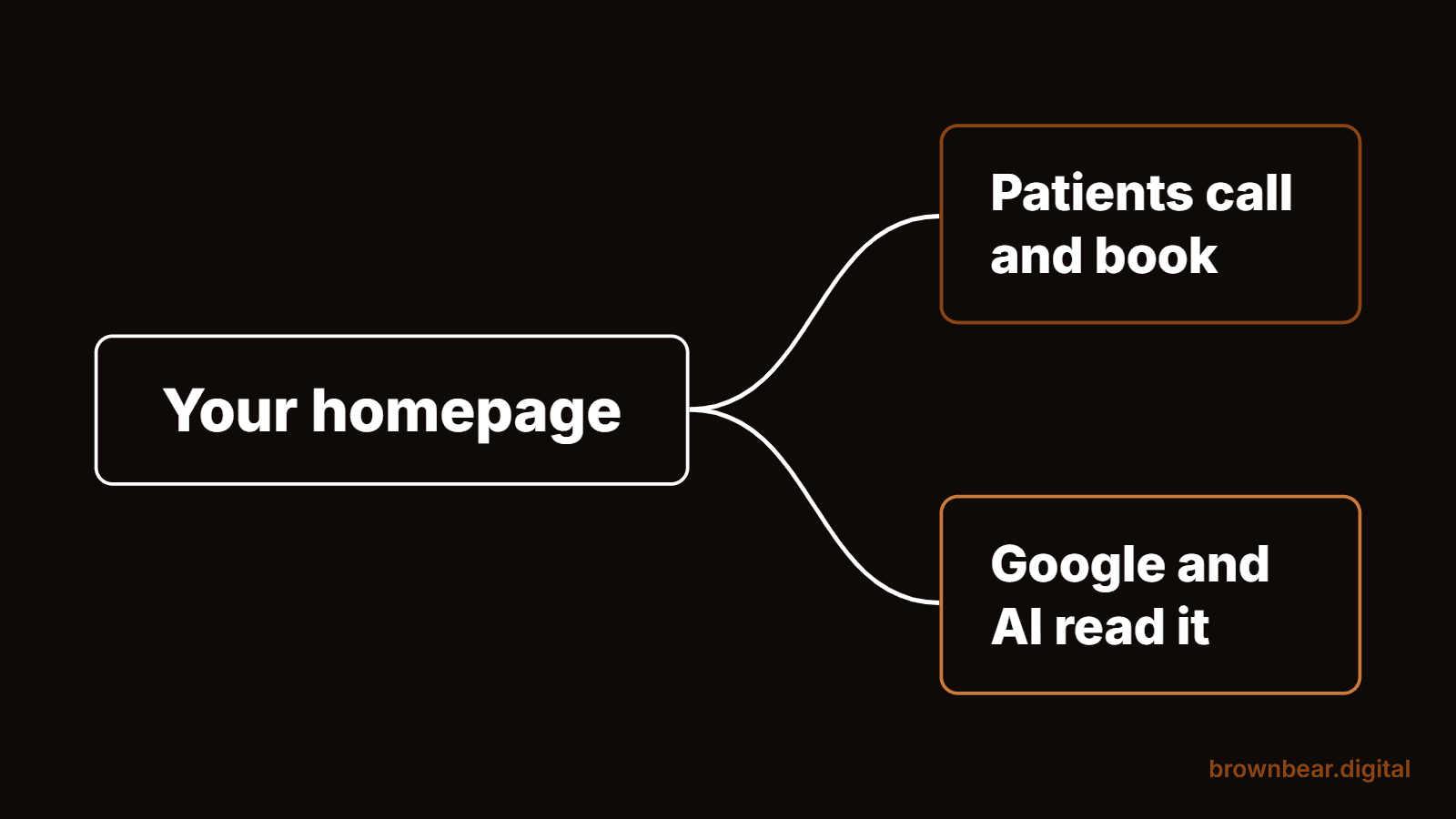
Medical website design is the planning, writing and building of a healthcare practice's website so that it does two jobs: turns visitors into booked patients, and gets found by people searching for your specialty in your area. The first job depends on a short list of things patients look for, like a tappable phone number, a way to book, your insurance plans and your providers. The second depends on how clearly the page tells Google and AI tools what you treat and where.
Most redesigns are judged on a third thing, how the site looks. Looks matter, because a dated site makes patients wonder about the practice behind it. But in our audit, the practice sites holding #1 were not the most striking ones. They were the ones that answered the patient's next question on the first screen.
Who Holds Page One When Patients Search Your Specialty and City
Independent and physician-group practices own these searches. Across 15 results pages and 150 results, practice websites held 102 spots, 32 of the 45 top-three spots and 10 of the 15 #1 spots. Hospitals and health systems held 33 spots and the other 5 #1s. Directories like Zocdoc, Healthgrades and Yelp held only 10.
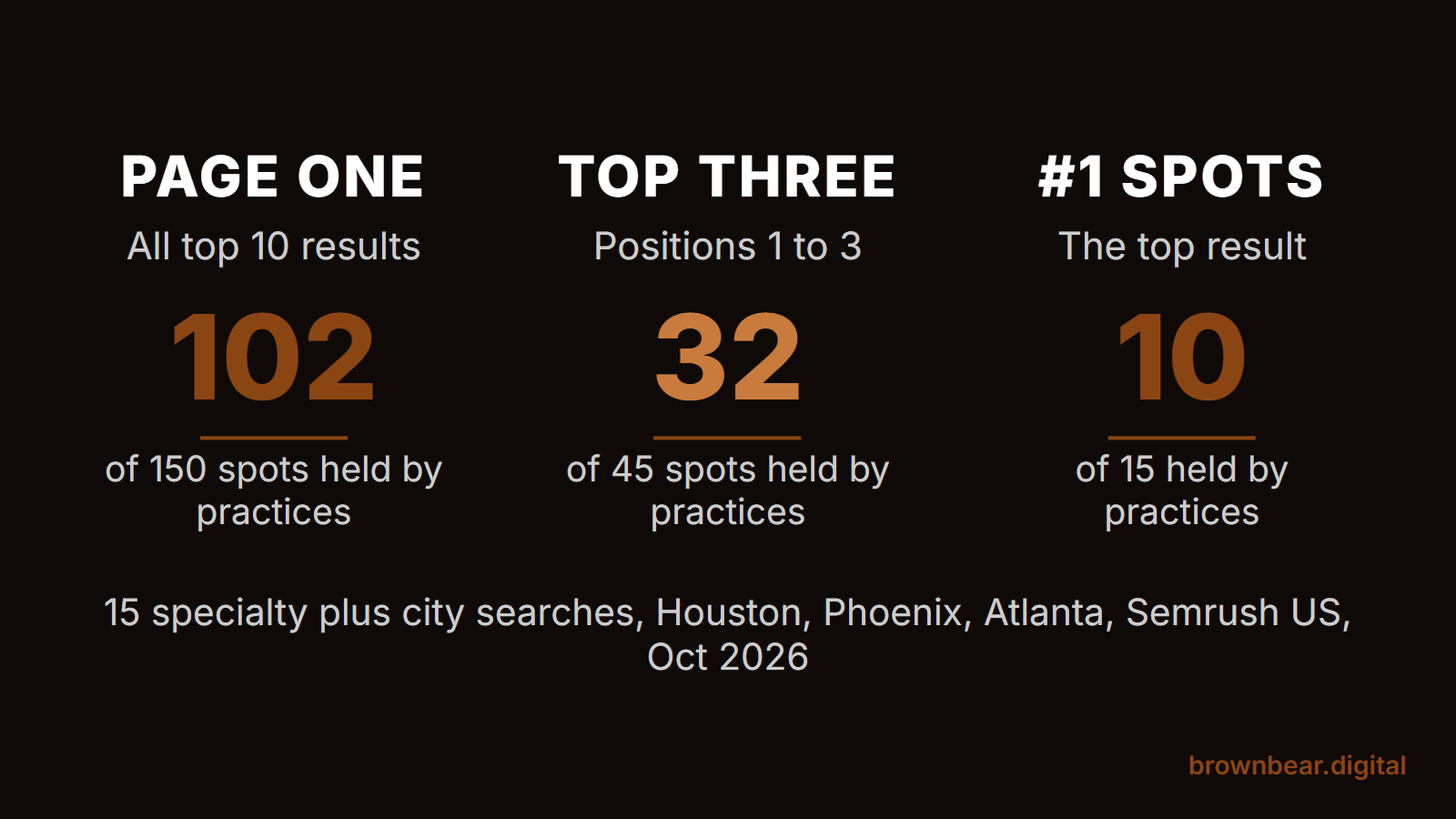
We searched five specialties in three metros: dermatologist, orthopedic surgeon, pediatrician, cardiologist and OB/GYN, in Houston, Phoenix and Atlanta. The results came from Semrush's US database on October 25, 2026, read from the Semrush web interface. We then loaded each ranking page the way a crawler that doesn't run JavaScript sees it and checked it for the features in this guide.
The split changes by specialty, and it tells you who you are up against:
- Dermatology and cardiology: practices held #1 in all 6 of these searches.
- Pediatrics: children's hospitals held #1 in Houston and Phoenix. Health systems took 8 of the 30 pediatric spots.
- Orthopedics: health systems took 9 of 30 spots, the most of any specialty, though practices still held #1 in Phoenix and Atlanta.
- OB/GYN: health systems held #1 in Houston and Phoenix, but practices held 25 of the 30 spots.
One results page broke the pattern. For "dermatologist Houston," 8 of the 10 results were directory profiles or a Reddit thread, and #1 was a practice blog post about skin care tips. When Google reads a search as "help me pick a doctor," directories can crowd out practice sites. Your own site still has to be the best answer once a patient clicks through from any of them.
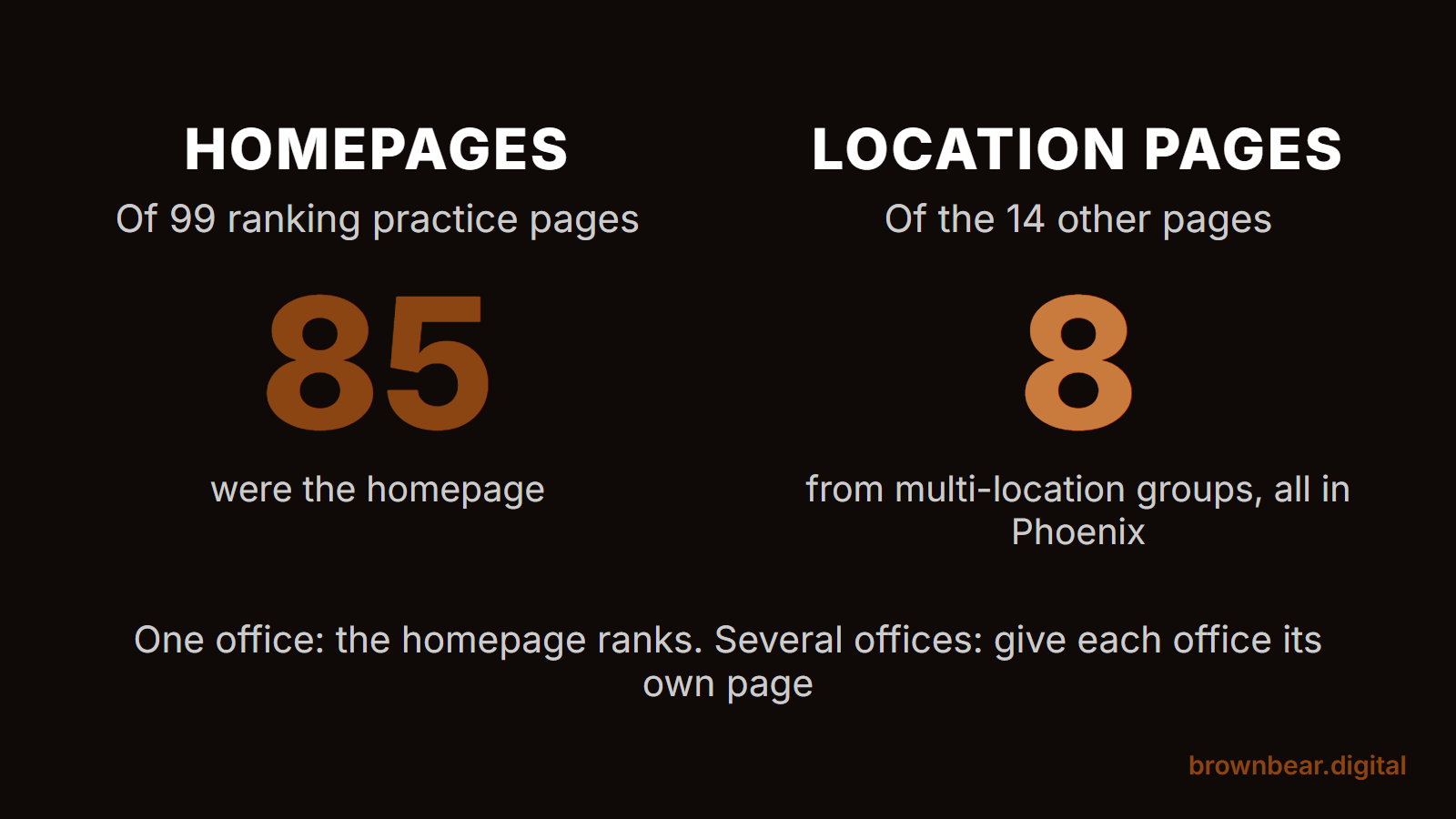
The page that ranks is usually the homepage. Of the 99 practice pages we audited, 85 were homepages. That makes your homepage both your best conversion page and your main ranking page for "specialty plus city," and it is why the rest of this guide spends most of its time there.
The Conversion Layer: Phone, Booking, Insurance and the Portal
Nearly every ranking practice site makes four things easy: calling, booking, checking insurance and getting into the patient portal. These are table stakes on page one, not differentiators. Here is how often the 99 practice pages had each one in the HTML they send:
| Feature | All 99 practice pages | The 32 top-three pages |
|---|---|---|
| A booking path, such as "Request an appointment" | 94 | 30 |
| Phone number in the page text | 91 | 30 |
| Patient portal link | 86 | 30 |
| Tap-to-call phone link | 84 | 26 |
| Insurance mentioned | 75 | 26 |
| New patient forms | 71 | 21 |
| Reviews or testimonials | 63 | 22 |
| Link to an online scheduling tool | 35 | 11 |
Two of those rows deserve a closer look, because they are where good-looking sites quietly lose patients.
Make the Phone Number Tappable
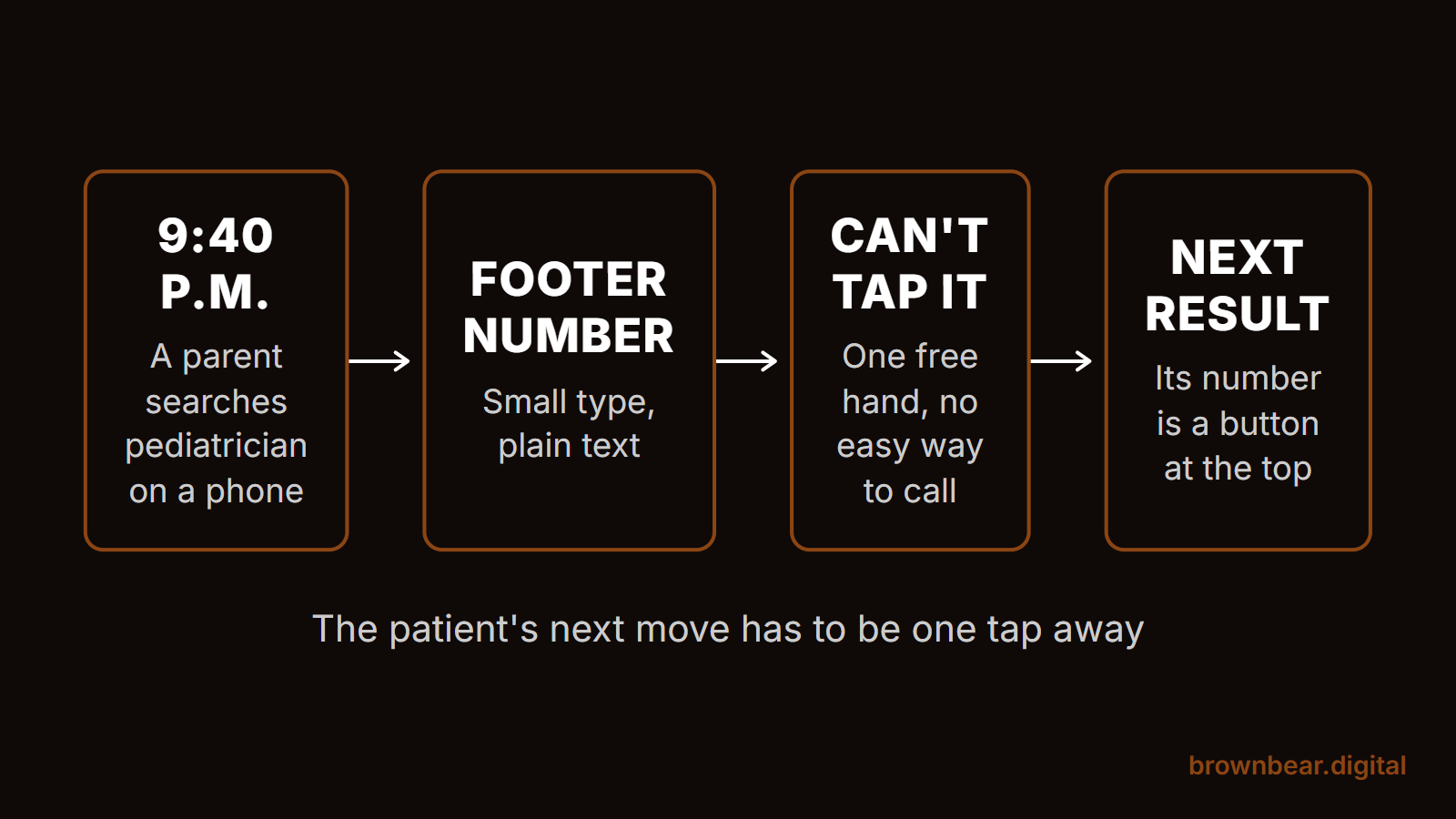
Most patients who find you on a phone want to call. Of the 99 sites, 91 showed a phone number in the page text, but only 84 made it a tap-to-call link. Fifteen ranking sites, including two that held #1, made a phone visitor copy the number by hand or hunt for it.
Picture a parent at 9:40 at night with a feverish toddler, searching "pediatrician" on a phone with one free hand. They land on your homepage, see the number in small type in the footer, and can't tap it. The next result's number is a button at the top of the screen, so they call that office in the morning. That is the whole conversion layer in one moment: the patient's next move has to be one tap away.
Give Booking a Real Path, Then Decide How Far It Goes
94 of the 99 sites had some booking path. Only 35 linked to an online scheduling tool where a patient can pick a time, such as healow, MyChart, ModMed, Tebra or Zocdoc. The rest sent people to a request form or the phone. Among the 10 practice pages ranked #1, 6 linked to a scheduling tool.
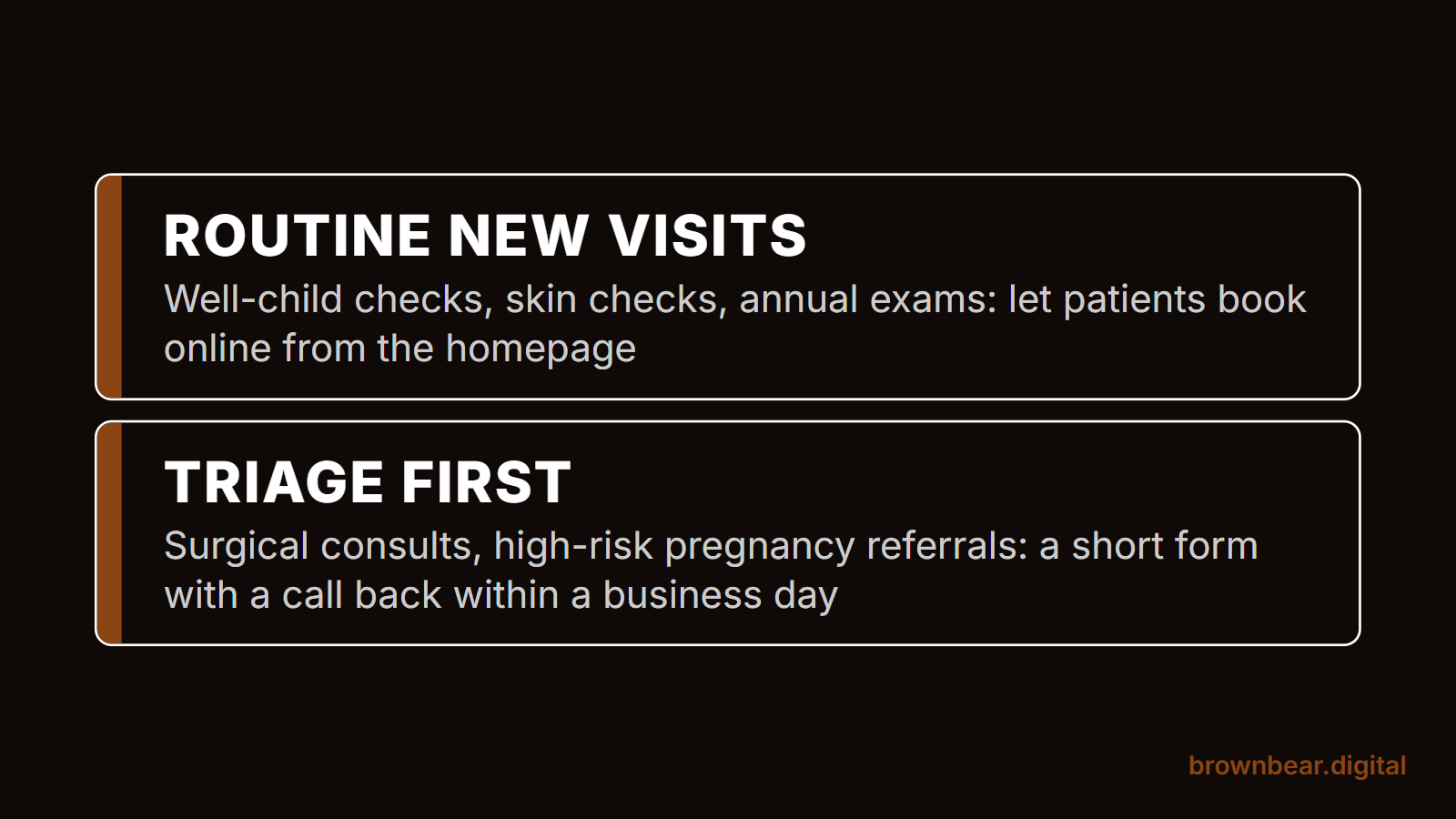
Whether you need real-time scheduling depends on your visit types. If most of your new visits are routine and short, like well-child checks, skin checks or annual exams, put self-scheduling on the homepage, because the patient who can book at 11 p.m. books with you. If new visits need triage or insurance checks first, like a surgical consult or a high-risk pregnancy referral, a short request form that promises a call back within a business day converts better than a calendar that lets people book the wrong visit.
Answer the Insurance Question on the Page
Insured patients ask "do you take my plan?" before almost anything else. 75 of the 99 sites mentioned insurance. The best versions list the main plans by name on a page linked from the main menu, and say what to do if a plan is missing. A line that reads "we accept most major insurance" answers nothing, and patients call to ask.
Keep the portal separate from new patients, too. 86 sites linked a patient portal, often as the most visible button in the header. That button serves your current patients. A new patient who taps "Patient Portal" hoping to book lands on a login screen and leaves, so give new patients their own clearly labeled button beside it.
The same rule shows up in paid search. When Bryan opens a practice's Google Ads account after hearing "ads didn't work," one of the two problems he finds most often is that the clicks were sent to pages not built to convert. A site that fails the conversion layer wastes every channel that sends traffic to it, not just SEO.
The Ranking Layer: Titles, Headings and the Page Google Picks
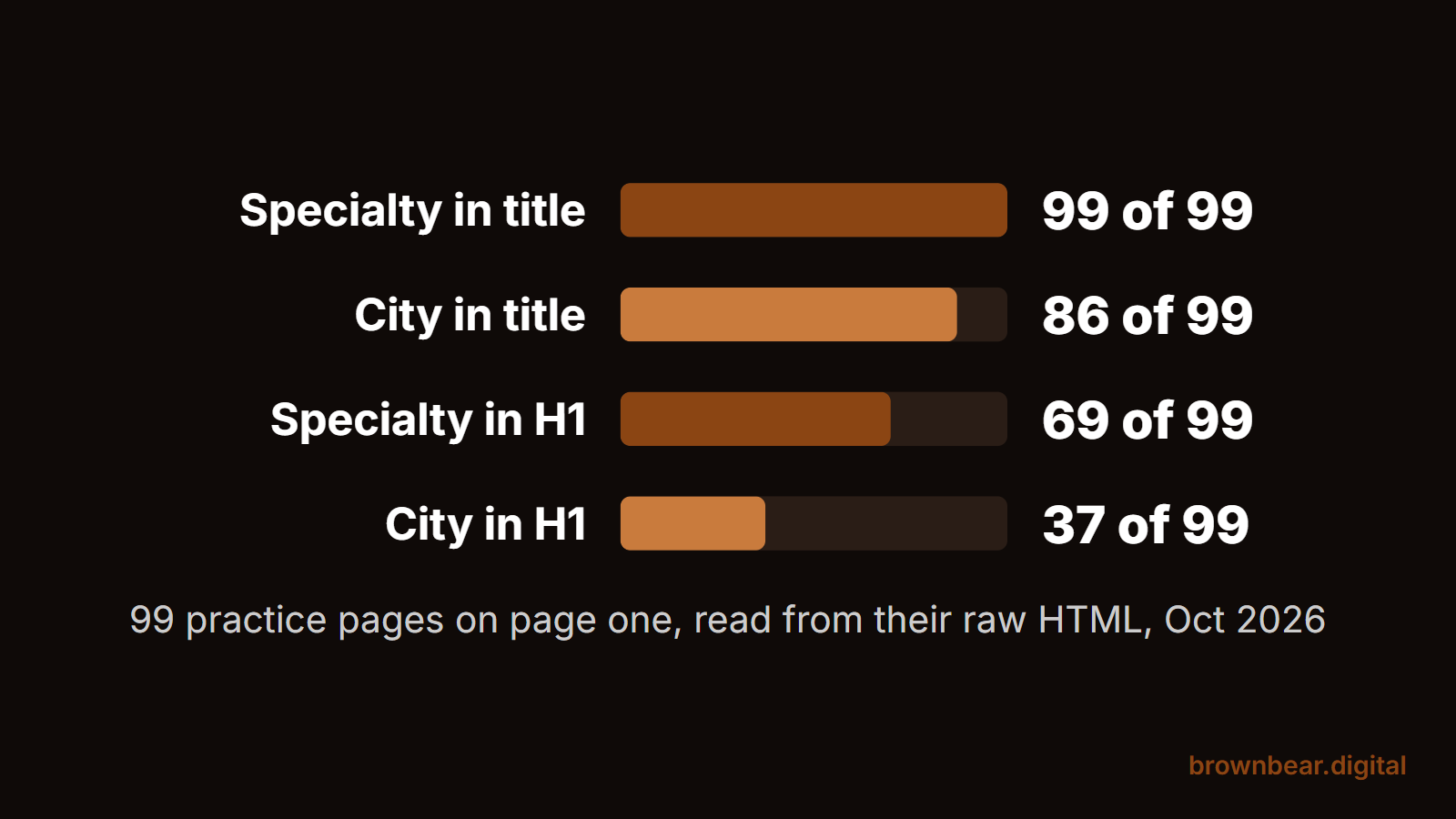
Ranking practice sites name the specialty and the city in the title tag. All 99 practice pages named the specialty in the title and 86 named the city. All 10 #1 practice pages had the city in the title.
The on-page H1 heading was looser. 69 of the 99 named the specialty in the H1 and only 37 named the city. Several #1 pages used brand lines as their H1, like "Caring for your heart with our hearts" or a surgeon's name. Twelve pages had no H1 in their raw HTML at all, and 22 had more than one.
Our read: Google leans on the title tag, the page content and your Google Business Profile far more than on the H1 alone, so a weak H1 rarely costs you the ranking by itself. But a clear H1 is free, and it is the first line an AI tool or a skimming patient reads. "Pediatrician in Houston Heights" tells both of them what they need. "Welcome to our practice" tells them nothing.
Single-Location Practices and Multi-Location Groups Rank Different Pages
This is where the right design forks. If you have one office, your homepage is the page that ranks, so it carries the specialty, the city, the address and the booking path. If you have several offices, the ranking page shifts to a location page. Of the 14 non-homepage practice pages on page one, 8 were location pages from multi-location groups, and all 8 were in Phoenix, from groups like U.S. Dermatology Partners, Women's Care and Arbor Pediatrics.
Say a three-office orthopedic group lists all three addresses in its homepage footer and has no page for each office. Google has to pick one page to rank in each suburb, and the homepage can only be about one place. Give each office its own page with its address, its providers, its hours and its own booking link, and the group can compete in each town instead of one.
Trust Signals Patients Check Before They Call
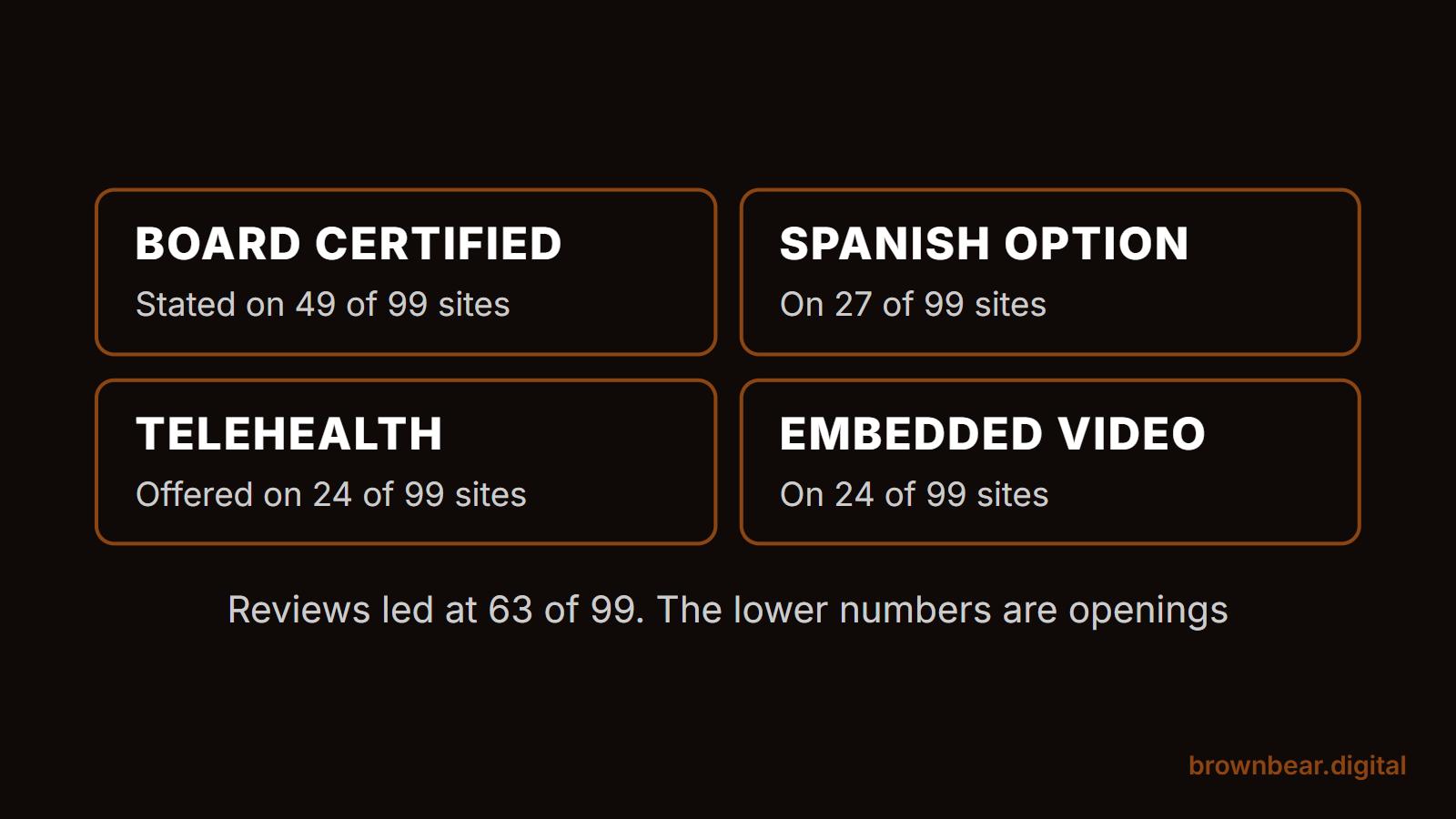
Patients look for proof that a real, qualified person will treat them. On the 99 ranking sites, the most common proof was reviews or testimonials on 63 pages, and "board certified" on 49. Spanish-language content or a Spanish option appeared on 27, telehealth on 24 and an embedded video on 24.
Those lower numbers are openings. A practice that offers care in Spanish and says so on the homepage stands out from the roughly three in four ranking sites that don't. A provider page with the doctor's training, board certification and a short video answers the "who will I actually see" question that most ranking sites leave to a bio list. Our guide to the videos worth making for a practice site covers where each one belongs.
Structured data was less common than most redesign proposals imply. 82 of the 99 pages had some structured data, mostly the website and organization markup that site builders add on their own. Only 43 declared a medical or local business type, and 12 carried review ratings in their markup. Bryan's view is that schema is worth keeping tidy but is not the big lever. The bigger levers are getting the page content into the HTML and organizing it so a machine can lift a clear answer from it.
For cosmetic specialties, the trust layer goes much deeper, from before-and-after galleries to surgeon credentials, and our plastic surgery website design guide covers it in detail.
Accessibility: The Rule Practices Keep Misreading
If your practice receives federal financial assistance from HHS, its website has a dated accessibility requirement. HHS's Section 504 rule requires recipients to make web content and mobile apps meet WCAG 2.1 Level AA. Under the current text of 45 CFR 84.84, that applies from May 11, 2027 for recipients with 15 or more employees, and from May 10, 2028 for those with fewer.
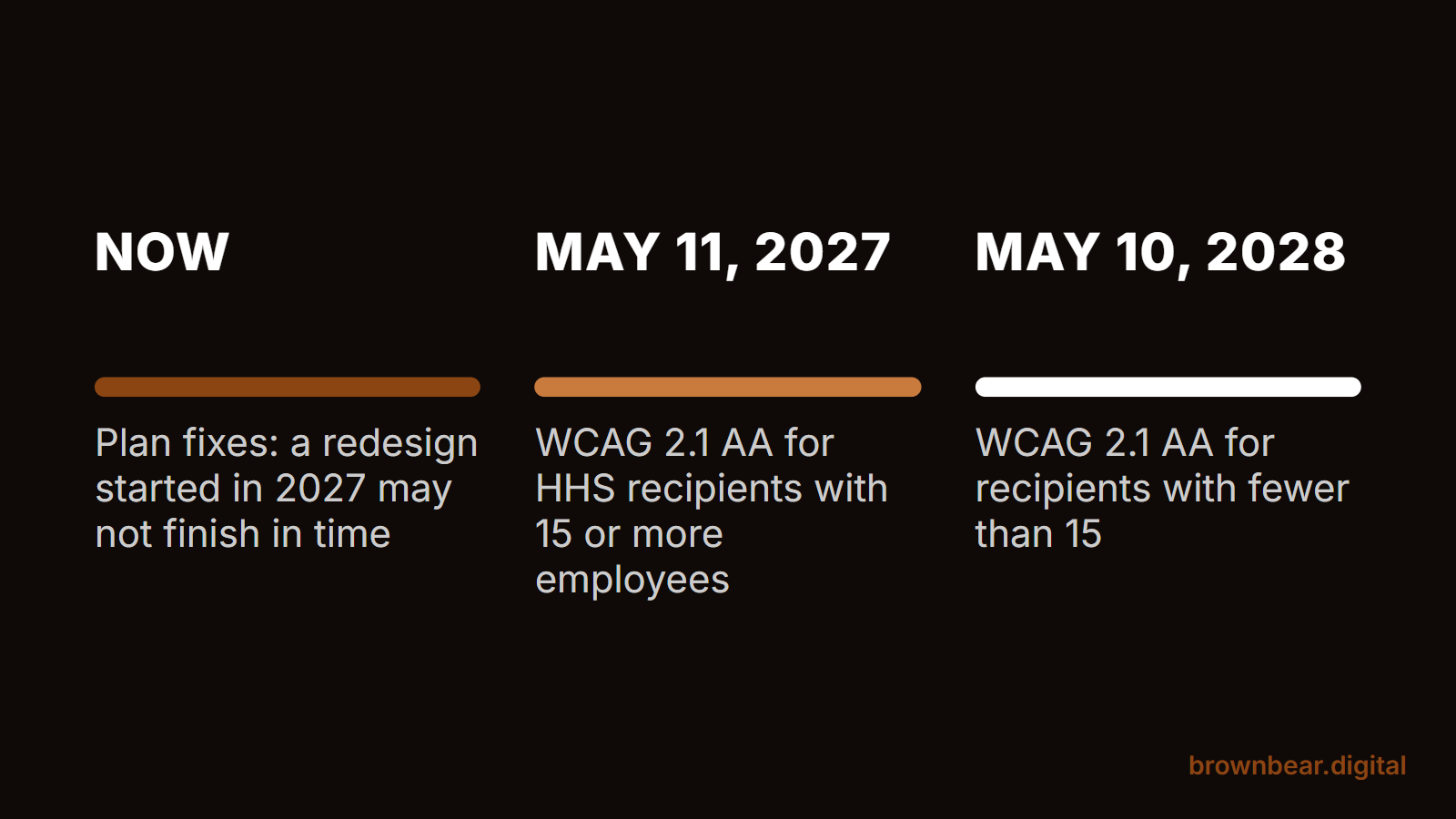
Medicaid payments have long counted as federal financial assistance. In its 2024 Section 1557 rule, HHS also changed its interpretation so that Medicare Part B payments count. That means most practices that bill insurance should assume the rule reaches them and confirm it with their counsel. If you have 15 or more employees, plan your fixes now, because a redesign started in 2027 may not finish before your date. If you have fewer, you have one more year, which is just enough time to make accessibility part of your next planned redesign instead of a separate rush project.
Only 35 of the 99 ranking sites linked an accessibility statement. 23 loaded an accessibility overlay, the toolbar widget that promises to fix a site automatically: accessiBe on 10, UserWay on 7 and AudioEye on 6. 13 of those 23 had the widget and no accessibility statement at all.
An overlay is not a compliance plan. In April 2025, the FTC finalized an order requiring accessiBe to pay $1 million over claims that its widget could make any website WCAG compliant. Real accessibility is built into the site: text alternatives on images, enough color contrast, forms that work with a keyboard and a screen reader, and headings in order.
Picture a practice manager whose web vendor adds an overlay for $49 a month and calls the site "ADA compliant." A patient who uses a screen reader still can't complete the new patient form, because its fields have no labels. The widget didn't touch the form, so the practice is paying monthly for the claim, not the fix.
Tracking, Forms and HIPAA on a Practice Website
HHS's Office for Civil Rights has warned covered entities that tracking technologies on their websites can disclose protected health information to vendors. A federal court vacated part of that guidance in June 2024: the part saying HIPAA is triggered when a tracker connects a visitor's IP address with a visit to a public page about a health condition or a provider. The HHS bulletin on online tracking technologies now carries that note and says HHS is evaluating next steps. Pages behind a login, like a patient portal, were not part of that ruling.
On the ranking sites, Google Tag Manager appeared in the raw HTML of 41 and Google's gtag script on 51. The Meta Pixel appeared directly on only 3, but that number is a floor, because Tag Manager can load a pixel after the page renders. If you don't know every tag your Tag Manager container fires, that is the first thing to find out.
Forms carry the bigger risk. A "request an appointment" form that asks for a reason for the visit and emails it through a standard form plugin sends health information through services that may not have signed a business associate agreement with you. Use a form or scheduling tool whose vendor signs one, and ask for no more on the form than the front desk needs to call back. Our guide to the HIPAA rules for practice website forms and analytics covers setup in more depth.
Speed, JavaScript and What AI Tools Read
The practice sites on page one were not light. The median ranking page sent 178 KB of raw HTML with 31 script tags before loading anything else. Our larger studies of 150 practice homepages show what that weight costs.
In the Brown Bear page speed study, 59 of the 73 homepages with full real-visitor data passed Core Web Vitals. On Google's simulated slow phone, the same homepages took a median 11.1 seconds to show their main content, and Google Tag Manager was on 134 of 149. In the JavaScript homepage study, the median homepage loaded 1,046 KB of JavaScript, 1.7 times the web-wide median.
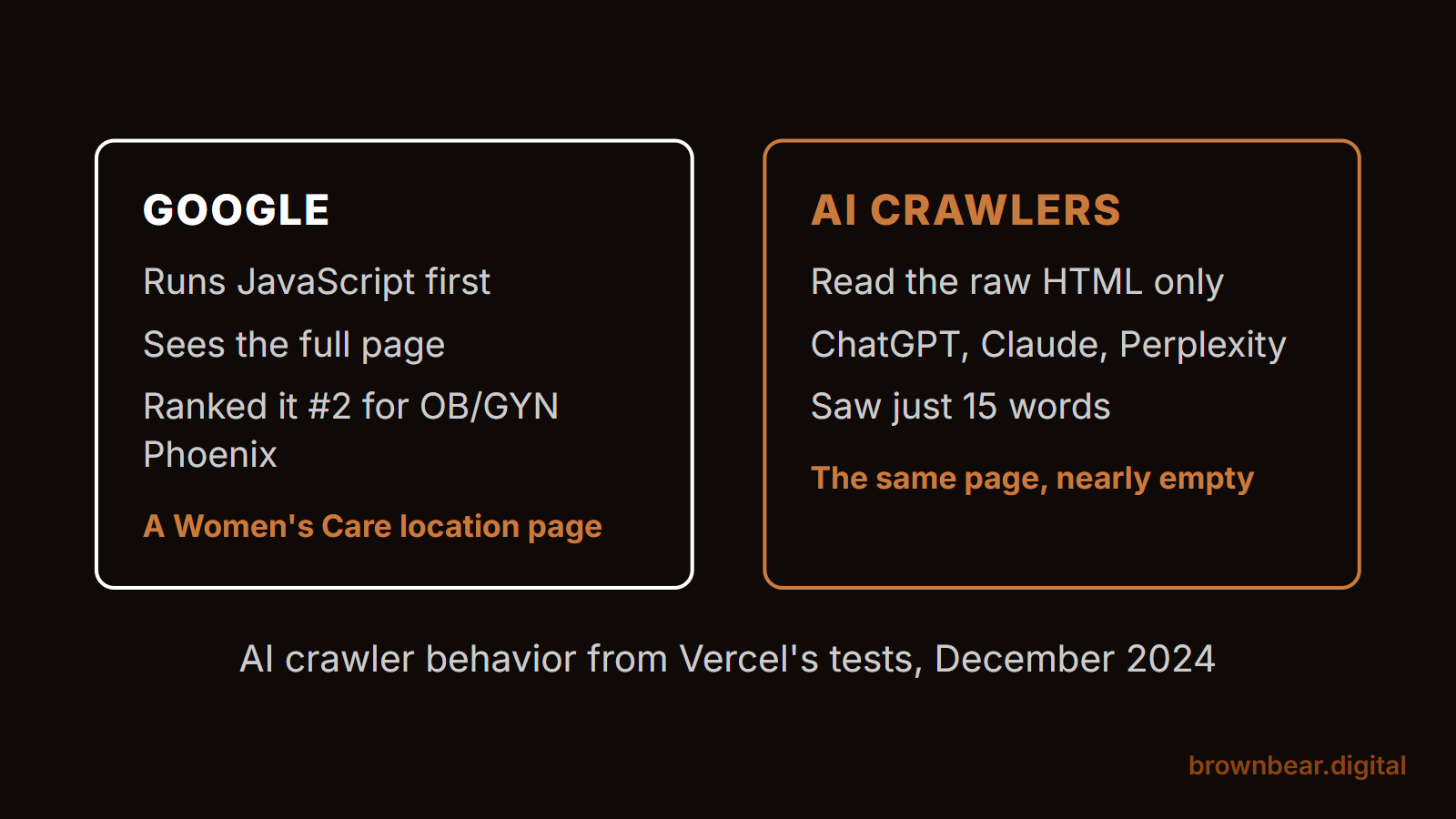
Google renders JavaScript before it reads a page, and it forgives a lot. In our audit, a Women's Care location page ranked #2 for "OB/GYN Phoenix" while its raw HTML carried just 15 words, because a JavaScript app builds everything else. AI crawlers work differently. When Vercel tested them in December 2024, the crawlers behind ChatGPT, Claude and Perplexity read the raw HTML and did not run JavaScript. To them, that page is nearly empty.
Say a cardiology practice redesigns with a full-screen video hero, a scroll animation library and a reviews carousel that loads from a widget. Patients on a fast laptop see a polished site. A patient on a phone in a parking garage waits for the video to load, and ChatGPT reads a page with no reviews and a heading that fades in only after a script runs. Same site, three different experiences, and only one of them is the one shown in the pitch meeting.
This is why Bryan strips large amounts of JavaScript out of the practice sites Brown Bear rebuilds. Our guide to JavaScript rendering fixes for practice sites walks through them by platform, and our study of what AI crawlers miss on practice websites shows the five patterns behind the failures.
Medical Website Design for Independent Practices and Cash-Pay Specialties
Medical website design works the same way for every specialty at the base: the conversion layer and the ranking layer above. Before you pick a path, look at who you compete with on page one and how your patients pay, because those two things change what the site has to emphasize.
For Medical Practices Up Against Health Systems and Directories
An independent practice usually competes with a hospital system's specialty page and a few directory profiles, and the practices that win make their homepage the most specific answer on the page. Desert Valley Dermatology held #1 for "dermatologist Phoenix" with a homepage whose title and H1 both say dermatologist and Phoenix, ahead of a national dermatology group's Phoenix location page. In "pediatrician Houston," Peekaboo Pediatrics held #2 directly behind Texas Children's by naming its neighborhood, Houston Heights, in the title. If a health system holds #1 for your specialty, compete on what it can't say: your neighborhood, your same-week availability and the names of the doctors a family will actually see.
For Plastic Surgery and Other Cash-Pay Practices
Cash-pay practices sell a consultation for an elective procedure, so the site has to build desire and trust before it asks for a call, and that pushes these sites toward heavy design. In our JavaScript study, 44 of the 131 plastic surgery homepages we could score autoplayed video and 69% loaded an animation library, and 25 hid their H1 until a script ran. Insurance lists matter less here, while galleries, surgeon credentials and pricing guidance matter more. Start from why plastic surgery websites stop converting consultations, and keep the motion from hiding the words. Dental implant practices sit in the same cash-pay lane, and our dental marketing guide covers how dental practices win patients across search and referrals.
Platforms, Templates and What Drives a Medical Website's Cost
WordPress ran 47 of the 99 ranking practice sites, the most of any platform we could detect. Duda, a website builder sold mainly through agencies and marketing vendors, ran 10, and HubSpot ran 3. Webflow and Next.js ran 2 each, and Wix, Squarespace and Drupal 1 each. The other 32 ran on platforms we couldn't fingerprint from the HTML. The platform didn't decide who ranked. Sites on every major platform held top-three spots.
What drives cost is scope, not the platform name. A template site for one office with stock content costs far less than a custom build for a group with ten locations, provider pages, a scheduling integration and new copy for every service. When you compare proposals, price these items one by one:
- How many pages get new, written copy, and who writes it: a medical writer, your team or the vendor.
- Which integrations are included: online scheduling, the patient portal link, forms with a signed business associate agreement, and review display.
- Whether location and provider pages are built as templates you can add to yourself.
- Who owns the domain, the hosting account and the site files if you leave the vendor.
The last item causes the most pain later. A low monthly price that comes with a site you can't take with you is a lease, not a website.
The Page-One Scorecard: Check Your Site Against 99 Ranking Practices
We turned the 12 most useful features from our audit into a scorecard. Tick what your homepage has, and see how your site compares with the 99 practice pages on page one. The median ranking practice page had 8 of the 12, and the median top-three page had 9. Only one of the 99 had all 12.
Treat the scorecard as a floor, not a formula. Every feature on it is common on page one, which means missing one puts you behind, but having all 12 doesn't guarantee a ranking. Once your score is where you want it, work through these steps in order:
- Fix the conversion layer first: a tap-to-call number and a booking button in the header on mobile, and an insurance list one click from the homepage.
- Put the specialty and city in your homepage title and H1, and if you have more than one office, give each office its own page.
- Read your site's raw HTML or ask your vendor for it, and confirm the main content and headings are there without JavaScript.
- List every tag in your Tag Manager container and every form vendor, and confirm which ones have signed a business associate agreement with you.
The immediate result is a site that stops leaking the patients it already gets. The long-term result is a site you can build on for years, with new providers, locations and services slotting into pages that already work.
Build a Medical Website That Converts With Brown Bear
A medical website earns its cost when a patient can find you, trust you and book in under a minute, on a phone, and when Google and AI tools can read every word that makes that true. Brown Bear designs and builds practice websites around those two jobs, with the same audit you just read as the starting point. If you want to see how your site stacks up, start with our medical website design services.
Written By
Founder, Brown Bear Digital
Bryan has 15 years of experience across SEO, paid search, and AI search strategy. He founded Brown Bear to give businesses direct access to senior-level search expertise without the agency overhead.
Learn More About BryanGet Found on Google.
Get Cited by AI.
Tell us about your site. We'll send back a proposal for SEO and AI search.